The Web Console is a developer tool and must not be used in production.
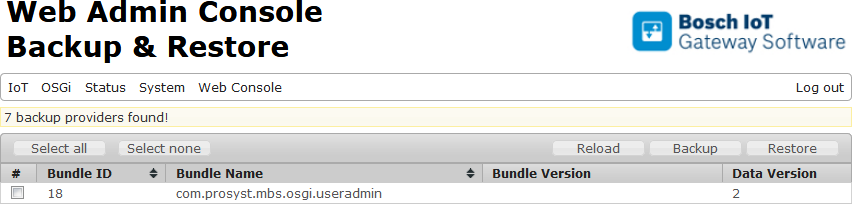
To view the registered Backup Providers and be able to take advantage of the backup functionality, access the Backup Admin page by selecting the respective tab from the Web Console.
Backup Providers are listed in a table with the following columns:
Select – Allows you to choose the bundles whose data you want to store.
Bundle ID – Holds the bundle IDs of the bundles that have registered Backup Providers.
Backup Provider – Shows the bundle symbolic name and version of the bundle that has registered an implementation of the BackupProvider interface.
Data version – Displays the version of the data that is being backed up.
To refresh the list of the currently registered Backup Providers, use the Reload button.