To add an OSGi Runtime to the list of the Frameworks view:
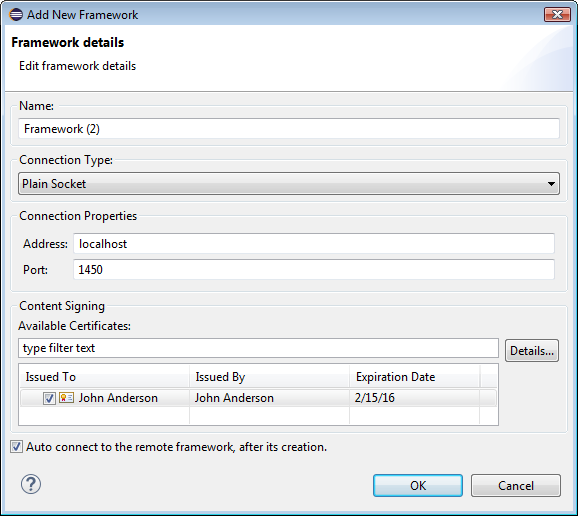
Click the button from the view's toolbar. The Framework Properties dialog appears prompting you to specify the connection properties of the OSGi framework.
From Connection Type select Plain Socket.
Fill in the connection settings for the framework:
Name – Type the friendly name of the runtime.
IP Address – Specify the IP address of the runtime host.
Port – Specify the port for connection to the runtime. By default, it is 1450.
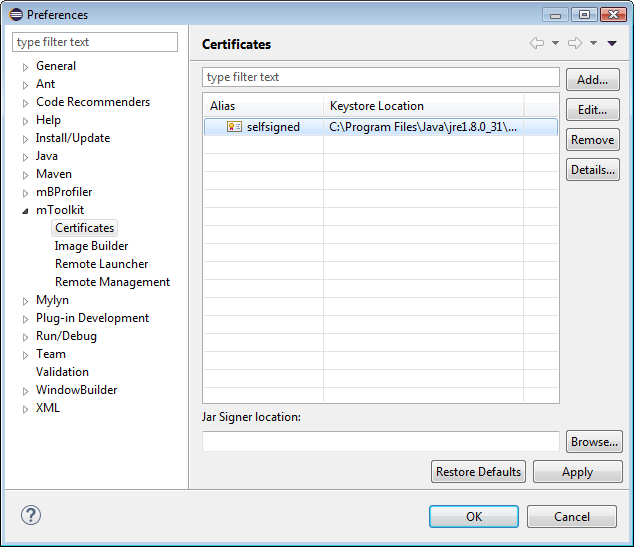
Automatic signing upon install - If you want to have bundles and deployment packages automatically signed when installed on this OSGi framework:
Add signer settings such as keystores and aliases within them under the Certificates section of the mToolkit preference page (Window > Preferences > mToolkit> Certificates).
Check the Sign content before deployment box.
In the Available Certificates list select those signers from mToolkit certificate preferences which are needed for this OSGi framework.
Connect automatically after completing the framework registration in Eclipse – Select Auto connect to the remote framework after its creation. mToolkit will try to connect the framework after you click the OK button.
Select OK to complete adding the OSGi runtime.
Removing an OSGi Runtime
To remove an OSGi Runtime from the frameworks list, and select the framework node and click the button from the view's toolbar.


 button from the view's toolbar. The Framework Properties dialog appears prompting you to specify the connection properties of the OSGi framework.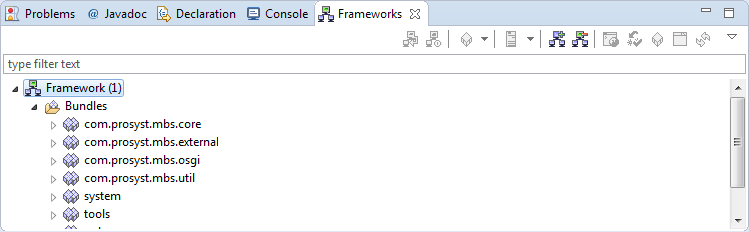
 button from the view's toolbar.