Launch the OSGi image builder export wizard wizard for the image:
Open the project's provisioning.xml file in Eclipse to load the PAR Editor, go to the Overview tab and click the Export PAR action on the right.
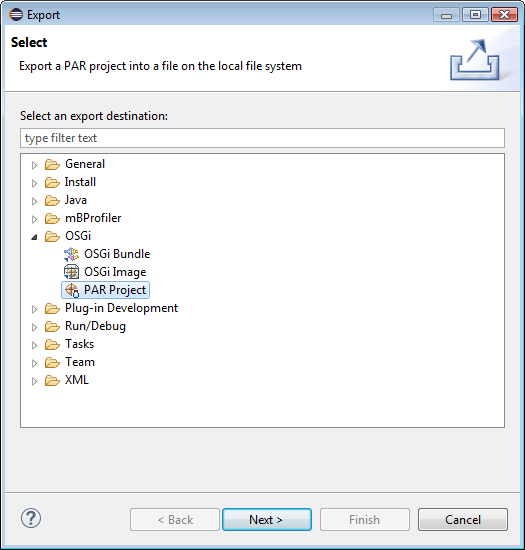
Right-click on the the PAR Project or on its provisioning.xml file in a navigation view and use the File > Export menu option. Then, expand the OSGi node and select the PAR Project node to launch the corresponding wizard. Click Next.
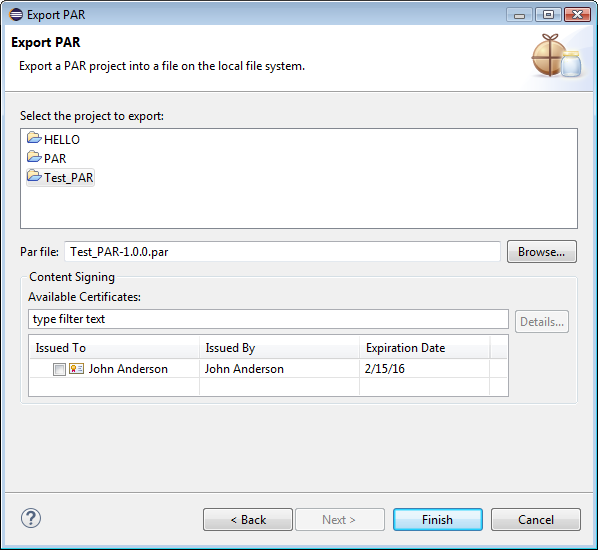
In the Export PAR wizard specify:
The PAR Project from the workspace to export. By default, the project that you have selected upon launching the export will be auto-highlighted. Choose another project if needed.
The location of the generated .par file.
To complete the generation, click Finish.
You can manually upload the PAR file to the backend Software Repository if needed.