


|
|
|
|
|
Frameworks View Popup Menu
The tree of a connected OSGi framework, displayed in the Frameworks view, has a popup menu, activated upon right-click, with different items depending on the currently selected node as well as on the mToolkit extensions installed in Eclipse, that can be seen on the figure below.
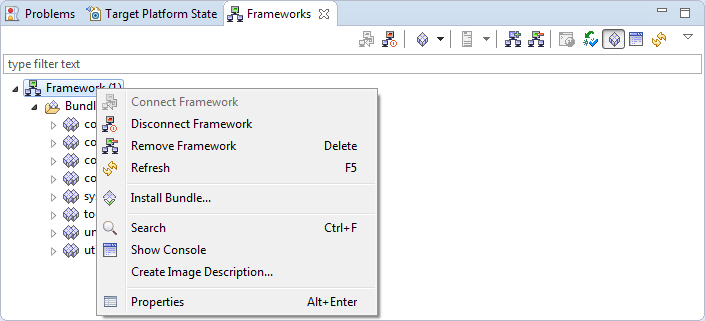
Popup Menu Command |
Description |
|---|---|
No node is selected |
|
Add Framework |
Adds a new OSGi framework to the tree of frameworks. |
Common to All Node Types |
|
Show Web Admin |
Shows the Web Admin Console running on the connected framework in a Web view. Enabled only if the framework has the bundles of the Web Admin Console installed. |
Search |
Looks for a node whose name contains the specified string. |
Restart In |
Restarts the framework remotely and if needed the framework can be re-launched in a mode that allows remote profiling and debugging. Requires framework start through the runtime management agent. Available if a specific mToolkit extension is installed. |
Create Image Description |
Generates an Image Description file reflecting the structure and content of the connected runtime. The description file can be then used to create an image for a specific target device platform. Supported if a specific mToolkit extension is installed. |
Framework Node |
|
Connect Framework |
Connects to the selected remote OSGi framework(s). Enabled only when there is no connection to the framework. |
Disconnect Framework |
Disconnects from the remote framework(s). Enabled only when there is a connection to the device. |
Remove Framework |
Removes the currently selected framework from the tree. |
Refresh |
Refreshes all device information shown in the tree of a device(s). |
Install Bundle |
Installs a new bundle on the selected framework. |
Edit Configurations |
Allows remote configuration of the framework by means of system properties and of a startup "add-on". Available if a specific mToolkit extension is installed. |
Properties |
Shows the connection settings for the current OSGi framework. |
Bundle Node |
|
Start |
Starts the selected bundle(s). |
Stop |
Stops the selected bundle(s). |
Update |
Updates the selected bundle. |
Install Bundle |
Installs a new bundle on the selected framework. |
Uninstall Bundle |
Uninstalls the selected bundle(s). |
Refresh |
Updates the information about the services of the selected bundle across the device's tree. |
Show Bundles IDs |
Displays the bundle IDs in braces after the bundle names. |
Show Bundles Versions |
Displays the bundle versions in braces after the bundle names. |
Properties |
Shows the content of the manifest file of the selected bundle. |
Service Node |
|
Go to service |
Allows you to go to the node of the registered service. Enabled only for the object classes of services within Used Services sub-nodes, i.e. services used from other bundles. |
Properties |
Shows the registration properties of the selected service. |
Management server node |
|
Connect Server |
Connects the framework with the selected management server. |
Disconnect |
Disconnects the framework from the server. |
Remove Server |
Deletes the server account from the framework. |
Properties |
Shows the connection properties of the management server. |
Frameworks View Pull-down Menu
The Frameworks view has a pull-down menu with options similar to those from the view's context menu:
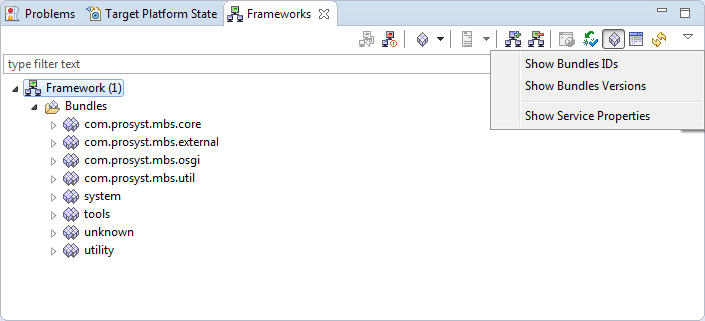
Pulldown Menu Command |
Description |
|---|---|
Show Bundle IDs |
Displays the bundle IDs in braces after the bundle names. |
Show Bundle Versions |
Displays the bundle versions in braces after the bundle names. |
Show Service Properties |
Shows the registration properties of the services. |
Frameworks View Toolbar
mToolkit adds a toolbar to the Frameworks view, which enables administration over OSGi frameworks and has commands similar to those of the pop-up menus:
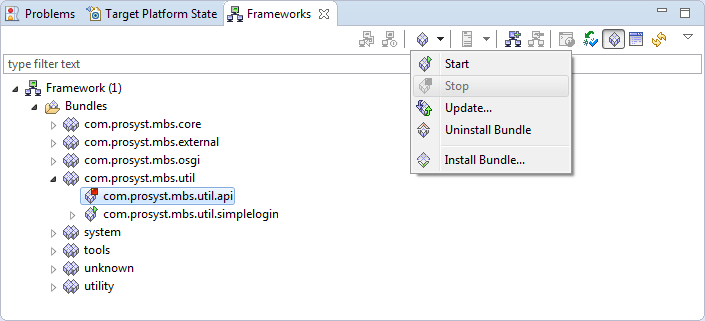
Button |
Toolbar Command |
|---|---|
|
Connect Framework |
|
Disconnect Framework |
|
Opens a pull-down menu for actions on a selected bundle. |
|
Stop |
|
Start |
|
Update |
|
Install Bundle |
|
Uninstall Bundle |
|
Connect Server |
|
Disconnect |
|
Add Server |
|
Remove Server |
|
Properties |
|
Add Framework |
|
Remove Framework |
|
Show Web Admin |
|
Show Services |
|
Show Bundles |
|
Show Console |


