


|
|
|
|
|
The BackupAdmin Service provides a way for bundles to persist their private data outside the OSGi cache and allows users to initiate a backup of their data (and its subsequent restoring). The BackupAdmin Service is designed with the following goals in mind:
Entities
The BackupAdmin Service API contains the following interfaces and classes:
Operation
Bundles that wish to use the backup functionality must register their own instances of the BackupProvider interface as OSGi services. These services are used by the BackupAdmin service registered by the OSGi Framework when a data backup/restore operation is requested by some third-party entity.
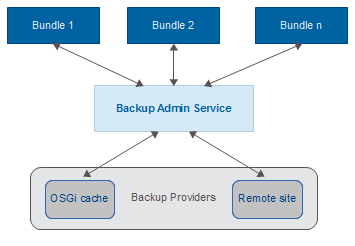
Registering bundle
The service is registered by System bundle.
Enabling and disabling the BackupAdmin service
By default the BackupAdmin Service is enabled on the default framework configuration. To disable the service, set the system property mbs.backupadmin to "false" before the framework startup.
User interface
Backing up via text console
The BackupAdmin Service adds the backup command group to the framework command line interface. For further information see the Management via Console document.
Backing up via the Web Admin Console
The Backup Admin Plugin for Web Console bundle – com.prosyst.mbs.web.console.backup.jar, extends the Web Console with functionality allowing the backup and restoring of data for specific bundles. Refer to the Working with web console document for more information in how to use the Backup Admin page available in the Web Console.
Backing up and restoring data
Using the Backup Admin to Back up and Restore Data
The following simple code snippet shows how to use the Backup Admin Service to initiate a backup (and later an import) process. In order to use this code:
The backup/restore will be done in the thread of the code that calls the Backup Admin service. It is up to the caller to determine if they wish to run the backup/restore in a different thread.
import com.prosyst.mbs.services.backup.BackupAdmin;
import java.io.File;
import java.io.FileInputStream;
import java.io.FileOutputStream;
import org.osgi.framework.BundleActivator;
import org.osgi.framework.BundleContext;
import org.osgi.framework.ServiceReference;
public class Activator implements BundleActivator {
private ServiceReference bkpAdminRef;
private BackupAdmin backup;
private File backupFile;
private File importFile;
public void start(BundleContext bc) throws Exception {
// Obtaining the Backup Admin Service from the OSGi framework
bkpAdminRef = bc.getServiceReference(BackupAdmin.class.getName());
if (bkpAdminRef != null) {
backup = (BackupAdmin) bc.getService(bkpAdminRef);
}
if (backup != null) {
backupFile = new File(
System.getProperty("backup.example.backup.file"));
System.out.println(" *** Executing backup to file: " + backupFile);
executeBackup();
System.out.println(" *** Backup complete!");
try {
Thread.sleep(5000L);
} catch (InterruptedException ie) {
}
importFile = new File(
System.getProperty("backup.example.import.file"));
System.out.println(" *** Executing import from file: " + importFile);
executeImport();
System.out.println(" *** Import complete!");
}
}
private void executeBackup() throws Exception {
FileOutputStream out = null;
try {
// Open an Output Stream to the file where data will be exported
out = new FileOutputStream(backupFile);
// Start the backup process
backup.backup(out, false);
out.flush();
} finally {
if (out != null) {
try {
out.close();
} catch (Exception e) {
}
}
}
}
private void executeImport() throws Exception {
FileInputStream in = null;
try {
// Open an Input Stream to the file containing data from a
// previous backup
in = new FileInputStream(importFile);
// Start the data import process
backup.restore(in, false);
} finally {
if (in != null) {
try {
in.close();
} catch (Exception e) {
}
}
}
}
public void stop(BundleContext bc) throws Exception {
backup = null;
if (bkpAdminRef != null) {
bc.ungetService(bkpAdminRef);
bkpAdminRef = null;
}
}
}
Results of executing a backup operation
The backup() and restore() methods from the BackupAdmin interface return MultiBackupStatus objects. MultiBackupStatus object holds a number of BackupStatus-es, one for each provider which has been processed. The possible results of a backup/restore operation are defined in the class BackupStatus. They are as follows:
The MultibackupStatus aggregates the status of all backup providers. If at least one provider fails, the overall status is FAILED.
Events sent by the backup admin
Events that are being sent by the Backup Admin as part of the backup/restore process. The Backup Admin fires the following framework events:
Additionally, Backup Admin events are also sent via the OSGi Event Admin service, if it is available. Events are sent with the following topics:
which correspond to the framework events with the same names.
Event Admin is not part of the Framework but rather comes from the com.prosyst.mbs.osgi package.
Backup Provider service registration property
As already mentioned if the bundle data need to be backed up/restored from a backup, the bundle must register an implementation of the BackupProvider interface as an OSGi service. The BackupAdmin service then uses all registered BackupProviders in order to perform a back up/restore operations on bundle's data.
BACKUP_ALIASES_PROPERTY
When registering a BackupProvider service, set this service property to specify a comma-separated list of aliases that this BackupProvider accepts when restoring backups. Use it to specify old names of the bundle if its symbolic name has changed and there are old backups using the original bundle symbolic name.
A bundle implementing the Backup Provider interface
This example bundle consists of two classes. The bundle activator registers an implementation of the BackupProvider interface as an OSGi service, and stores some custom data in its OSGi cache. It also provides methods for reloading the custom data from the cache. The second class is the actual implementation of the BackupProvider interface. It is responsible for performing the actual backup and import of data, as well as forcing the activator to reload its data from the OSGi cache.
import java.io.BufferedReader;
import java.io.File;
import java.io.FileInputStream;
import java.io.FileOutputStream;
import java.io.IOException;
import java.io.InputStreamReader;
import java.io.OutputStreamWriter;
import org.osgi.framework.BundleActivator;
import org.osgi.framework.BundleContext;
import org.osgi.framework.ServiceRegistration;
import com.prosyst.mbs.services.backup.BackupProvider;
public class Activator implements BundleActivator {
static final String DATA_FILE = "mydata";
private ServiceRegistration sReg;
private BackupProviderImpl backupProvider;
private String myData = Long.toString(System.currentTimeMillis());
BundleContext bc;
public void start(BundleContext bc) throws Exception {
this.bc = bc;
//Storing some custom data in the cache
first
System.out.println(" *** Custom data is the following string: " + myData);
File f = bc.getDataFile(DATA_FILE);
OutputStreamWriter out = null;
try {
out = new OutputStreamWriter(new FileOutputStream(f));
out.write(myData);
out.flush();
} finally {
if (out != null) {
try {
out.close();
} catch (Exception e) {
}
}
}
System.out.println(" *** Custom data is stored in the file: " + f);
//Registering the implementation of the BackupProvider
// interface which will be called by the Backup Admin
backupProvider = new BackupProviderImpl(this);
sReg = bc.registerService(BackupProvider.class.getName(), backupProvider, null);
}
public void stop(BundleContext bc) throws Exception {
if (sReg != null) {
sReg.unregister();
}
}
//Creating a method for reloading data from the OSGi cache
void reloadData() throws IOException {
File f = bc.getDataFile(DATA_FILE);
BufferedReader in = null;
try {
in = new BufferedReader(new InputStreamReader(new FileInputStream(f)));
myData = in.readLine();
} finally {
if (in != null) {
try {
in.close();
} catch (Exception e) {
}
}
}
}
String getData() {
return myData;
}
void setData(String data) {
myData = data;
}
}
The following BackupProviderImpl class is responsible for the actual backup/restore of data:
import java.io.File;
import java.io.InputStream;
import java.io.OutputStream;
import java.util.ArrayList;
import java.util.List;
import com.prosyst.mbs.services.backup.BackupProvider;
import com.prosyst.mbs.services.backup.BackupUtil;
public class BackupProviderImpl implements BackupProvider {
private Activator act;
private File baseDir;
BackupProviderImpl(Activator act) {
this.act = act;
baseDir = act.bc.getDataFile("");
}
//Backing up the file "mydata" that was created by
// the Activator using the BackupUtil class
public void backup(OutputStream out) throws Exception {
System.out.println(" *** The backup service has been called, start backing up my data");
System.out.println(" *** Current value for myData is: " + act.getData());
//Making sure the correct file
is backed up
List files = new ArrayList();
files.add(new File(baseDir, Activator.DATA_FILE));
BackupUtil.addFiles(baseDir, files, out);
System.out.println(" *** File backup complete");
}
public boolean restore(InputStream in, String dataVersion) throws Exception {
System.out.println(" *** The data import service has been called, start importing my data");
System.out.println(" *** Value of the data before import: "
+ act.getData());
//Reading the data stored by using the BackupUtil class
//There is no need to list all files because all the data
is required
BackupUtil.extractFiles(baseDir, null, in);
System.out.println(" *** Data import complete, forcing data reload");
act.reloadData();
System.out.println(" *** Value of the data after reload: "
+ act.getData());
return true;
}
public String getDataVersion() {
return "1.0.0";
}
}
External backup and auto restore features
The framework can execute external backup and auto restore on startup. These features prevent user configuration loss, for example, on firmware update. External backup and auto restore use the Backup Admin service.
Externally triggered backup (auto backup)
The externally triggered backup feature is implemented by simply opening a server socket on the loop-back address on port "23174". The port can be configured by setting the system property mbs.backupadmin.listener.port. As soon as a connection to this port is established, a full backup is performed and data is stored in a file on the local file system. The name of the file can be set by the mbs.backupadmin.autobackup.file property. You must set the mbs.backupadmin.autobackup.file property to enable both the externally triggered backup and restore features. After the backup is completed, the framework closes the connection.
The system properties mbs.backupadmin.listener.port and mbs.backupadmin.autobackup.file must be set prior to framework startup. See the Changing settings document for more information on setting system properties. During the backup process the backup data is temporarily saved and after the process ends the temporary file is renamed to the value of the mbs.backupadmin.autobackup.file system property.
Auto restore
Prerequisites for triggering an automated data restore:
The auto restore process differs from the standard restore started via the Backup Admin API. Following is a short description of the steps performed during an auto restore:
Progress monitor
The ProgressMonitor interface provides means for monitoring the progress of backing up and restoring data with the Backup Admin service. Bundles that are interested in monitoring the backing up and/or restoring operations must register with the OSGi framework their own implementation of the ProgressMonitor interface. The ProgressMonitor interface provides the following methods:
This method is called when a backup/restore operation is started, or if the Progress Monitor is registered while an operation is in progress. It receives the ServiceReference objects for all Backup Providers that will be visited as part of the backup/restore operation.
This method is called when the current backup/restore operation is completed.
This method is called only if the Progress Monitor service is registered while a backup/restore operation is in progress. Pass as an argument a Map that holds the ServiceReference and BackupStatus as key-value pairs. The Map contains information about all service providers that have already been processed in the current backup/restore operation at the time this Progress Monitor is registered.
This method is called when an operation on a Backup Provider is initiated. Pass as an argument the Service Reference for the Backup Provider that is about to be processed.
Utilities
As in most cases a bundle that performs a backup of its data simply stores some files from its OSGi cache directory, a simple utility class is provided as part of the Backup Admin package to accommodate this scenario. This class is called BackupUtil, and it provides the following methods:
This method can copy a set of files to an OutputStream by creating a ZipOutputStream over it and adding the files as ZIP entries, with names of the entries relative to the base directory specified by the dir parameter – that is, if a file is named dir/subdir1/file1, it will be added in the archive under the name subdir1/file1.
If a ZipInputStream can be opened over the provided InputStream object, the files stored in the ZIP archive are extracted in the directory specified by the dir parameter.
For more details on the servicerefer to Backup Admin properties.