


|
|
|
|
|
The ConditionalPermissionAdmin service is defined by the OSGi Service Platform Core Specification release 4. The service extends the concepts of dynamic permission definition of the OSGi Permission Admin service by introducing conditional permissions. It is registered under the org.osgi.service.condpermadmin.ConditionalPermissionAdmin basic interface and under the com.prosyst.mbs.framework.condpermadmin.MbsConditionalPermissionAdmin additionally-defined one, and is available only if the framework is started with security – refer to the "Starting the Framework with Security" section in the Starting the framework document.
Registering bundle
This service is registered by the System bundle.
Basic principles
A conditional permission is associated with a set of conditions and a set of permissions. The permissions of the conditional permission become granted when all associated conditions become satisfied.
Bundle developers can define local permissions which set the maximum of permissions that a bundle should have. This allows for better restriction of permissions as well as for auditing the functions that the bundle has. The local permissions of a bundle should be placed in a file, called permissions.perm and placed within the OSGI-INF directory of the bundle JAR file. Each permission definition should be in a new line following the encoded form supported by its class definition. If the local permission resource is not included in a bundle, the framework will set java.security.AllPermission as local permissions for the bundle.
You can turn off the processing of local permissions by using the mbs.disableLocalPermissions system property.
The ConditionalPermissionAdmin Service Specification introduces two standard conditions - bundle location condition and bundle signer condition. The bundle location condition – org.osgi.service.condpermadmin.BundleLocationCondition, is an analog to the permission definitions used in the OSGi Permission Admin service. The bundle signer condition is related to the principal distinguished name of the certificate the bundle is signed with.
When adding a conditional permission to the ConditionalPermissionAdmin service, you should supply info objects for required conditions and permissions. The encoded string of a condition info should have the format of:
[condition_class_name "condition_arg" "condition_arg"]
and the one of a permission information:
(permission_class_name "permission_name" "permission_actions")
The concept of default permissions from the PermissionAdmin service is still preserved though slightly modified - as default permissions the ConditionalPermissionAdmin treats those conditional permissions which do not have conditions.
In addition, you can explicitly force evaluation of the conditional permissions of a specific bundle by using the methods of the com.prosyst.mbs.framework.condpermadmin.MbsConditionalPermissionAdmin service interface.
Initial configuration of Conditional Permissions Table
At startup, the FW must be able to read an initial table of conditional permissions from a text format file supplied as an URL. The following system properties are used:
The following UML diagram describes the startup process:
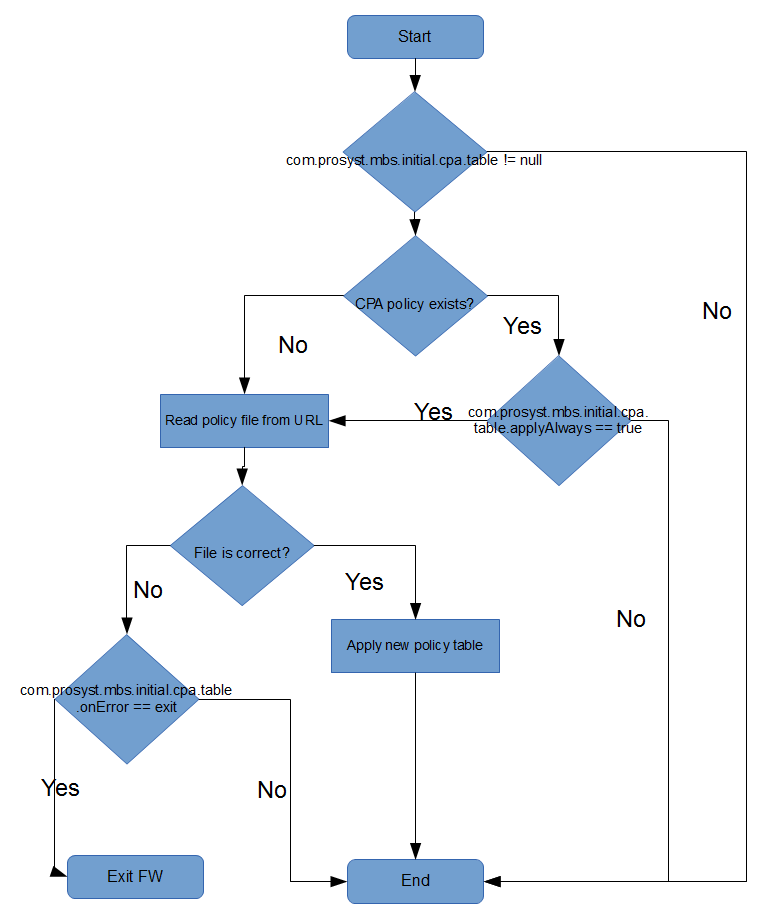
Conditional Permissions are specified by the policy file. These must be only one permission per line. The proper permission encoding format is:
access {conditions permissions} name
where:
For more information refer to chapters 9.15.6.7, 9.15.8.5 and 10.4.3.5 of the OSGi R4 specification or chapters 50.14.7.7, 50.14.9.5 and 51.4.4.5 of the OSGi R5.
Using a Group of Permissions for a Single Permission Entry
To optimize determining the conditional permissions of bundles in the OSGi platform, the implementation of the ConditionalPermissionAdmin service provides the opportunity to define groups of functionally-related permissions, which will be handled as a whole instead of saving and retrieving permissions one-by-one. The paradigm of functional permissions works as follows:
If needed, you might later change the permissions directly in the group - to apply the change to the ConditionalPermissionAdmin service, reset the conditional permissions by calling the service's setConditionalPermissionInfo method again by including the permission group in the set of permission definitions.