


|
|
|
|
|
The framework is capable of installing certain bundles without loading their classes until they are really needed. This class loading "on demand" speeds up greatly the initial startup time of the framework.
The OSGi framework implementation supports two approaches for lazy activation definition:
This document will focus on the second approach as the first one is already described in details by the OSGi Alliance.
Lazy bundles
Three types of bundles can be subject of lazy initialization:
All of them are lazy bundles.
States of a Lazy bundle
This section discusses the states and transitions that a bundle passes during its lifecycle in regards to lazy initialization.
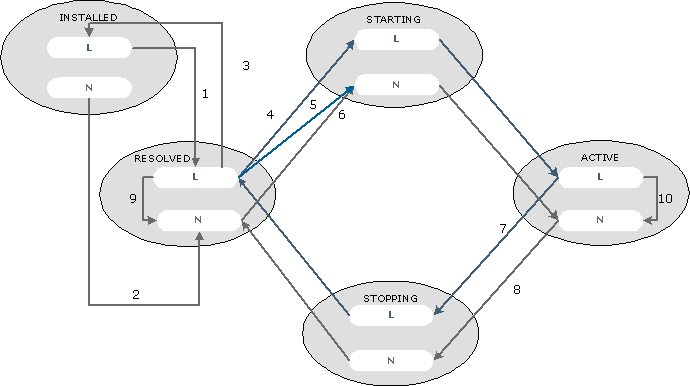
1 |
Resolve |
2 |
Traditional OSGi bundle resolve |
3 |
Failed resolve |
4 |
|
5 |
Explicit start from the runtime console, from the Web Admin Console or from another bundle |
6 |
Traditional OSGi bundle start |
7, 8 |
|
9 |
Explicit stop |
10 |
Explicit start |
Lazy services and bundles in the text console
The framework's text console indicates lazy services and bundles in the following way:
Enabling lazy initialization
By default, the lazy initialization of the framework is turned off. To enable it, before framework startup set the mbs.bundles.lazy system property to true.
On most JVMs the OSGi Runtime can be easily started in lazy initialization mode by passing the lazy option to the corresponding server script file.
After you have declared a bundle as lazy you need to specify the bundle as such in the boot.ini file with
<action>i -S -l</action>
as otherwise even if everything else is correct the bundle will start up normally.