


|
|
|
|
|
A document on creating wire objects through the Wire Admin Service.
A wire is represented by an org.osgi.service.wireadmin.Wire object. It can be used by producers to update the data objects available in it through its update(Object) method. Consumers can request the updated information by invoking the wire's poll() method. More than a single wire can connect a consumer and a producer.
With regard to the established connection, a wire has two states:
With regard to its validity, a wire can be:
There are three ways in which you can create a wire: using the server runtime console, using the property editor of the Wire Admin Service in the Web Admin Console, or programmatically by getting and using the Wire Admin Service.
Initially, the Wire Admin service contains no default wires. Such have to be created by the developers needing them.
For each created wire, no matter the way in which it is created, the Wire Admin creates a new configuration instance representing the wire.
Using the wa Console Command Group
The wa console command group allows managing wires available in the Wire Admin. To enter this group, type "wa/" in the server's runtime console.
The following commands are available:
Command |
Shortcut |
Description |
|---|---|---|
list |
ls |
Prints the available wires, producers or consumers. Usage:
|
create [<data_filter>] <producer_PID> <consumer_PID> |
c |
Creates a new wire between the specified producer and the specified consumer. The <data_filter> is an optional part. It represents the filter for the data that will go through the wire. It must be constructed according to the requirements for constructing standard LDAP filers. The criteria for the filtering can be the values of the filtering constants of the WireConstants interface. See Filtering the Data Output for details. For example, the command can be used in this way: create consumer.test producer.test This command would create a wire between the consumer with PID "consumer.test" and producer with PID "producer.test". If we want the wire to handle data filtering, we could re-write the latter command line adding an LDAP filter like this: c (wirevalue.current>10) consumer.test producer.test |
delete <wire_ID> |
d |
Deletes the specified wire. |
Using Web Admin Console
Web Admin Console allows easy management of available wires through the WireAdmin configuration. To enter the property editor dialog of the WireAdmin configuration, go to the Configuration page and select the WireAdmin Configuraiton row from the Configurations table. The WebAdmin Configuration dialog contains the properties contained in this factory configuration and allows you to administer them. Description of the properties is available in the Configuration Resources part.
Figure 1. WireAdmin Bundle configurations properties.
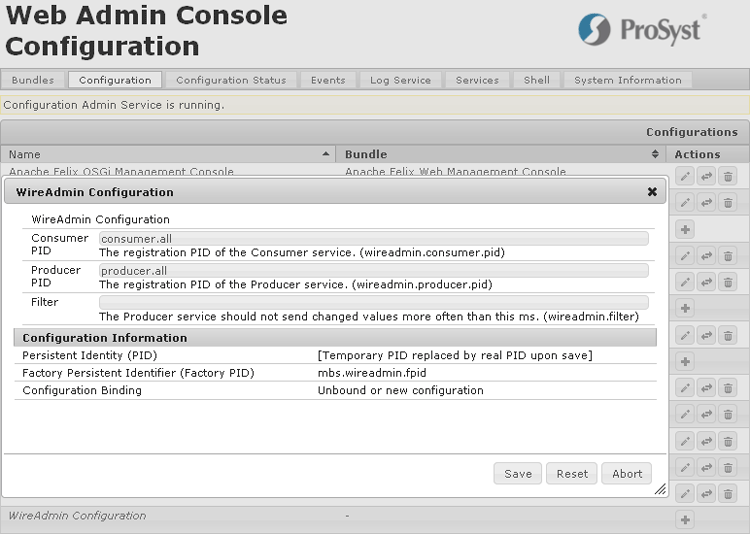
Initially, the WireAdmin Bundle contains no configuration instances because it contains no default wires.
To create a new wire, you need to create a new instance of the factory configuration. This is done with the following steps:
Getting the WireAdmin Service
To create a new wire in a programming way, get reference to the Wire Admin Service and invoke its createWire method. The parameters needed for this method are: producer PID, consumer PID and a Dictionary of the properties of this wire. The following properties are implicitly added to the Dictionary of properties by the Wire Admin Service:
You should not include these properties when creating the wire because they are automatically overridden by the Wire Admin Service.
The following properties can optionally be supplied to create a wire filter that will be passed as a value to the WireConstants.WIREADMIN_FILTER property:
The following example invokes the Wire Admin Service to create a wire with a temperature filter based on both value and time criteria. It will allow sending data only if the following three conditions are true: the values are between 0 and 100, the time interval between two produced values is greater than 500 ms and the absolute delta between the current and the previous value is less than 20.
Listing 2. Wire-made data filtering.
import org.osgi.framework.*;
import org.osgi.service.wireadmin.*;
import java.util.Hashtable;
public class WATest implements BundleActivator {
private ServiceReference waRef;
private WireAdmin wa;
private Wire wire;
public void start(BundleContext bc) throws BundleException {
// getting a WireAdmin service reference
waRef = bc.getServiceReference(WireAdmin.class.getName());
if (waRef == null) {
throw new BundleException("Unable to get WireAdmin service reference!");
}
WA = (WireAdmin) bc.getService(waRef);
if (WA == null) {
throw new BundleException("WireAdmin service has not been registered!");
}
Hashtable wireProps = new Hashtable();
// A temperature filter (considering
// that the Producer service produces numerical values)
// that will evaluate to true if and only if the values send through this wire
// are in the interval 0-100, the time interval
// between two produced values is more than 500ms
// and the absolute delta (|current - previous|) is less than 20
String wireFilter = "(&(" + WireConstants.WIREVALUE_ELAPSED + ">=500)"
+ "(" + WireConstants.WIREVALUE_CURRENT + ">=0)"
+ "(" + WireConstants.WIREVALUE_CURRENT + "<=100)"
+ "(" + WireConstants.WIREVALUE_DELTA_ABSOLUTE + "<=20))";
// setting the filter
wireProps.put(WireConstants.WIREADMIN_FILTER, wireFilter);
wire = wa.createWire("producer.pid", "consumer.pid", wireProps);
}
public void stop(BundleContext bc) {
wa.deleteWire(wire);
bc.ungetService(waRef);
}
}