


|
|
|
|
|
This document describes the architecture model and the basic functionalities of the Automation Module.
Module Design
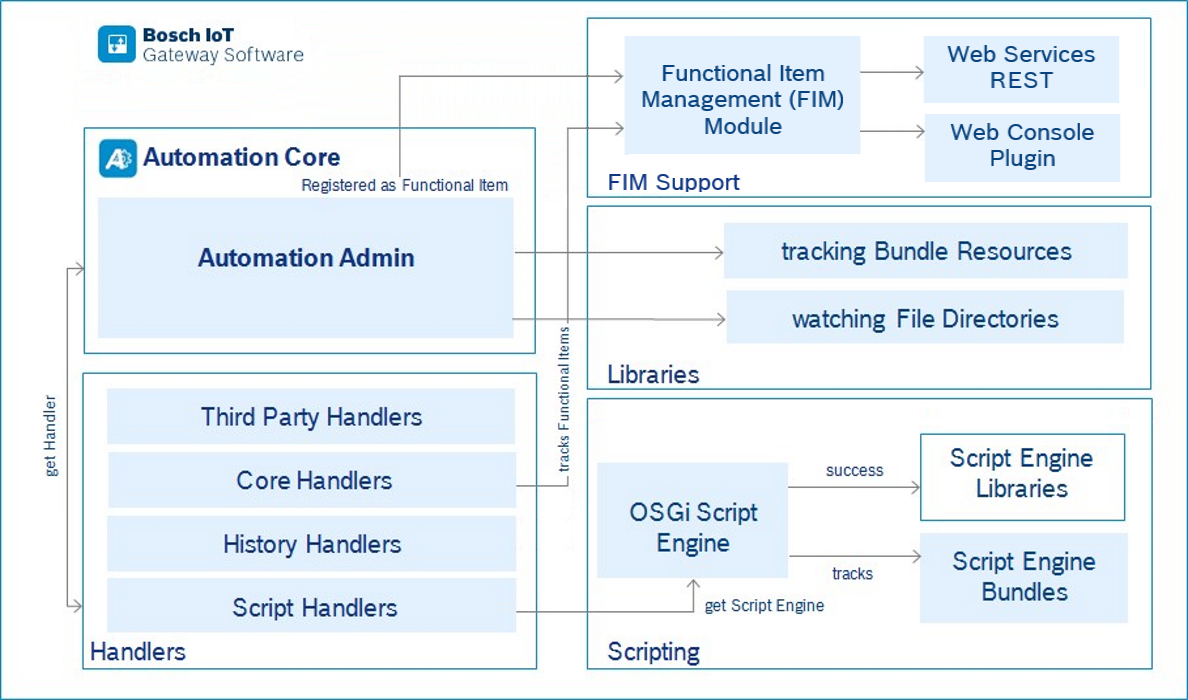
OSGi Runtime
The Bosch IoT Gateway Software allows the Automation module to be used.
Automation
The main functionality of the Automation module is provided by Automation Core bundle. Of course the Automation Core bundle will not provide alone the whole functionality. It is designed to collaborate with other modules that are part of the solution. The Automation module provides a set of built-in handlers – "Handlers" group. It contains three bundles – Core, History and Script. The module also provides the ability for the users to define their own handlers and add them to the system. This extendability is one of the important features of the module. The other important part is that the Automation module tracks two types of resources: bundle resource files and system files with Rules and Templates, which are added automatically. The built-in handlers need to cooperate with some other modules of the Bosch IoT Gateway Softawe – Functional Item Management module, Scripting module, REST module, History module and Web Console, also use some of the features provided by the Framework built-in bundles:
Rules and Rule Engine
The when-then statements like:
are called “Rules”. The Automation module enables the user to define a set of rules that eliminate the need of human intervention when monitoring, managing and controlling of the various devices is needed, and provides an environment – a rule engine, which is responsible for automatizing the evaluation and execution of these rules.
The Automation module provides to the user an easy way to build the rules from small pieces – instructions, which are responsible for a part of the logic of a particular rule. These pieces and their logic are independent from each other but still they are able to communicate between each other by virtue of their inputs and outputs. The instructions can be classified in three categories:
Built-in Handlers
The code responsible for the implementation of an instruction is called a Handler. The Automation module provides a set of such handlers as well as the ability for the users to define their own and add them to the system. The handlers provide the logic responsible for the rules execution. The metadata describing this logic and how the instructions communicate with each other is stored in Handlers definitions. These definitions can be provided as Handler or Handler Factory services registered in an OSGi Framework. The Automation module contains a well systematized set of such handler definitions. For more details refer to the Using Built-in Handlers guide.
Templates
In order to facilitate the usage of existing handlers as much as possible, there is also an ability to create and add templates. They are convenient if you want to have many rules with different inputs, that are composed of the same instructions. They hide the complex details and export only the inputs that can be configured.
REST API
The FIM defined REST API simplifies the integration of the Automation module with other systems or cloud services by managing Automation Admin Functional Item in a common way.
Admin API
The Bosch IoT Gateway Software defines the Functional Item service as a general abstraction for representing different types of functionalities. It can be used for atomic functionality of:
The Automation module defines one Functional Item service – Automation Admin. It exposes all Rule's, Handler's and Template's management functionality as Functional Item operations. This enables the Bosch Cloud Services and Bosch Web UI Business Logic to work with the Rules, Handlers and Templates in a general way. Its unique Functional Item ID is automation:admin. The name of the Admin as a Functional Item is Automation Admin.
Web Console Plugin
The Automation module contains a Web Console plugin that provides GUI for managing rules, templates and handlers. It is based on the Admin's API.