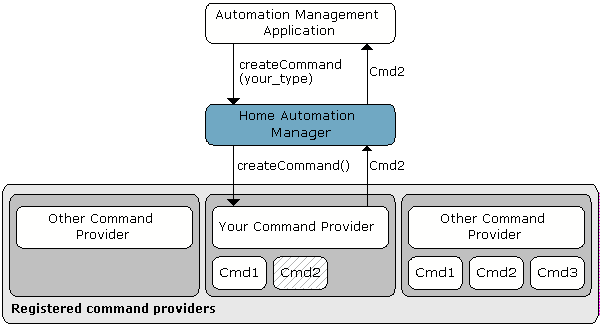
Commands of certain type are handled by a common command provider which creates and retrieves command objects upon request.
When the Home Automation Manager has to create, retrieve or execute a command of a certain type, it contacts the appropriate command provider.
Automation management applications such as the HAM plugin for the Web Admin Console can initialize new commands and rules through interaction with the Home Automation Manager.
Using Basic Command Provider Implementation
The Home Automation Manager Module offers a ready basic implementation of command provider. In most cases you can develop a new command type by extending it. The basic command provider implementation accomplishes the following tasks:
Implements the methods used by the Home Automation Manager.
Provides a ready-made mechanism for persistent storage of commands in the Config Tree: Each command's configuration properties are stored in a special node of the tree. Thus it is possible for the basic command provider to reconstruct a command object using only the information from its config node.
Allows reporting of a status upon a command execution. The status can be set using the setStatus method. A condition of type status condition listens for such statuses and can be set to be triggered when a certain command returns a certain status.
Development Tasks
To define a new command type, execute the following steps:
Create a Command - Extend the Command interface, and then implement it.
Implement a Command Provider - Implement the CommandProvider interface for creating and retrieving command objects.