


|
|
|
|
|
Guide on how to define Functional Items.
Functional Items (FI) enable controlling different processes in a unified way. For example turn ON/OFF Devices, Enable/Disable Automation rules, Enable/Disable GUI features (e.g. disable write process during data restore), enable/disable access of Users. In order to do so you need to create base Interface (In the example below the Interface is "BinarySwitch") that has property "STATE" (that can be changed to ON/OFF or Enable/Disable) and a set of operations (e.g. turnOn/turnOff/toggle).
Each Functional Item must extend the "FunctionalItem" Interface (fim.FI) in order to define its supported properties and operations. One Functional Item Interface can extend another Functional Item Interface also, defining additional properties and operations. Each Functional Item implementation provides support of all the properties and operations defined in a Functional Item Interface.
Interfaces may have many different Java implementations that are controlling the different processes. Implementations may have many instances. It is mandatory that each implementation instance is registered as an OSGi service and has Unique ID (UID). For more information check Java API. Each Implementation has to support the properties defined in the Interface.
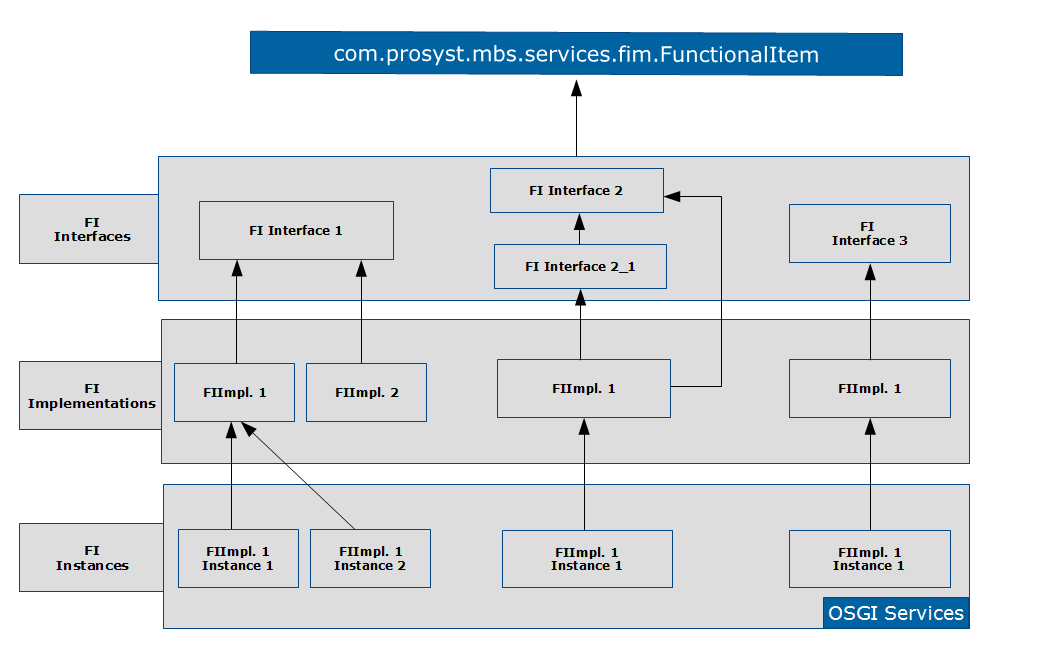
In the following example we can see the different implementations of the "BinarySwitch" Interface.
fim>$ls -f (objectClass=*BinarySwitch)# UID Name Functional Item Interfaces-----------------------------------------------------------------------------------------------------------------------1 demo:fim:BinarySwitch:1 BS Room 1 com.prosyst.mbs.demo.fim.BinarySwitch2 demo:fim:BinarySwitchExt:1 com.prosyst.mbs.demo.fim.BinarySwitchExt com.prosyst.mbs.demo.fim.BinarySwitch
For more information please check the FIM Demo.
Each Interface contains a set of Properties and Operations and has to be annotated as Item (Description and FI Version are recommended, but not required).
Example:
@Item@Name("Binary Switch")@Version("2.0.0")@Description("Binary Switch test")public interface BinarySwitch extends FunctionalItem {
Supported Types
The data type of a functional item property or operation argument and return type can be one of the following types:
In order to ensure the ability to save, store and restore their state, each bean has to provide:
How to Define Properties
Each Functional Item Property is characterized by:
"R" – Readable FI property means that it will be present in the Map of FI properties returned by the corresponding getter method.
"W" – Writable FI property means that the value can be changed with setter.
"E" – Eventable FI property means that the implementation will throw and event when the property is changed.
If not specified, the default access level is set to "RE".
The following example shows definition of Property Metadata with the default level of access "RE":
public enum State {
/*** Defines the switched off state. ***/
OFF("Switched Off"),
/*** Defines the switched on state. ***/
ON("Switched On");
...
}
/*** Property name used for binary switch state. ***/
@Property
@Description("Switch state.")
public static final String PROPERTY_STATE = "state"; //$NON-NLS-1$
/*** This method returns the current binary switch state. ***/
public State getState();
If different level of access is needed then it can be specified additionally:
@Property(access = "RWE")
If FI access is set to Eventable in case of Operation executions it throws information for the event (to be able to view the event information one must be subscribed for events):
fim>$subscribe -t * /*** Subscription to all events. ***/Subscription ID: 1fim>$sub# Topics Filter Include-----------------------------------------------------------------------------------------------------------------------1 REG UNREG PROP OPERfim>$ex demo:fim:BinarySwitch:1 toggleOperation executed successfully.No result returned.fim>$FI EVENT HANDLER: 1-----------------------------------------------------------------------------------------------------------------------FI EVENT PROPERTY_CHANGEDevent.topics
com/prosyst/mbs/services/fim/FunctionalItemEvent/PROPERTY_CHANGEDobjectClass
[com.prosyst.mbs.demo.fim.BinarySwitch,com.prosyst.mbs.services.fim.FunctionalItem]property.name stateproperty.value.new Switched Onproperty.value.old Switched Offtimestamp 1426926411766uid demo:fim:BinarySwitch:1
How to Define Operations
Functional Item Operations define the available operations that may be executed over a Functional Item.
For example "turnOn", "turnOff", "toggle":
/*** This method turns on the binary switch. ***/
@Operation
@Description("Turns on the binary switch.")
public void turnOn();
/*** This method turns off the binary switch. ***/
@Operation
@Description("Turns off the binary switch.")
public void turnOff();
/*** Toggles the current state of the binary switch. ***/
@Operation
@Description("Toggles the current state.")
public void toggle();
Abstract Functional Item
For more convenient implementation of Functional Items there is Abstract Functional Item which is part of com.prosyst.mbs.services.fim.spi. Abstract Functional Item has part of the base methods already implemented. It creates an abstract implementation of FunctionalItem interface which provides utilities for service registration, retrieving the properties and operations meta information and sending property changed events. The class is not thread safety.
Abstract Functional Items requires: