


|
|
|
|
|
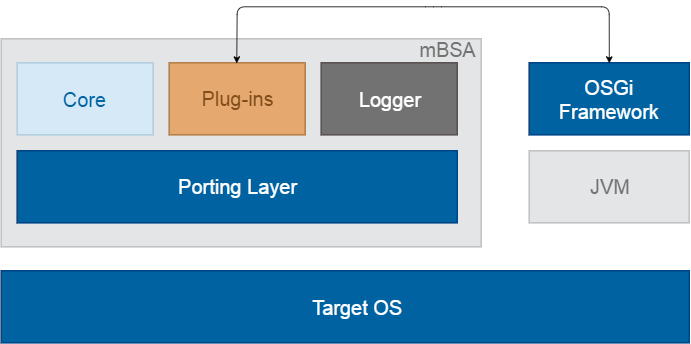
System Architecture for the mBSA Module.
System Components
mBSA is a platform for loading and dynamically initialization of native plug-ins, which provides functionality through C++ interfaces. mBSA is separated in four main parts: Porting Layer, Core, set of plug-ins and Java Client.
The Java client provides Java classes which allows the communication with mBSA and its main plug-ins from within applications written in the Java language.
Module Blocks
The Porting Layer is used to make core and plug-ins implementation independent from OS. This gives the ability to run mBSA without source code modifications on all platforms for which the porting layer is implemented. Porting layer is implemented for Win32 and Linux.
The Core is responsible for plug-ins loading, plug-ins starting, getting reference to plugin interface, etc. Actually, it is the most important part in mBSA.
mBSA plug-ins are divided in several groups:
You can find configuration information for each plugin in the Configuration Properties section in the Setup Guide.
OSGi Runtime Management
Having the OSGi Runtime controlled by mBSA delivers many benefits regarding integration with the underlying operating system, actions in cases of faults, tracking OSGi platform's state by means of watchdogs, etc. mBSA monitors the state of the OSGi Runtime - it regularly pings the OSGi framework to check if running, as well as monitors resource consumption of the OSGi process. In case the OSGi Runtime is not responding, mBSA restarts it.
In addition, upon request from the Update Manager from the OSGi framework, mBSA is able to restart the runtime along with the OS as well as to update at runtime the whole OSGi image including the underlying JVM and OS.
In particular, the OSGi Runtime is launched within an additional mBSA instance which communicates with the main one. The additional mBSA instance provides support of a Java API which bundles can use from within the OSGi framework to communicate with the main mBSA's plug-ins as described in the next section "mBSA Management from within OSGi".
mBSA Management From Within OSGi
When the OSGi Runtime is launched by mBSA, OSGi applications can contact mBSA plug-ins by using a regular OSGi service. The service is com.prosyst.mbsa.core.Core and is registered by the framework. To get the Java interface to a plugin, call the getInstance method of the Core service casting the result to the relevant Java object type. As argument to the getInstance method use the ID_I<PLUGIN_NAME> of the relevant plugin specific interface.
For example, to access the features of the File Access plugin from within OSGi, provide the ID_IFILEACCESS field of the com.prosyst.mbsa.fileaccess.FileAccess interface as argument to Core's getInstance method. As a result, the Core service will return an instance of the FileAcces plugin main object.
mBSA Log Files
The mBSA generates numerous log files, classified by mBSA modules – Core, Plug-ins, etc.. Logs of the main mBSA are placed in the <image_home_dir>/mbsa/bin/logs directory and those of the mBSA instance running OSGi Runtime in the <image_home_dir>/mbsa/bin/logs/fwcore one.
mBSA-Related Folders and Files
Regarding the SDK runtime image file structure, there are certain folders and files worth knowing about as they contain the basic components of mBSA.