|
|
|
|
|
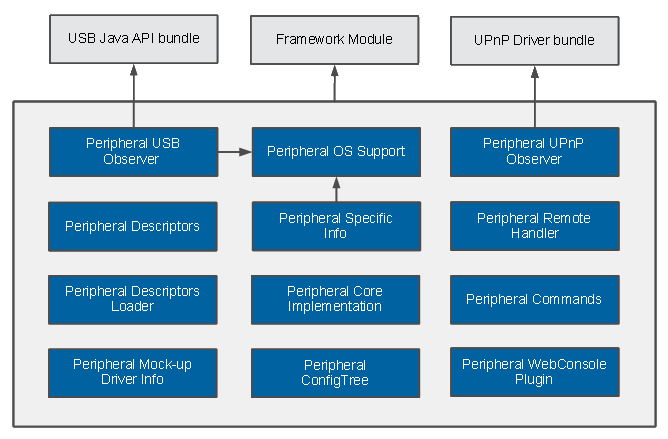
The PeripheralAdmin service maintains a list of Peripheral objects representing physical devices connected to the system. Using the PeripheralAdmin service allows you to have the Java drivers for devices attached to your gateway automatically configured, updated, started or stopped.
PeripheralAdmin Service
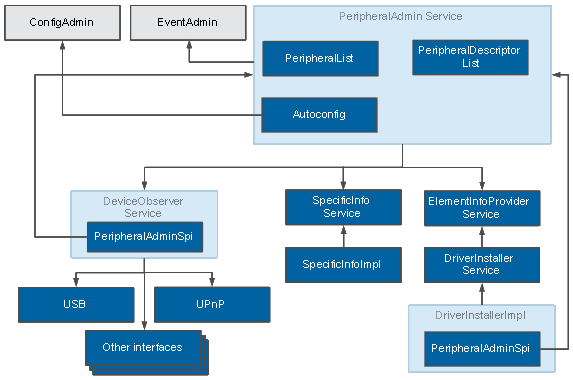
The PeripheralAdmin service provides access to and capabilities for management of devices attached to the hardware. On every device (un)plug it is notified by the respective DeviceObserver service. In a list of PeripheralDescriptor objects the PeripheralAdmin service maintains meta-data about known devices that are expected to connect. The PeripheralAdmin uses the SpecificInfoProvider service to get the specific info about a peripheral device that is plugged. The PeripheralAdmin service uses the ConfigAdmin service to set the configurations for plugged devices and their drivers. To track the driver status of a device plugged to the system and to perform operations with this driver ((un)install, update, start, stop), the PeripheralAdmin uses the ElementInfoProvider service. To publish events to the FW when a device or its driver changes its state (see the diagrams and tables below), the PeripheralAdmin makes use of the EventAdmin service.
DeviceObserver Service
To be notified when devices are attached to or detached from your hardware, the PeripheralAdmin service relies on DeviceObserver services. For communication with the PeripheralAdmin, the respective DeviceObserver uses a PeripheralAdminSpi (PeripheralAdmin Service Provider Interface) object. During its initialization the PeripheralAdmin service provides a PeripheralAdminSpi object to all available DeviceObserver services. Different implementations of the DeviceObserver service interface are used for the different interconnect interfaces (e.g. USB, UPnP, eSATA, PCMCIA, Printer Ports, etc.). Currently, DeviceObserver implementations are available for USB and UPnP devices.
PeripheralDescriptor
In a list of PeripheralDescriptor objects the PeripheralAdmin service maintains meta-data about known devices that are expected to connect. Each PeripheralDescriptor object is associated with a real device and contains data such as:
For more information about the Peripheral Descriptor structure refer to: Peripheral Descriptor Structure
SpecificInfoProvider Service
The PeripheralAdmin uses the SpecificInfoProvider service to get the specific info about a peripheral device that is plugged, e.g. the COM port to which the device is attached. For the different operating systems platforms different SpecificInfoProvider implementations are used.
DriverInstaller Service
The DriverInstaller service extends the ElementInfoProvider service with the functionality to perform driver (un)install, update, start, stop. Also here different DriverInstaller implementations are used for the different operating systems platforms. The default DriverInstaller implementation (peripheral.driver.installer.noagent, which is used in the target image of the product) after a plugged peripheral device is matched with a descriptor it sends information to the PeripheralAdmin about the state of the required driver to be configured by the PeripheralAdmin.
The PeripheralAdmin Workflow
A typical flow of events after plugging a device:
Device States
Status |
Description |
|---|---|
NOT_ASSOCIATED |
Peripheral is attached but no matching descriptor is found. |
PENDING |
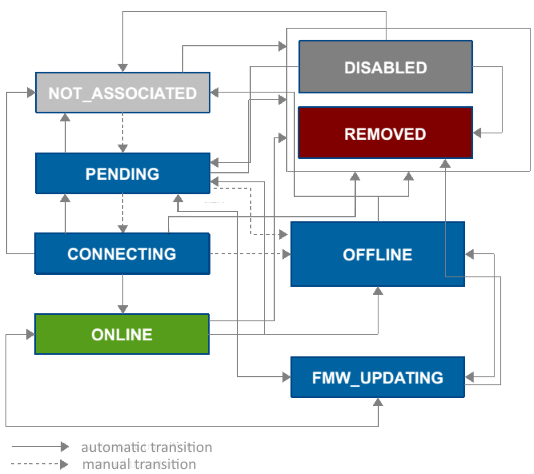
Peripheral is attached, a matching descriptor is found. Its driver is installing, starting, stopping, updating or peripheral is waiting for driver first response. |
CONNECTING |
Driver responded that it is connecting to the peripheral. |
ONLINE |
Peripheral is operational. |
OFFLINE |
Peripheral is attached but not operational. |
REMOVED |
Peripheral is detached. |
DISABLED |
Peripheral is disabled. |
FROM/TO |
NOT_ASSOCIATED |
PENDING |
CONNECTING |
ONLINE |
OFFLINE |
REMOVED (DISABLED) |
FMW_UPDATING |
|---|---|---|---|---|---|---|---|
NOT_ASSOCIATED |
- |
Matching descriptor is found. Driver is installing, updating, starting, stopping, or peripheral waiting for first driver response |
- |
- |
- |
Peripheral is detached (disabled) |
- |
PENDING |
Descriptor is removed |
- |
Driver response connecting received |
- |
No driver response received for a certain amount of time. Driver installation has failed. Or manual only installation configured |
Peripheral is detached (disabled) |
Firmware update started |
CONNECTING |
Descriptor is removed |
Driver is stopping or updating |
- |
Driver responded with connected event |
Driver responded with disconnected event |
Peripheral is detached (disabled) |
- |
ONLINE |
Descriptor is removed |
Driver is stopping or updating |
- |
- |
Driver responded with disconnected event |
Peripheral is detached (disabled) |
Firmware update started |
OFFLINE |
Descriptor is removed |
Driver is stopping or updating |
- |
- |
- |
Peripheral is detached (disabled) |
Firmware update started |
REMOVED |
- |
- |
- |
- |
- |
- |
- |
DISABLED |
Enabled |
Enabled |
- |
- |
- |
Peripheral is detached (disabled) |
- |
FMW_UPDATING |
- |
Firmware update finished |
- |
- |
- |
Peripheral is detached (disabled) |
- |
Device Driver States
Status |
Description |
|---|---|
NOT_INITIALIZED |
Initial driver status. |
INSTALLING |
Driver install operation is running. |
UPDATING |
Driver update operation is running. |
UNINSTALLING |
Driver uninstall operation is running. |
STARTING |
Driver is installed and is starting. |
STOPPING |
Driver is started and is stopping. |
STARTED |
Driver is installed and is started. |
NOT_INSTALLED |
Driver is not present. |
FROM/TO |
NOT_INITIALIZED |
NOT_INSTALLED |
INSTALLING |
INSTALLED |
STARTING |
STARTED |
STOPPING |
UPDATING |
UNINSTALLING |
|---|---|---|---|---|---|---|---|---|---|
NOT_INITIALIZED |
- |
Driver or driver element missing |
- |
Driver installed |
- |
Driver is installed and started |
- |
- |
- |
NOT_INSTALLED |
- |
- |
Peripheral is plugged and PA forced installation |
- |
- |
- |
- |
- |
- |
INSTALLING |
- |
Install failed |
- |
Install success |
- |
- |
- |
- |
- |
INSTALLED |
- |
- |
- |
- |
Driver Started after install. |
- |
- |
Driver update is forced |
Uninstall is forced |
STARTING |
- |
- |
- |
Start failed |
- |
Start success |
- |
- |
- |
STARTED |
- |
- |
- |
- |
- |
- |
Stop is forced |
- |
- |
STOPPING |
- |
- |
- |
Stop success |
- |
Stop failed |
- |
- |
- |
UPDATING |
- |
- |
- |
Update failed/finished successfully |
- |
- |
- |
- |
- |
UNINSTALLING |
- |
Uninstall success |
- |
Uninstall failed |
- |
- |
- |
- |
- |
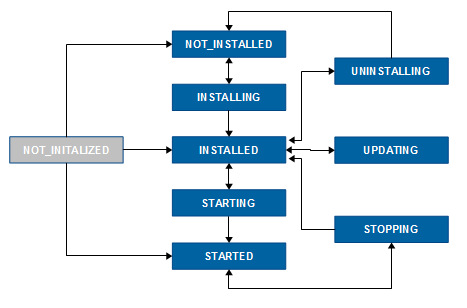
When a peripheral device is plugged the initial state of the device is NOT_ASSOCIATED and the initial state of its driver is NOT_INITIALIZED.
Module Design