


|
|
|
|
|
Overview
Policy Admin manages the system policy that connects Identities with security functions.
Policy Admin Architecture
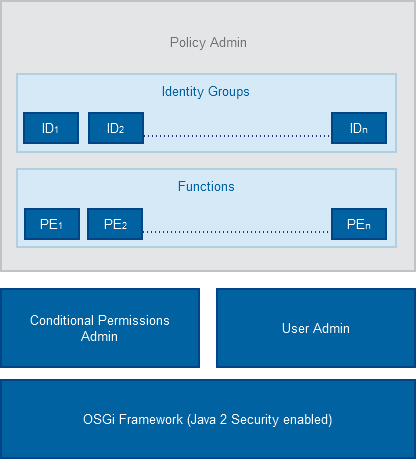
The Policy Admin module provides an extension to the OSGi Conditional Permissions Admin, which allows for easier management and creation of security policies. The Policy Admin also extends over to JSON-RPC Web based Services without the need for the OSGi Security Layer to be enabled.
The Policy Admin creates a correlation matrix between Identities (IDs) and their respective rights to access different resources.
Identities (IDs)
Each Identity (ID) represents an identifiable actor in the system for which a policy might be applied. Typically an ID can represent an user or locally-running code (bundle), or remotely running code (3rd-party server accessing remote services), etc. It is possible to define new Identities based on OSGi Conditions and they can be also used by Conditional Permission Admin Identity.
For example the BundleSignerCondition (BSC) allows the policy maker to grant specific rights to bundles coming from identified and trusted parties, based on code signing
It is also possible to use the User Admin entries to define new IDs and allocate them the appropriate rights. This however must be explicitly done using the functions contained in the Policy Admin User Admin bundle. The files that define the IDs can be found in /policy/users. Every file in that directory defines exactly one identity.
For detailed information on how to define IDs refer to Defining IDs and Policies.
Identity Groups (IG)
Identities can be stacked together to form Identity Groups (IG). All the IDs inside an Identity Group inherit the same rights. This allows for easier management and policy definition for multiple entities.
Furthermore, if a Policy Element (PE) for an Identity Group and a specific Function had been defined as mutable, then it is possible for the member Identity to have a customized value of that PE.
For example, if some Identity Group (which groups applications by some criteria) is by default allowed to have Network Access, and that Policy Element is defined as mutable - then a specific application within this group may have a different PE value.
The files that define the Identity Groups are placed in policy/groups/. Every file in that directory defines exactly one group identity.
Policy Elements (PE)
Policy Elements (PE) contain the actual authorization value (allow/deny) of the Identity-Function matrix.
There are two types of Policy Elements allowed:
Functions
The Policy Admin (PA) uses Functions to assign access permissions to IDs. A Function is used to group and abstract the low-level rights (Permissions) granted to an Identity. The semantics and the content of Functions is defined by the policy maker, which is then typically named with some human-readable name, like Network Access, Location Access, User Management, etc.
Functions allow the policy maker to focus on the overall structure of the policy without having to set a myriad of OSGi Permissions separately to each Identity. Such grouping also makes the permission checks more efficient in Bosch IoT Gateway Software. Functions can also represent an end user application. For example, when an application has been downloaded and installed by the device owner, it may appear as a new Function in the policy. This allows the administration UI to visualize this app as a new Function to device owner. The owner can then grant/deny other users (children, guests, etc.) access to this app via PA.
There are two types of functions:
Policy Admin Identity Providers
The Policy Admin have integrations for User Admin, Permissions Admin and Conditional Permissions Admin which it uses as Identity Providers.
However there are some limitations such as:
Policy Admin Limitations
The Policy Admin have the following limitations: