


|
|
|
|
|
Module Design
This document contains a short description of the basic terms and principles of the Test Execution Environment.
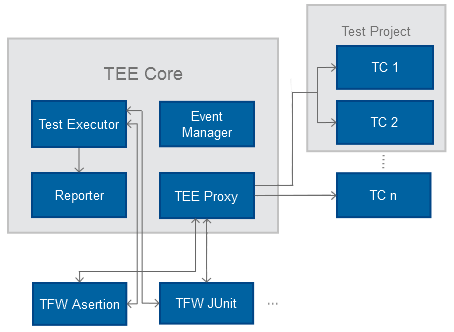
Basic Concepts
Test
A test is the smallest element of the test hierarchy of the TEE. Each test represents a Java method that executes some actions which are purposed to check whether methods of registered OSGi services (or exported classes) are working correctly.
Test Case
A test case consists of a series of tests (test methods) performed in a predefined order. OSGi-aware test cases are typically Java classes which consist of sets of test methods (tests). An OSGi-aware test case is usually packaged as an OSGi bundle which has specific manifest headers containing information about this OSGi-aware test case.
The OSGi-aware test case bundles are placed in the testcases directory which is specified by the tee.core.base.testcases system property. TEE uses this directory for storing the bundles of the test cases which can be executed.
Test cases generate results which describe clearly and in detail whether the tested functionality is working as expected or not. Test case result generation is usually done in two ways:
Test cases can allocate resources, e.g. open sockets or files, get OSGi services, etc. This is usually done in a special test case initialization method. All occupied resources must be freed after test execution in order to leave the target system in the state prior to test case execution. This is also done in a special test case method.
Any exceptions, thrown during the test execution but not expected by the running test are caught by TEE and logged.
The way a test case is written and its contents completely depend on the test case model.
Each test case contains three components, not all of which are compulsory:
Test Project
A test project represents a collection of test cases which are executed together. It is defined in a XML file which contains information about the test cases included in the project, the execution mode and duration of the project, etc. By default, test projects are placed in the tee/sa/projects directory of the target framework. For further information about the test project concept, refer to Defining a New Project.
Test Case Model
A Test Case Model defines the rules for writing and executing a test case. These are typically sets of abstract classes which define abstractions for test cases and common utility classes.
Following are listed the currently supported Test Case Models:
Implementations of the above-mentioned test case models are stored in the tee/sa/tfws directory which is created after you install the TEE.
Test Configuration
A test configuration is a XML file containing some prepositions needed for the proper test case execution. For example, you can configure the system properties, the configurations for the Configuration Admin, or the installation of some bundles before test case execution. Depending on the place of the test configurations, they are:
There are also two test configuration models provided by the TEE to meet the needs of the different test case models – the OSGi Framework Configuration Model and the Reference Test Case Configuration Model. They define the schemes for writing new test configurations.
Refer to Defining a New Test Configuration for guidelines on creating a new test configuration following the OSGi Framework Configuration Model.
Result Report
A result report contains information of the generated logs provided in HTML or JUnit XML format. It is placed in the tee/sa/logs directory and has the following structure by default:
<current_date_and_time> file could be also in .xml format
A test case has four basic test levels:
A test project has a Passed level only if all test cases it contains were executed successfully. If one test case of the project results with a Failed or Error level, the whole project is respectively with a Failed or Error level. In case one or more test cases are skipped, the result of the project is not influenced. If all test cases are with a Skipped test level, the test project is assumed as Skipped.