


|
|
|
|
|
This document describes how to use Parser service to execute console commands and how to provide new console commands.
Parser Service Operation Model
The Parser service of the Core Library maintains a common set of commands so that bundles in the OSGi framework can retrieve these commands and redirect them to miscellaneous clients.
The following diagram clarifies the operation principles of the Parser service:
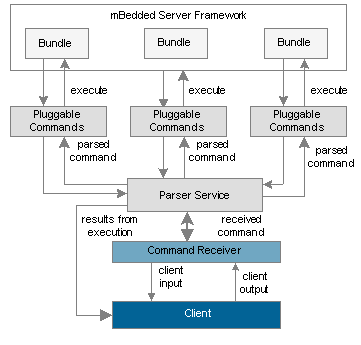
Calling the Parser Service
You can call the Parser service with the conventional techniques, defined by the OSGi Framework Specification.
import org.osgi.framework.BundleContext;
import org.osgi.framework.BundleActivator;
import org.osgi.framework.ServiceReference;
import com.prosyst.util.parser.ParserService;
public class TestActivator implements BundleActivator {
BundleContext bc;
ServiceReference parserRef;
ParserService parser;
public void start(BundleContext bc) {
// Retrieving the Parser Service
parserRef = bc.getServiceReference(ParserService.class.getName());
parser = ((ParserService) bc.getService(parserRef)).getInstance();
. . .
}
public void stop(BundleContext bc) {
bc.ungetService(parserRef);
}
}
In order to release the runtime resources consumed by the Parser service, when done using it call its release method before ungetting service reference from the framework.
Executing Commands through the Parser Service
In a Programming Way at Runtime
You can make the Parser service load the execution of a command by calling its parseCommand method, which as input argument requires the command together with its options and parameters, all formatted as a single string. The Parser Service parses the input into command tokens for you.
Do not place a new line symbol in the execution string.
This listing uses the Parser service from Listing 1.1 to invoke the cd info command (see "System Service Console Commands"), which result in switching to the info group.
Listing 1. Parsing commands through the Parser service.
import org.osgi.framework.BundleContext;
import org.osgi.framework.BundleActivator;
import org.osgi.framework.ServiceReference;
import com.prosyst.util.parser.ParserService;
. . .
//The string of the command to add.
String command = "cd info";
parser.parseCommand(command);
. . .
Through a Script at Startup
At registration, the Parser service is capable of launching an install script with console commands to be executed, whose location is the value of the mbs.parser.startup system property (if local path is used, the location must be absolute). The preferred format of the commands within the startup install script is <group>.<command>.
The startup file is treated in the same way as for the exec command - if the value of mbs.parser.startup is a valid URL, then the script is retrieved from there. Otherwise, it is searched for in the directory specified with the mbs.exec.base system property. You might also use the mbs.parser.startup.onfwstart and mbs.parser.startup.newthread system properties to additionally configure the startup script execution. For more information on the system properties of the Parser service, refer to the Setup section.
Mapping Execution Results to a Communication Stream
For a separate command output, you should use a separate instance of the Parser service. The Parser service is not available through a service factory and all its consumer receives the same service object. Changing the output from a bundle will result in changing the output in all other bundles using the Parser Service, which in some cases may cause troubles. That is why, a separate instance per output stream is a requirement.
To use another output stream, call the getInstance method to obtain a separate Parser service instance.
To make a console client view the results from a command execution, you should specify the stream to which data should be redirected. Call the setOutputStream method of a separate Parser Service object with the target output stream as parameter. Next, on calling the parseCommand method, the result will be provided over the output stream specific to the Parser Service instance.
This listing redirects command results to the system output (for example the local console) identified by the System.out print stream.
Listing 2. Redirecting execution results.
parser.setOutputStream(System.out);
Command Syntax
The command syntax adopted in the Parser service is described as:
[<group_name>.]<command> [<param> [<param>]][&]
where:
The Parser service makes no difference between parameters and options. An option exists only as a term and is generally assumed as a parameter, which starts with "-" symbol. It is up to corresponding Pluggable Commands service to decide how to interpret a parameter.
Adding Pluggable Commands
Adding pluggable commands to this common set provides capabilities for management and configuration of specific bundles.
As it was described above, to plug commands into the command inventory of the Parser service you should develop a Pluggable Commands service and register it in the OSGi framework. The interface to implement is com.prosyst.util.pcommands.PluggableCommands.
Providing Information About Commands
You pass information about your commands in the getCommandInfo method. It should return an array of CommandInfo objects, each of them dedicated to a single command. You should pass the following command properties in the CommandInfo constructor:
At position (2*i) place the parameter/option name and at (2*i + 1) - the parameter/option description, where i is equal to or greater than zero.
Executing a Command
In the executeCommand method of PluggableCommands you should execute a command passed by the Parser service. The arguments that this method receives are:
Organizing Commands in Groups
You should organize your commands in a group classifying the functions that they provide. Every group has a name and a help message describing its purpose. They are specified in the getGroupName and getHelpMessage methods of the Pluggable Commands service.
You cannot insert commands in groups that are already defined by another entity.
Registering the Pluggable Commands as a Service
Finally, the Pluggable Commands service should be registered in the OSGi framework under the com.prosyst.util.pcommands.PluggableCommands interface name. The Pluggable Commands service should have the following registration properties:
If the registration properties are missing, the Parser service will get the Pluggable Commands service right after it is registered. Otherwise, the Parser service will hold only a reference to the service and will not get the service object until a command exported by the service is executed.
Using a Utility to Format the Command Output
The com.prosyst.util.pcommands.PCommandsUtils class contains methods for enhanced formatting of the printed command output.
An Example of Pluggable Commands
This listing contains the TestCommands class, which implements a Pluggable Commands service. In the getGroupName method it adds a new command group, called "example". The getCommandInfo method introduces commands with the following properties:
When the client issues the "command" command, the executeCommand method prints the parameters received as well as a message when the command option is used.
Listing 3. Defining new commands.
import com.prosyst.util.pcommands.CommandInfo;
import com.prosyst.util.pcommands.PluggableCommands;
import java.io.PrintStream;
public class TestCommands implements PluggableCommands {
private static String command = "command";
private static String shortcut1 = "comm";
private static String shortcut2 = "c";
// Methods inherited from interface com.prosyst.util.pcommands.PluggableCommands
// Executing a command on request
public void executeCommand(String name, String[] params, PrintStream pStream) {
String option = "";
String result = "";
if(name.equals(command) || name.equals(shortcut1) || name.equals(shortcut2)){
for(int i=0; i < params.length; i ++) {
if(params[i].equals("-o")) {
option = params[i];
} else {
result = result.concat(params[i]);
}
}
if(option != "") {
pStream.println("\tExample option used!");
}
pStream.println(result);
} else {
pStream.println("Unrecognized command: " + command);
}
}
// Defining command properties
public CommandInfo[] getCommandsInfo() {
CommandInfo[] commands = new CommandInfo[1];
String[] names = {command, shortcut1, shortcut2};
String[] params = {"[-o]", "Command option", "parameter", "Command parameter"};
commands[0] = new CommandInfo(names, "Example command ", params);
return commands;
}
public String getGroupHelpMessage() {
return "Just an example command group";
}
// Specifying the group's name
public String getGroupName() {
return "example";
}
}
This listing exemplifies how to register the commands above into the framework so that the Parser service can receive a notification and insert them into its command inventory.
Listing 4. Announcing new commands set by registering it as a service in the framework.
import org.osgi.framework.BundleActivator;
import org.osgi.framework.BundleContext;
import org.osgi.framework.ServiceRegistration;
import TestCommands;
import java.util.Hashtable;
public class CommandsActivator implements BundleActivator {
ServiceRegistration sReg = null;
String servName = "com.prosyst.util.pcommands.PluggableCommands";
public void start(BundleContext bc) {
// Registering the collection of commands as a service
Hashtable regProps = new Hashtable();
regProps.put("group", "example");
regProps.put("description", "Just an example command group");
sReg = bc.registerService(servName, new TestCommands(), regProps);
if (sReg != null) {
System.out.println("Commands registered successfully!");
}
}
public void stop(BundleContext bc) {
sReg.unregister();
}
}