


|
|
|
|
|
The OSGi management capabilities of mToolkit allows managing bundles on the OSGi framework directly from the development environment. This feature is useful for testing the behavior of deployable units (bundles) in a real OSGi runtime environment, and bug-fixing, profiling and optimizing at runtime. You can change the content of the deployable unit after having installed it on the framework, and update it right away.
Management Model
mToolkit allows you to create a list of OSGi-enabled devices (also termed as frameworks or OSGi Runtimes) and connect to any of them by simply selecting it from the list and invoking "connect". The list of OSGi devices is placed in a separate view - the Frameworks view.
Once connected, the framework can be ordered to install, start, stop, update and uninstall specific bundles.
Communication with OSGi Runtimes
The communication with an OSGi Runtime is acquired through the Instrumentation Agent (IAgent) running on top of it.
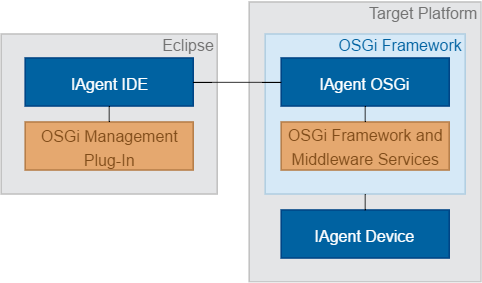
Setting up the OSGi Runtime
To be able to connect your OSGi framework to mToolkit and to Eclipse, you have to install the IAgent OSGi bundle in it, as described in the Tooling Clien (IAgent) guide. The IAgent OSGi bundle is available here:
The IAgent OSGi bundle needs the OSGi Package Admin and Start Level services and the Service Tracker. To use its full capabilities, the OSGi framework should be running its console parser and the OSGi Event Admin service. For the needs of application management, the framework should also have a proper application container.