|
|
|
|
|
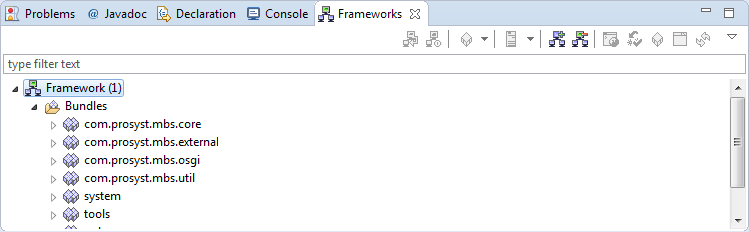
The Frameworks view provides the means for administration of remote OSGi frameworks. It supports connecting to OSGi frameworks as well as deployment and management of bundles and applications. For each successfully connected framework, the Frameworks view provides a tree with the bundles, deployment packages, services and applications available on an OSGi framework as nodes.
As by default the Frameworks view is not open, to make it appear in Eclipse go to Window > Show View > Other and in the Show View dialog select Frameworks under the mToolkit category.
The Frameworks view adds a view toolbar as well as offers convenient commands in the popup menu and in the view's pulldown menu.
The view has two display modes - Bundles (default) and Services. As concluded from the modes' names, the main display units in the Bundles mode are the bundles installed on the connected OSGi frameworks with the services they are registering and using as sub-nodes, while in the Services mode the tree is arranged by the registered services on the connected OSGi frameworks with the bundles registering and using them as sub-nodes.
To switch from the Bundles mode to the Services mode, click the  button from the view's toolbar. To return from the Services mode to the Bundles mode, click the
  button.