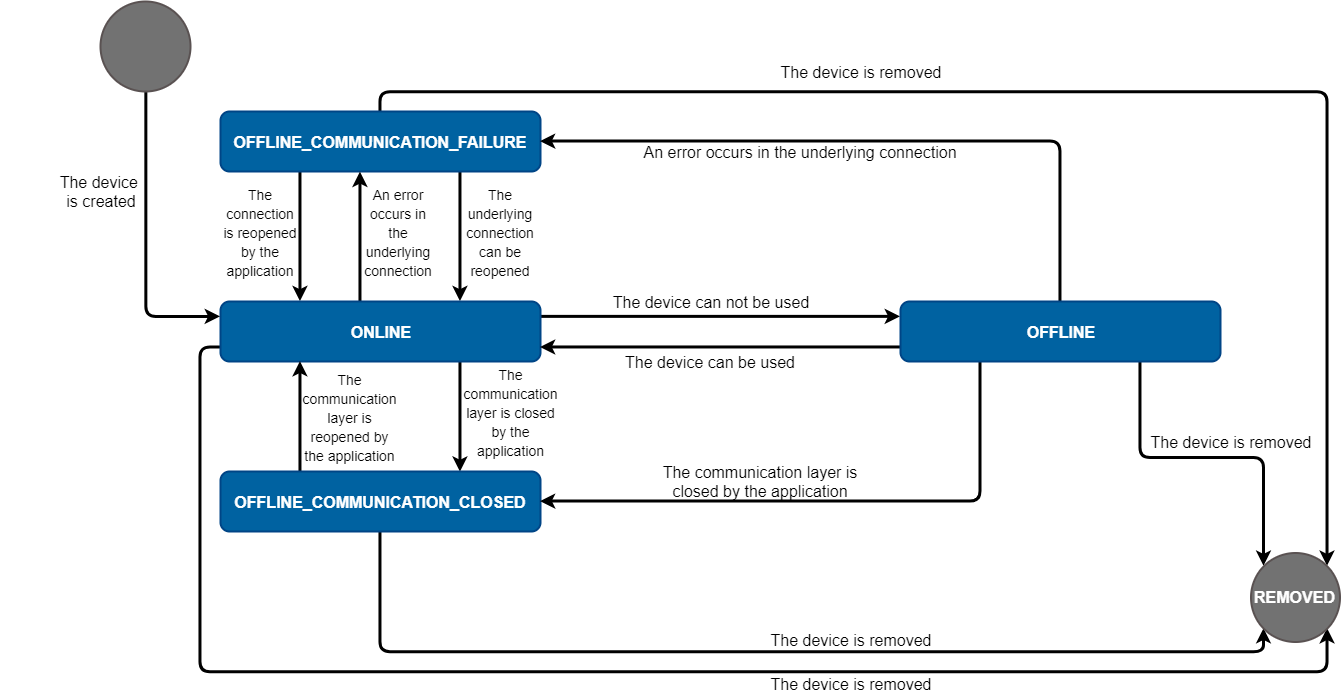
This page describes the various states and available transitions between them and com.prosyst.mbs.services.modbus.manager.ModbusDevice
State Change Diagram
States
Initial device creation
Once device is created it goes into state STATE_ONLINE. This means that the application should verify that the com.prosyst.mbs.services.modbus.driver.ModbusLink is connected and it is connected to an actual Modbus Device. The STATE_ONLINE state has the following exit options:
If error occur in the underlying physical connection while executing a Modbus request the device will go into STATE_OFFLINE_COMMUNICATION_FAILURE. Thus if the connection is lost while the device is not executing any requests, or the request is timed out, the connection will be closed, the device will go into STATE_OFFLINE_COMMUNICATION_FAILURE and will try to reconnect until it is removed or the connection is restored.
If the underlying connection is closed by the application(currently this can be done by calling the close() method of the ModbusLink) the device will go into STATE_OFFLINE_COMMUNICATION_CLOSED and will not try to do anything about the restoration of the connection. This generally means that if the application close the underlying connection then it should take care of removing or reconnecting the device.
If the application explicitly request the device to go into STATE_OFFLINE the device will go into this state. This generally means that by some reason the device can not be used by the application.
If the device is removed, then it goes in STATE_REMOVED. Thus any part of the application not involved in the removal of the device can detect it has been removed.
State OFFLINE_COMMUNICATION_FAILURE
A device in state OFFLINE_COMMUNICATION_FAILURE can go into STATE_ONLINE or STATE_REMOVED according to the following transitions:
If the underlying connection is available once again, the device will try to reconnect and if this is done, the device will go in STATE_ONLINE.
If the application restore the underlying connection, the device will be notified and will go in STATE_ONLINE.
If the device is removed, it will go into STATE_REMOVED.
State OFFLINE_COMMUNICATION_CLOSED
A device in state OFFLINE_COMMUNICATION_CLOSED has the following transitions available:
If the application restore the underlying connection the device will go into STATE_ONLINE.
If the device is removed it will go into STATE_REMOVED.
State STATE_OFFLINE
A device in STATE_OFFLINE has the following transitions available:
If the application explicitly request the device to go into STATE_ONLINE - the device will go into this state. In general this means that the reason making the device not available for the application is no longer valid so the device can be used by the application again.
If the application close the underlying connection while trying to overcome the stoppers making the device unavailable, the device will go into STATE_OFFLINE_COMMUNICATION_CLOSED.
If some error in the underlying connection occur while the application is trying to fix the issues making the device unusable, the device will go into STATE_OFFLINE_COMMUNICATION_FAILURE and will try to reconnect itself until it is removed.
If the device is removed it will go into STATE_REMOVED.
State STATE_REMOVED
A device in STATE_REMOVED can not be used anymore. Instead the application could try to create a new device with the same properties, if this is required.
No other transitions are available and the application can not request explicitly state other than STATE_ONLINE and STATE_OFFLINE.