Key Manager
Overview
The Key Manager has the following purposes and benefits:
- Dynamic cryptographic private key, public key and certificate management – The keys and certificates can be generated, renewed and removed on the fly.
- Keys and certificates are persistently stored in a key store – Secure Java keystore takes care about the keys and certificates storage.
- Keys and certificates life cycle notifications – The notifications enable the external monitoring.
- Fully integrated with Java security API – The keys and certificates are accessible with the Java security API.
- Self-signed and certificate authority certificates are supported – The requested certificate can be self-signed or issued by a certificate authority.
- Backup and restore – Backup and restore are supported through BackupAdmin service.
Architecture
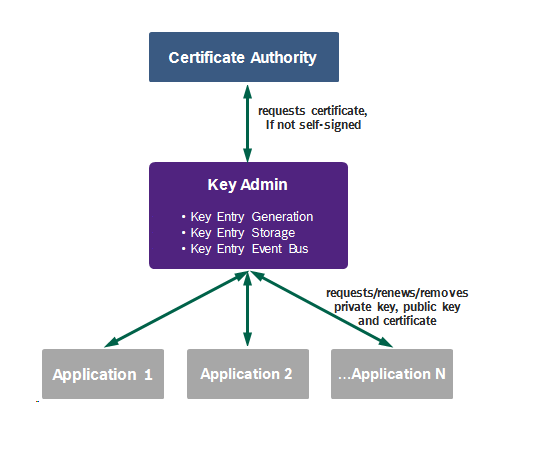
The Key Manager architecture is presented in the following figure:
Key Admin
The purpose of the Key Admin is to manage the private keys, public keys and the certificates. See the Key Entry section below for more information.
Certificate Authority
The Certificate Authority is to issue certificates, requested by the Key Admin if not self-signed.
Application
The Application uses one or more of the private keys, public keys and the certificates.
Key Entry
Properties
The Key Entry has the following properties:
- It groups the cryptographic private key, public key and the issued certificate.
- It is identified by a unique alias.
- It has its own life cycle with a state changes: requesting, valid, invalid, removing etc.
- It is dynamic and can be:
Status Life Cycle
The Key Entry status life cycle is presented below:
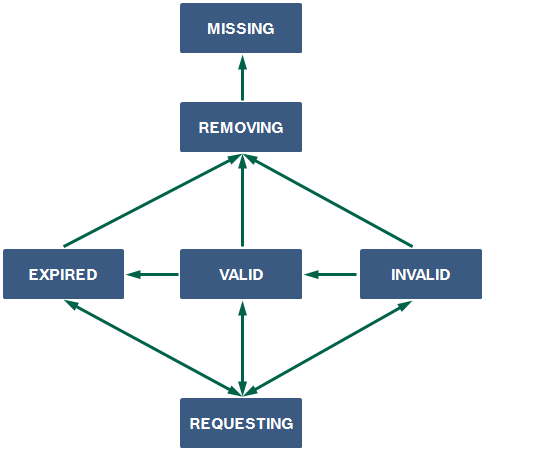
The Key Entry statuses are:
- REQUESTING – the key entry is about to be requested; used by request and renew;
- VALID – the key entry is valid;
- INVALID – the key entry is invalid for unknown reason;
- EXPIRED – the key entry is invalid, since it has expired;
- REVOKED – the key entry is invalid for being revoked (currently not supported);
- REMOVING – the key entry is about to be removed;
- MISSING – the key entry is missing.
Work Flows
Self-Signed Certificate Flow
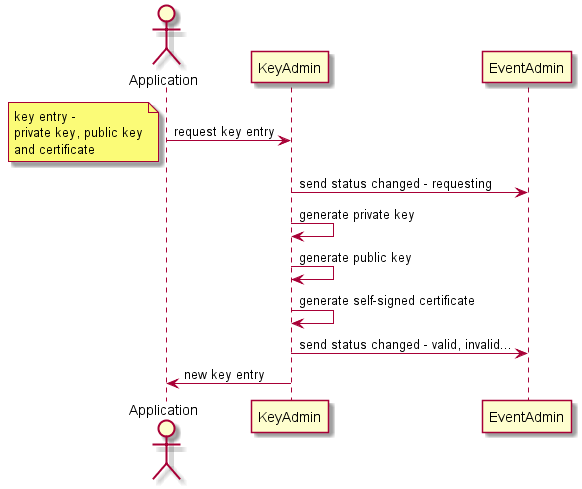
This flow works in offline mode and does not need certificate authority, because the self-signed certificate is generated by the Key Admin.
Below is the diagram for new key entry (private key, public key and certificate) request using self-signed certificate.
Certificate Authority Flow
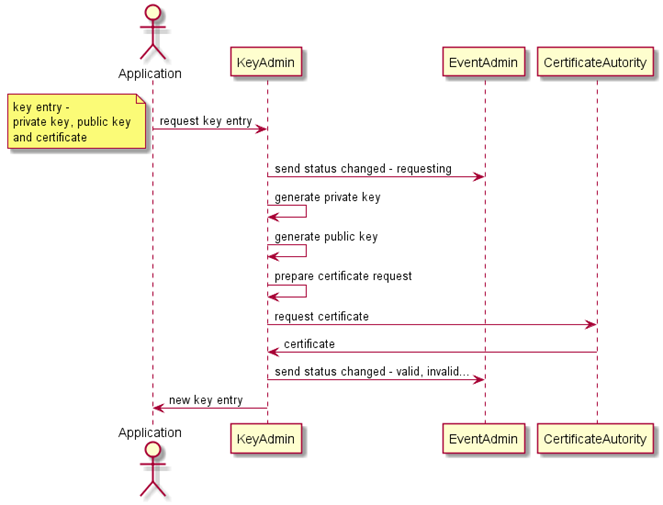
This flow works in online mode and uses a connection to the certificate authority, which generates the certificate.
Below is the diagram for new key entry (private key, public key and certificate) request from the certificate authority.