


|
|
|
|
|
The Scene Command is a command that executes a sequence of other commands consecutively.
Required Bundles
To be able to create and manage automation components, you need the following bundles from the bundles folder active in the OSGi framework:
Overview
A Scene Command executes a collection of other commands. The commands are executed in a predefined order. A fixed delay can be inserted before each of them. The properties passed upon the startup of a scene, e.g. from a rule, are sequentially directed to the commands.
Fail Behavior
You can configure how a scene should behave in cases of faults, e.g. when a member command's execution results with an error. There are two types of fail behavior:
To specify the default fail behavior of your system you can use a system or a configuration property:
Using a System Property
The fail behavior can be set up using a system property.
Property |
Default Value |
Description |
|---|---|---|
fail |
interrupt |
|
Using a Configuration Property
The Scene provider registers a Managed Service Factory with FPID mbs.ham.command.scene and name HAM Scene Provider Configuration.
Configuration Property |
Name |
Type |
Default Value |
Description |
|---|---|---|---|---|
fail |
Fail Behavior |
String |
interrupt |
|
For information on how to change system and configuration properties refer to System Properties & Configurations
Scene States
If you execute a scene directly (as opposed to as a part of a rule), you can handle its lifecycle. The scene has the following states:
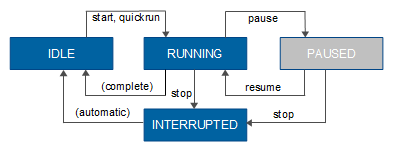
You can retrieve the current state of a scene with the getState method. You can put a scene in different states by using the pause, stop and resume methods.
Scenes within Scenes
One scene can participate with another scene in a parent-child relationship. In this case, the child scene will have two independent lifecycles - one related to being the main manageable entity and one to being dependent on the lifecycle of the parent. For example, if "Scene 1" is the parent of "Scene 2" and the child scene is stopped, the parent scene will continue its execution. However if the parent scene "Scene 1" is stopped the child scene "Scene 2" is also stopped.
Enabled/Disabled Component Commands
A command participating in a scene can be enabled (default) or disabled (its execution is skipped). This option is convenient in testing. When a scene includes a long running command you can temporarily disable it to test the execution of the other commands. The enabled state is controlled via the setEnabled method of the Scene interface. Simply pass as arguments the flag indicating the state and the index of the command associated with this state.
Managing Scenes
Via Java API
After creating an instance of the command as described in Managing Commands you can include it in a scene by using the following methods:
After configuring your command, call the save method. The Command Provider will save it in Config Tree.
Via ConfigTree
All commands are stored in Config Tree, which allows you to import/export or add/edit commands by modifying XML files. Refer to Configuring HAM via Config Tree.
The following snippet defines a scene which triggers one Log Command with ID LogCommand1, waits one second and then triggers a Rule State Command with ID RuleStateCommand1.
<config name="SceneCommand">
<property key="id_gen" value="4" type="long"/>
<config name="SceneCommand4"> <config name="1">
<property key="enabled" value="true" type="boolean"/>
<property key="command_type" value="RuleStateCommand" type="string"/>
<property key="delay" value="1000" type="int"/>
<property key="command_id" value="RuleStateCommand1" type="string"/>
</config>
<config name="0"> <property key="enabled" value="true" type="boolean"/>
<property key="command_type" value="LogCommand" type="string"/>
<property key="delay" value="1000" type="int"/>
<property key="command_id" value="LogCommand1" type="string"/>
</config>
</config>
</config>