


|
|
|
|
|
HDM API System Architecture Diagram
The following diagram shows the main components in the Device Access module from the perspective of the HDM API implementation.
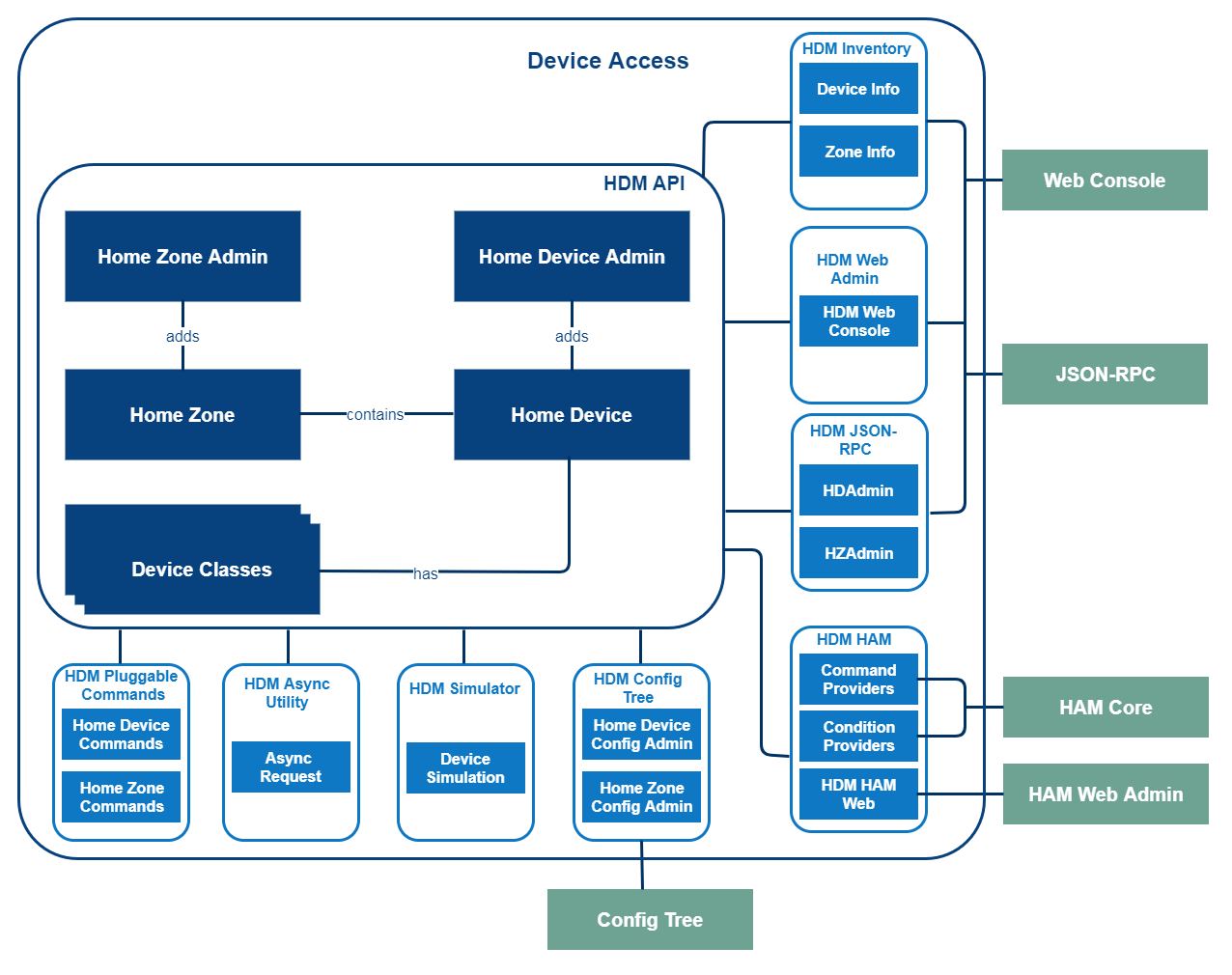
Home Device Admin
The Device Admin is used for:
This interface (com.prosyst.mbs.services.hdm.HomeDeviceAdmin) will be registered only when the HDM API implementation is enabled. The HDM API implementation is disabled by default. If you want to use the HDM API implementation, the steps described in HDM API Setup Guide should be followed.
Home Device
One Home Device is a representation of one physical home device. It provides common information related to home devices such as UID, name, status, vendor, version, type etc. It provides access to Device Classes which represent the functionality of home devices.
One physical home device is represented by one Home Device. Complex physical home devices will be represented with a set of Home Device objects. The main functionalities of physical devices are represented as child Home Device objects.
Device Class Objects
The functionality of Home Devices is represented by Device Class objects. Each Home Device may have zero or more Device Class objects attached to it.
Home Zone Admin
The Home Zone Admin is used for:
This interface (com.prosyst.mbs.services.hdm.zones.HomeZoneAdmin) will be registered only when the HDM API implementation is enabled. The HDM API implementation is disabled by default. If you want to use the HDM API implementation, the steps described in HDM API Setup Guide should be followed.
Home Zone
Home Zones allow grouping of home devices according to their location, functionality, etc. Each Home Zone can have a user friendly name. Home Zones support common executable operations, such as setting a property on all devices in the zone that have a particular device class.
A zone can contain child zones. One Home Device can participate in several Home Zones. There is a special Home Zone called System Zone that contains all Home Zones that are not added as child zones, as well as the Home Devices that are not added to any zone.
HDM Inventory
The HDM Inventory provides structured information about available home devices and home zones. This user friendly information is shown through the Web Console.
HDM Web Admin
With the use of the HDM Web Admin module the HDM API implementation can be accessed via a web interface. The HDM Web Console is a web-based application that allows management of home devices and home zones.
HDM JSON-RPC
This module provides JSON-RPC access to the HDM API implementation. The HDM JSON-RPC allows remote access to home devices and home zones over HTTP connection as well as receiving remote notifications about any changes in the state of the home devices via WebSocket connection.
HDM HAM
The HDM HAM module describes the principles of adding automation for home devices and home zones. This module provides:
HDM Config Tree
The HDM Config Tree allows configuration of home devices and home zones in the system by XML or binary format. The configuration data can be imported and exported.
HDM Simulator
The HDM Simulator contains a protocol adapter which is used for creating and managing simulated home devices.
HDM Async Utility
The standard methods for changing properties or invoking operations on Device Class Objects are executed synchronously. This means that the program halts while the Protocol Adapter waits for a response from the physical home device. The HDM Async Utility provides a method for changing properties and invoking operations on Device Class Objects that are executed asynchronously. For example- you can send requests to a sleeping device. These requests are put in a queue and are executed when the home device wakes up. This is impossible with synchronous methods.
HDM Pluggable Commands
The HDM API implementation exports a set of pluggable commands that can be used to contact and control home devices using various home protocols.