


|
|
|
|
|
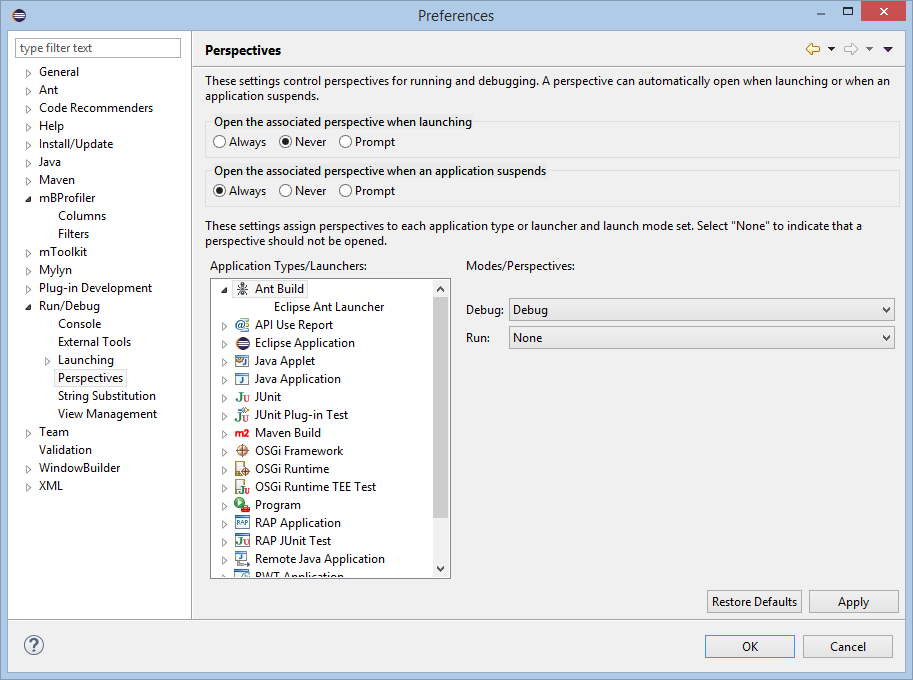
By default, when launching a profile configuration, you will be prompted to switch to the mBProfiler perspective. This is enabled when the Open the associated perspective when application suspends option of the Run/debug - > Perspective preferences is set to Always:
Another preference concerning the mBProfiler perspective is the View Management. To enable the automatic view opening when mBProfiler perspective is loaded, check the mBProfiler option in the Perspective pane. The Do not automatically open/close views which have been manually closed/open option controls weather all views that where manually closed/opened will remain closed/opened next time they are used. However, this setting does not affect the Heap and the Monitors views, as they are always opened.