


|
|
|
|
|
This document describes the architecture model and the basic functionalities of the Home Automation Manager (HAM).
Building Components
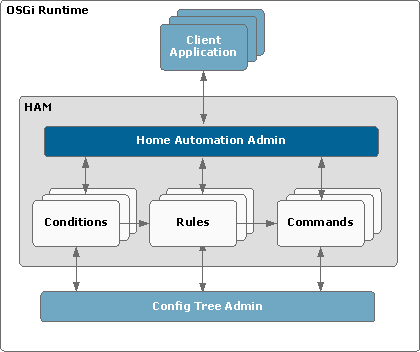
OSGi Runtime
The OSGi runtime allows the Home Automation Manager and the Config Tree utility to be used for creation and management of home automation projects. For intelligent device management and as an abstraction layer for different types of external devices and protocols, the runtime might also host the Home Device Manager.
Config Tree Admin
The Config Tree Admin is a part of the Config Tree utility and processes Configuration objects. By using it, you can import/export entire home automation projects and configuration options.
HAM
Home Automation Admin
The Home Automation Admin allows creation and management of home automation projects. The basic components of such projects are the Home Automation objects commands, conditions and rules. Through the Home Automation Admin, you can perform the following operations:
Commands
A command is an executable predefined action. It can be started by a rule or by other application through its interface.
There is a dedicated Command Provider for each type of commands. Command Providers are registered as services in the OSGi framework under the com.prosyst.mbs.ham.spi.CommandProvider interface.
See Commands.
Scenes
A scene command allows you to create and schedule series of commands. These commands can have predefined delays between them. After the scene has started, the commands participating in it are executed consequently.
There is a dedicated Scene Provider that manages the scenes automation. The Scene Provider is registered as a service in the OSGi framework under the com.prosyst.mbs.services.ham.command.scene interface.
Groups
A group is a type of command that allows you to execute a group of different commands in parallel. The group command executes the selected collection of other commands simultaneously, in separate threads.
Conditions
A condition is a trigger that can launch the execution of a command. Conditions are event producers compliant with the OSGi Event Admin. When a condition is triggered, an event is fired in the HAM system. Such an event contains the ID and the type of the relevant condition, as well as other properties specific to the condition type.
There is a dedicated Condition Provider for each type of conditions. Condition Providers are registered as services in the OSGi framework under the com.prosyst.mbs.ham.spi.ConditionProvider interface.
See Conditions.
Rules
A rule links a condition to a command. The rule listens for events coming about its condition, and when the condition is satisfied, the rule executes the command asynchronously (in a separate thread).
A condition and a command can participate in more than one rule.
See Rules.
Application Abstraction Layer
The application abstraction layer enables you to restrict the access of client applications to Home Automation objects (commands, conditions and rules) that were not created by them, as well as to import/export Home Automation objects per application.
Architecture
The application abstraction layer is introduced through a Service Factory from which the separate client applications retrieve separate Home Automation Admin service objects. Thus one client application has no access to the commands, conditions and rules created by other applications. For example, if an application invokes the getCommands method of its Home Automation Admin service object the method will return only the commands in the HAM that were created by this application. Applications are differentiated from one another by unique application IDs.
For more details see Application Abstraction Layer.