The Azure IoT adapter is designed to operate in three different working modes, based on how data can be mapped, sent and represented.
These working modes are controlled by creating factory configurations, which gives you flexibility in defining various IoT Hubs or dedicated IoT devices, and filtering (including or excluding) associated devices.
For example, you can decide to create multiple factory configurations for different IoT Hubs with corresponding groups of devices, in order to feed particular applications.
You can create the following factory configurations:
Azure IoT Device Message Adapter Configuration – send telemetry data using one-to-one mapping between functional items and Azure IoT devices
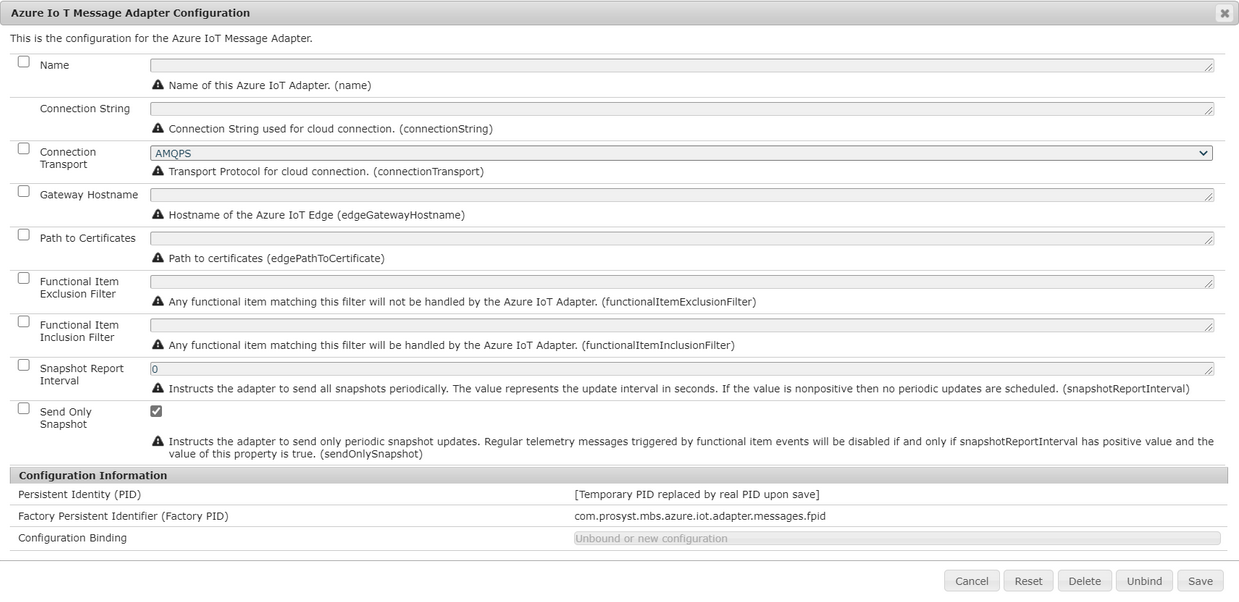
Azure IoT Message Adapter Configuration – use a single IoT device to send device-to-cloud messages for each functional Item, without creating dedicated IoT devices
To activate any of these modes, create a new configuration from the corresponding type. In the Working with web console navigate to the OSGi→Configuration and click on the Plus button to view and/or change the desired configuration:
The selected configuration appears in a pop-up window where you can configure the desired mappings:
The following fields are available to manage the corresponding properties:
Name – This is a string to uniquely identify your configuration.
For Azure IoT Device Twin Adapter Configuration and Azure IoT Device Message Adapter Configuration - this is the connection string of the IoT Hub.
For the Azure IoT Message Adapter Configuration - this is the connection string of the dedicated IoT device that will send the messages from all Functional Items.
Connection Transport – This allows selecting the transport protocol to be used for this specific adapter. The AMQPS transport is selected by default since this transport is the recommended transport for gateways, but any of the other transports supported by Microsoft Azure SDK can be used too.
Gateway Hostname – This is the gateway hostname of the Azure IoT edge device if the client applications needs to connect to Azure IoT Edge. If the Bosch IoT Gateway Software is deployed as Azure IoT Edge module, this will be automatically extracted and used, so you won't need to populate it by yourself.
Path To Certificates – This is the absolute path to the root certificate used by the Azure IoT edge gateway. This might depend on the volume bindings and mounts if deployed as Azure IoT Edge module.
When a new configuration is created, by default the corresponding adapter tracks all devices and their Functional Items. To modify this default behavior you can use Exclusion and Inclusion filters, shown in the image above: - If you do not want some Device or Device Functional Item, just make an Exclusion filter matching them. - If you need to include some Functional Item that is not part of a device just make an Inclusion filter matching it.
Snapshot Report Interval – This is the interval for sending all snapshots periodically from the adapter. Its value represents the update interval in seconds. If the value is nonpositive then no periodic updates are scheduled.
Send Only Snapshot – This Instructs the adapter to send only periodic snapshot updates. Regular telemetry messages triggered by functional item events will be disabled if and only if snapshotReportInterval has positive value and the value of this property is true.