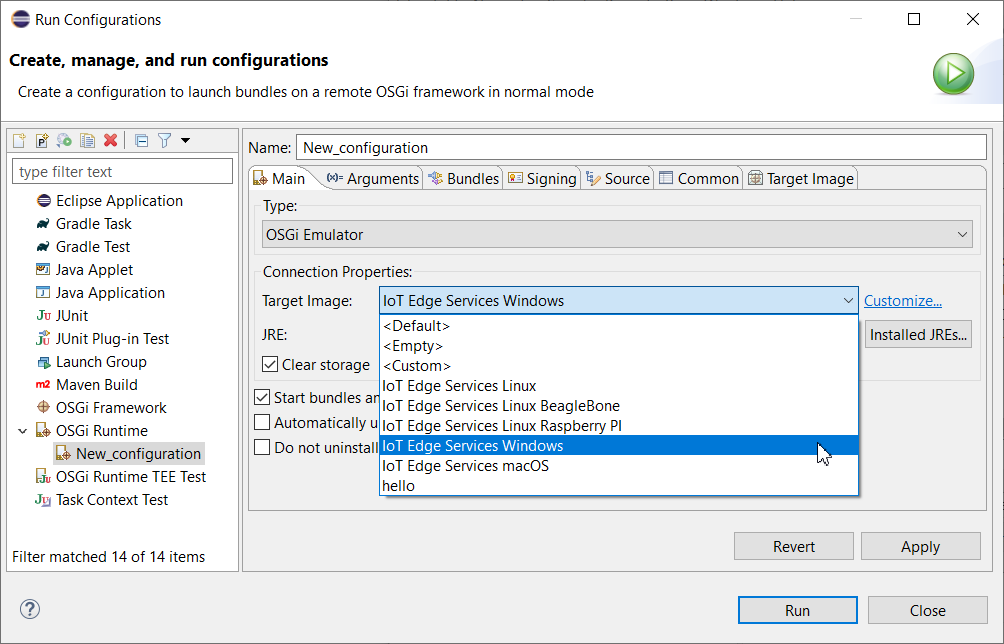
Using a ready image definition already configured with needed bundles will save defining each bundle separately.
To use a ready image definition:
In the workbench use the Run > Run Configurations menu option and from the OSGi Runtime node locate the remote OSGi framework launch configuration for the emulated runtime.
Set the Connecion Type to OSGi Emulator.
From the Target Image field select the image description to apply into the runtime. You can choose between the following image descriptions:
Pre-defined image description files available in the OSGi Runtime specified from the mToolkit preferences page. These files represent images containing features most typical for devices.
Image description files from the workspace
From the JRE field select the JVM to run the OSGi Runtime upon. If you have installed a custom JVM (Skelmir CEE-J® VM or Aonix Perc® Ultra), you will be able to select it and run the runtime on top of it as well.
As a result, the Target Image tab will be populated with the bundles from the image description.