The following guides demonstrate how to discover, add, filter or remove devices.
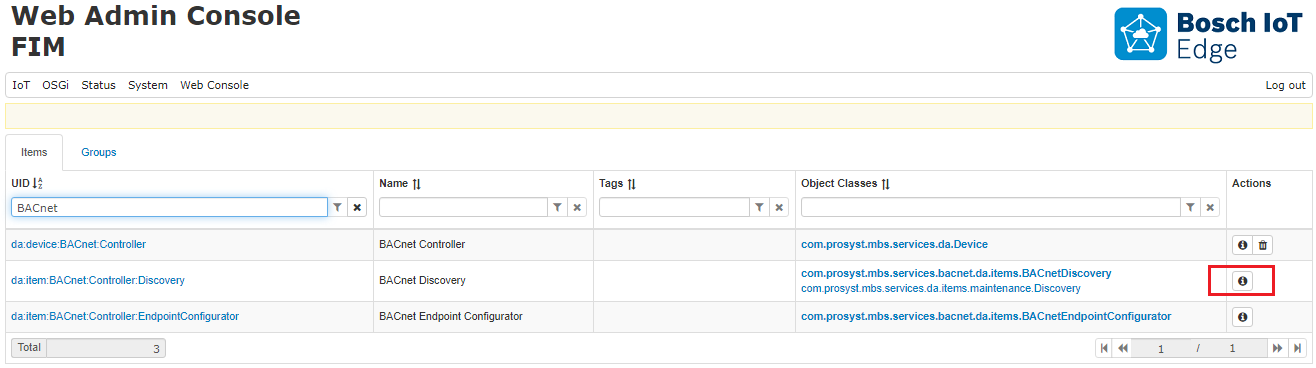
Once you have the BACnet Adapter bundle running, go to the Web Console and then to IoT > FIM. The devices will be displayed as Functional Items (or FIs). For more information on FIs, visit Managing Functional Items.
A BACnet Controller device will always be present together with its two device items – Discovery and Endpoint Configurator items.
The BACnet Controller device is the central point for management and controlling of the BACnet services and network. It is always present when the BACnet bundle is running normally. It has a fixed UID da:device:BACnet:Controller.
The BACnet Discovery functional item is the interface for the control and management of the discovery process. For more information refer to Discovering Devices guide.
The BACnet Endpoint Configurator functional item is the interface for filtering BACnet available devices on the network and configuring their representation inside the system. The functional item has a fixed UID da:item:BACnet:Controller:EndpointConfigurator. It has properties and operations described in Filtering Devices guide.
To see the properties and operations the BACnet Discovery functional item maintains click on the "Information" icon under Actions on the right-hand side.