


|
|
|
|
|
The purpose of the ZigBee Device Configurations is to provide customization of the ZigBee Home Device properties and device classes.
All Device Items are represented as Device Classes. Same rules apply for both and can be configured the same way.
ZigBee Device Configuration Format
The ZigBee Device Configurations are hosted by the Config Tree module under ZigBeeDeviceConfiguration root. The following picture depicts the node structure of the ZigBeeDeviceConfiguration:
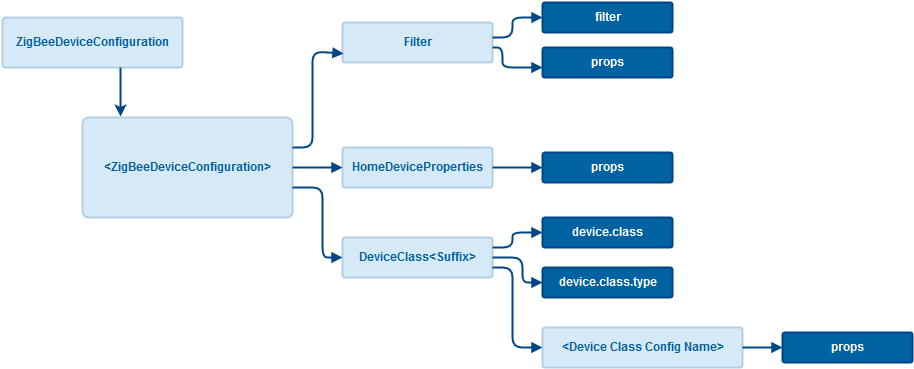
ZigBeeDeviceConfiguration
This is an example of ZigBeeDeviceConfiguration for "Bitron Home" On/Off Socket
<config name="ZigBeeDeviceConfiguration">
<config name= "Bitron Home
OnOff">
<config name= "Filter">
<property key= "vendor" value= "Bitron Home" type= "string" />
<property key= "model" value= "902010/28" type= "string" />
</config>
<config name= "HomeDeviceProperties">
<property key= "PowerSource" value= "MainsPowered" type= "string" />
</config>
<config name= "DeviceClass_OnOff">
<property key= "device.class"
value= "com.prosyst.mbs.services.hdm.deviceclasses.BinarySwitch"
type= "string" />
<config name= "ConfigureReporting_OnOff">
<property key= "attributeId" value= "0" type= "int " />
<property key= "minReportingInterval" value= "0" type= "int " />
<property key= "maxReportingInterval" value= "60" type= "int " />
</config>
<config name= "AdditionalProps">
<property key= "testProp1" value= "12" type= "int " />
<property key= "testProp2" value= "34" type= "int " />
</config>
</config>
</config>
</config>
Under the root, it is allowed to have 1 or more device configurations. The Config Tree rule is to have different name of the Config Node.
Filter
The Filter Node is not mandatory. It is allowed to have either 0 or 1 element. The filter node may have filter property, which contains an OSGi filter or a set of properties, which are concatenated with "&" to construct an OSGi filter.
<config name="Filter">
<property key= "filter" value= "(&(vendor=Eurotronic)(active.ep=1))" type= "string" />
</config>
or
<config name="Filter">
<!-- The addresses put as strings in the home device properties -->
<property key= "nwk.address" value= "[0x00,0x00]" type= "string" />
<property key= "firmware.vendor" value= "Telegesis" type= "string" />
</config>
HomeDeviceProperties
This node contains properties that will be copied over the home device own properties.
<config name="HomeDeviceProperties">
<property key= "PowerSource" value= "MainsPowered" type= "string" />
</config>
Special device properties
Device Class Configuration Set
This node must have a name, which starts with "DeviceClass" and consists of a device.class property and a set of device class configurations that will be applied to the specified device class.
<config name="DeviceClass_Thermostat">
<property key= "device.class" value= "com.qivicon.services.zigbee.deviceclasses.provider.ha.hvac.ThermostatHA12" type= "string" />
<config name= "ConfigureReporting_LocalTemperature">
...
</config>
<config name= "UnsupportedAttribute_OccupiedCoolingSetpoint">
...
</config>
...
</config>
The type of the device class can be specified for additional filtering via device.class.type property.
<config name="DeviceClass_MultiLevelSensor_Light">
<property key= "device.class"
value= "com.prosyst.mbs.services.hdm.deviceclasses.MultiLevelSensor"
type= "string" />
<property key= "device.class.type" value= "light" type= "string" />
<config name= "ConfigureReporting_0x0400_0x0000">
<property key= "attributeId" value= "0x0000" type= "int " />
<property key= "minReportingInterval" value= "1" type= "int " />
<property key= "reportableChange" value= "10" type= "int " />
<property key= "maxReportingInterval" value= "540" type= "int " />
</config>
</config>
Device Class Configuration
This node contains a name and a set of properties.
ConfigureReporting Device Class Configuration
Almost every device class needs to send configure reporting commands for one or more cluster attributes. The name of a device class configuration for this operation must start with "ConfigureReporting". These special configurations are recognized by the AbstractDeviceClassObjectV3 (com.prosyst.mbs.services.zigbee.hdm.deviceclasses.common.AbstractDeviceClassObjectV3) and should be processed by all the device classes which require reporting in the ZigBee module.
Check the DeviceClassConfiguration (com.prosyst.mbs.services.zigbee.hdm.deviceclasses.config) for the property keys which are supported by the AbstractDeviceClassObjectV3 (com.prosyst.mbs.services.zigbee.hdm.deviceclasses.common.AbstractDeviceClassObjectV3).
An example of the ConfigureReporting device class configuration for the local temperature is given below:
<config name="ConfigureReporting_LocalTemperature">
<property key= "clusterId" value= "0x0201" type= "int " />
<property key= "attributeId" value= "0" type= "int " />
<property key= "minReportingInterval" value= "1" type= "int " />
<property key= "maxReportingInterval" value= "540" type= "int " />
<property key= "reportableChange" value= "1" type= "int " />
</config>
If there are multiple ConfigureReporting configurations for the same cluster-attribute pair purposed for a single device class, then a priority property can be used to define which configuration object should take precedence and be used by the device class. The bigger priority value is used. In the example below there are configurations purposed of all OnOff Switches and configurations for the specific OnOff device modules which need to override the common one.
<config name="On/Off">
<config name= "Filter">
<property key= "filter"
value= "(&(vendor=ACME)(model=Plug))"
type= "string" />
</config>
<config name= "DeviceClass_OnOff">
<property key= "device.class"
value= "com.prosyst.mbs.services.hdm.deviceclasses.BinarySwitch"
type= "string" />
<config name= "ConfigureReporting_OnOff">
<property key= "priority" value= "2" type= "int " />
<property key= "clusterId" value= "6" type= "int " />
<property key= "attributeId" value= "0" type= "int " />
<property key= "minReportingInterval" value= "1" type= "int " />
<property key= "maxReportingInterval" value= "300" type= "int " />
</config>
</config>
</config>
If there is a need to send configure reporting for manufacturer specific attribute isManufacturerSpecific could be used. By using isManufacturerSpecific a ZCL frame with manufacturer specific bit up and containing the manufacturer code woud be send to the device:
<config name="ConfigureReporting_ManufacturerSpecificfAttribute">
<property key="clusterId" value="0x0006" type="int" />
<property key="attributeId" value="1" type="int" />
<property key="minReportingInterval" value="1" type="int" />
<property key="maxReportingInterval" value="540" type="int" />
<property key="reportableChange" value="1" type="int" />
<property key="isManufacturerSpecific" value="true" type="boolean" />
</config>
Some devices do not support reporting for attributes marked as reportable by specification. Device classes can be instructed to mark such attributes as already configured in the DB by using disableReporting and this way escape configuring them on every initialization:
<config name="ConfigureReporting_LocalTemperature">
<property key= "clusterId" value= "0x0201" type= "int " />
<property key= "attributeId" value= "0" type= "int " />
<property key= "disableReporting" value= "true " type= "boolean " />
</config>
Another way not to send reporting configuration message is to use ignoreReporting. By using "ignoreReporting" the device class will ignore a certain attribute, however the attribute will not be marked as configured in DB. So upon next initialization, if the "ignoreReporting" configuration is missing, the attribute will be configured:
<config name="ConfigureReporting_LocalTemperature">
<property key="clusterId" value="0x0201" type="int" />
<property key="attributeId" value="0" type="int" />
<property key="ignoreReporting" value="true" type="boolean"/>
</config>
UnsupportedAttribute Device Class Configuration
Device classes try to find a proper cluster attribute match for each of the device class properties. While a particular attribute can be mandatory for most devices of a single type, it may have no sense for a device with reduced functionality. For example, radiator thermostats support only heating mode and the Thermostat cluster's attribute OccupiedCoolingSetpoint is not needed in this case, even though this attribute is mandatory for the cluster. The purpose of UnsupportedAttribute device class configuration is to hide such attributes (properties).
The name of a device class configuration purposed for this operation must start with "UnsupportedAttribute". These special configurations are recognized by the AbstractDeviceClassObjectV3 (com.prosyst.mbs.services.zigbee.hdm.deviceclasses.common.AbstractDeviceClassObjectV3) and should be processed by all device classes which require to hide an attribute (property). Check the DeviceClassConfiguration (com.prosyst.mbs.services.zigbee.hdm.deviceclasses.config) for the property keys which are supported by the AbstractDeviceClassObjectV3.
<config name="UnsupportedAttribute_OccupiedCoolingSetpoint">
<property key= "clusterId" value= "0x0201" type= "int " />
<property key= "attributeId" value= "0x0011" type= "int " />
</config>
DeviceClassOrder Device Class Loading Order
Device class order allows to rearrange activation sequence of device classes in a single HomeDevice(Endpoit). Endpoint zero "0" means root HomeDevice. Default class order is set to zero "0". Setting a higher order number will move the device class to the beginning of activation sequence, a lower order number will move it to the end of activation sequence.
In the example below, activation of root HomeDevice will start with WakeUpExt, then all unlisted device classes and Identifier will be the last activated device class.
<config name="DeviceClass_WakeUpExt">
<property key="device.class" value="com.prosyst.mbs.services.zigbee.hdm.deviceclasses.WakeUpExt" type="string" />
<config name="DeviceClassOrder_WakeUpExt">
<property key="order" value="1" type="int" />
<property key="endpoint" value="0" type="int" />
</config>
</config>
<config name="DeviceClass_Identifier">
<property key="device.class" value="com.prosyst.mbs.services.hdm.deviceclasses.Identifier" type="string" />
<config name="DeviceClassOrder_Identifier">
<property key="order" value="-1" type="int" />
<property key="endpoint" value="0" type="int" />
</config>
</config>
Disable Device Class from Loading
Device class "Disable" allows to ban the loading of a certain device class in a single HomeDevice(Endpoit). Endpoint zero *"0"* means root HomeDevice. The identifier of the cluster also should be specified.
By default all device classes are permitted for a device. In the example below, the BinarySwitch matched to OnOff cluster(cluster id=6) is disabled for HomeDevice(Endpoint 1).
<config name="DeviceClass_BinarySwitch">
<property key="device.class" value="com.prosyst.mbs.services.hdm.deviceclasses.BinarySwitch" type="string" />
<config name="Disable_BinarySwitch">
<property key="endpoint" value="1" type="int" />
<property key="cluster" value="6" type="int" />
</config>
</config>
Sequence
When an event for a new device is received by the Zigbee DA HDM Adapter (ZigBee DA HDM Adapter Bundle), it reads its basic properties as vendor, version, model, etc. and looks for a ZigBee Device Configuration, whose filter matches the properties of the device. If there are matching configurations, the Home Device properties from the configuration are applied to the device.
The HDM Adapter continues with the loading of the device classes. After the creation of each device class the HDM Adapter checks if among the ZigBee Device Configurations, already filtered for the device, there are configurations, purposed for this device class. If the device class implements an interface, pointed by the device.class property, the corresponding configurations are passed to the device class by invoking ConfigurableDeviceClass#configure. Of course, only device classes, which implement this interface can be configured.
Just after ConfigurableDeviceClass#configure, the DeviceClassObjectSpiAccess#configure is called. So that if passing ConfigureReporting configuration, it becomes available for the DeviceClassObjectSpiAccess#configure method.
If a Config Tree node with a ZigBee Device Configuration is added when there already are created ZigBee Home Devices, the configurations are applied to the existing devices. Devices are filtered, HomeDeviceProperties updated, events triggered to HDM, the device classes ConfigurableDeviceClass#configure are called. It is up to the their implementations if they will be able to apply these configurations at that later stage, when initialization is over and polling intervals are not like during pairing.
Exporting Configurations
Add a ConfigTree header in the exporting bundle Manifest file, for example:
ConfigTree: xml=/config/urmet-on-off.xml; type=ZigBeeDeviceConfiguration; version=1.9.0,
xml=/config/centralite-ias-zone.xml; type=ZigBeeDeviceConfiguration; version=1.0.0,
xml=/config/4-noks-thermostat.xml; type=ZigBeeDeviceConfiguration; version=1.5.0