|
|
|
|
|
This document describes how to configure ZigBee Key Devices. In the context of device abstraction and automation ZigBee key devices can be used to control not only ZigBee enabled devices but any other actuator by employing proper representation in HDM.
Key Devices in HDM
ZigBee specifications define a group of application devices that are used to control other ZigBee devices via the ZigBee wireless technology based on the server/client model. These devices are usually battery powered, hand held and are equipped with a set of buttons (keys). The devices implement a variety of client clusters and pressing a button triggers generation and transmission of a server received commands towards a corresponding server cluster allocated on another ZigBee device in the PAN via configured device bindings. The configuration of the buttons on the physical device, the set of client clusters implemented and the commands that they would generate differ between different vendors and are out of scope of the ZigBee specifications. Based on the functionality of the client clusters implemented a wide range of such devices exists like on/off switches, level control switches, color control switches, remote controls, panic buttons, pump controllers, fan controllers, door lock controllers, shutter controllers, etc.
In the context of device abstraction and automation ZigBee key devices can be used to control not only ZigBee enabled devices but any other actuator by employing proper representation in HDM and mapping the generated cluster commands to appropriate device class property changed events. Thus ZigBee key devices are manageable using Our device abstraction and enabled for usage with the Automation module. ZigBee HDM adapter implements a mechanism for configuring key devices representation based on ConfigTree configurations. Thus each device button is represented by a home device with Key device class object that holds matching information to be applied to incoming messages. These home devices are added as children to the ZigBee home device that represents the active endpoint holding the client clusters of interest. The Key device class object only supports device class property event.pressed with property metadata describing the mapped ZigBee message. Based on the key configuration, the ZigBee message generated by pressing a button on the physical device will be matched to a Key device class object that will trigger device class property changed event for the event.pressed property. In order for the generated ZigBee message to be delivered to the ZigBee driver, discovered key devices are bound to the coordinator based on the implemented client clusters.
Key Configurations Tree Structure
ZigBee key configurations are defined in terms of templates meaning that one configuration can be matched and applied to more than one ZigBee device. Each configuration template consists of a Filter node and several Configuration nodes. Configuration templates are organized in Group nodes. The key configurations tree consists of a list of Group nodes, the configurable type is ZigBeeKeyConfigurationTemplates, as you can see from the following example:
<config name="ZigBeeKeyConfigurationTemplates">
<config name="RemoteControlGroupV3">
<config name="RemoteControlTemplateV4">
<config name="Filter">
<property key="device.id" value="0x0006" type="string" />
<property key="profile.id" value="0x0104" type="string" />
<property key="input.clusters" value="[0, 1, 3]" type="string" />
<property key="output.clusters" value="[6, 8]" type="string" />
<property key="active.endpoint" value="1" type="string" />
...
</config>
<config name="Configuration1">
<property key="identifier" value="Off" type="string" />
<property key="clusterIdentifier" value="6" type="int" />
<property key="commandIdentifiersFilter" value="[1]" type="string" />
</config>
<config name="Configuration2">
<property key="identifier" value="On" type="string" />
<property key="clusterIdentifier" value="6" type="int" />
<property key="commandIdentifiersFilter" value="[0]" type="string" />
</config>
...
</config>
</config>
</config>
Configuration Group Nodes
Key configuration groups combine several configuration templates.
Restrictions
Group nodes are validated based on the following restrictions:
Configuration Template Nodes
Each configuration template consists of a Filter node and several Configuration nodes.
Filter Nodes
Filter nodes contain only property nodes and represent a subset of protocol properties and their values to be used in the matching process. The values of the property nodes are of type String as are the values of the home device protocol properties. For each home device which protocol properties match the properties in the Filter node the Configuration nodes are applied.
<config name="Filter">
<property key="device.id" value="0x0006" type="string" />
<property key="profile.id" value="0x0104" type="string" />
<property key="input.clusters" value="[0, 1, 3]" type="string" />
<property key="output.clusters" value="[6, 8]" type="string" />
<property key="active.endpoint" value="1" type="string" />
...
</config>
Configuration Nodes
Configuration nodes hold information needed for association of one or more ZigBee ZCL messages to a Key device class object and its event.press property. For each Configuration node a home device with Key device class object is created as a child of the endpoint home device which protocol properties match the Filter node. The UID of each child home device is generated based on the pattern <parent_uid>#(1000 + <configuration_number>) so the association between buttons and home devices remain permanent. An incoming message that has been generated by a button being pressed on the configured physical device will trigger event.pressed property changed event only if the cluster identifier in the ZCL header of the message is equal to the clusterIdentifier property and the command identifier and command parameters (if any) in the ZCL payload of the message match the commandIdentifiersFilter property. As one button on the physical device may generate different commands or several buttons may generate the same command but with different parameters, the command identifiers filter is represented by a JSON style array that defines a set of command identifiers and optionally command parameters. Each element in the array encodes a ZigBee ZCL message that shall trigger event.pressed device class property changed event. If only command identifier is sufficient to identify the incoming message then the element in the array shall be of type Integer specifying the command identifier. If command parameters are also to be matched then the element shall be of type JSON array with two elements - command identifier and array of command parameters.
<config name="Configuration1">
<property key="identifier" value="On" type="string" />
<property key="clusterIdentifier" value="6" type="int" />
<property key="commandIdentifiersFilter" value="[1]" type="string" />
</config>
Restrictions
Template config nodes are validated based on the following restrictions:
Configuration Matching Process
Initiating Configurations Matching on Device Initialization
During the initialization of the root home device for each active endpoint on the physical ZigBee device a child home device is created. Protocol properties are added according to the information in the simple descriptor on the endpoint including information for the application profile identifier, application device identifier, server and client clusters, etc. Currently imported key configuration templates are matched against the protocol properties of each home device that represents an active endpoint based on the configuration template filter. Protocol properties values are compared to filter node properties values as String using equals(). If the filter node of a configuration template matches the protocol properties of an endpoint home device then the configuration nodes included in the template are applied and bindings are created between the configured device and the coordinator.
Initiating Configuration Matching on ConfigTree Modification
Another entry point to the matching process is when there are valid modifications in the configuration tree. Once the configuration tree has been successfully updated all changes are analyzed and currently available endpoint home devices are iterated. If a home device has been configured with a template that is removed then all its children key devices are removed. If a home device has been configured with a template that is modified then all its children key devices are removed and the configuration nodes in the template are reapplied resulting in new children key devices. If a home device has not yet been configured by any of the previously existing templates then the matching process is initiated based on the currently available templates.
Receiving events from Key Devices in HDM
When a button is pressed on the physical device, based on the device bindings with the coordinator, an event is delivered to ZigBee HDM adapter for an incoming ZigBee message. Based on the source address of the message the corresponding home device is found and notified. The handing of the message is dispatched down the home device hierarchy. The cluster identifier, command identifier and optionally the command parameters in the ZCL payload of the message are matched against the configuration information in each Key device class object. If the incoming message can be matched to a Key device class object then device class property changed event for the event.pressed property is triggered.
Example
As an example, lets consider the situation of a ZigBee remote control device with one active endpoint that implements OnOff and LevelControl client clusters.
The device has 4 buttons that generate the following commands - OnOff:On, OnOff:Off, LevelControl:MoveToLevelWithOnOff(1, 10, 65535) and LevelControl:MoveToLevelWithOnOff(0, 10, 65535). This device shall be represented in device abstraction layer as follows:
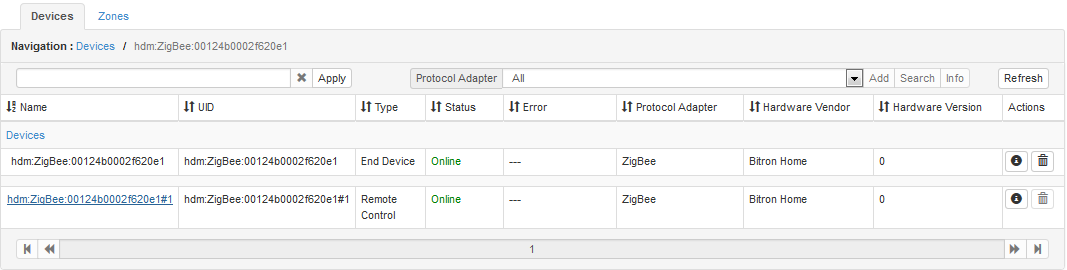
The active endpoint on the device is represented by a child device with protocol properties based on the information from the simple descriptor of the endpoint:
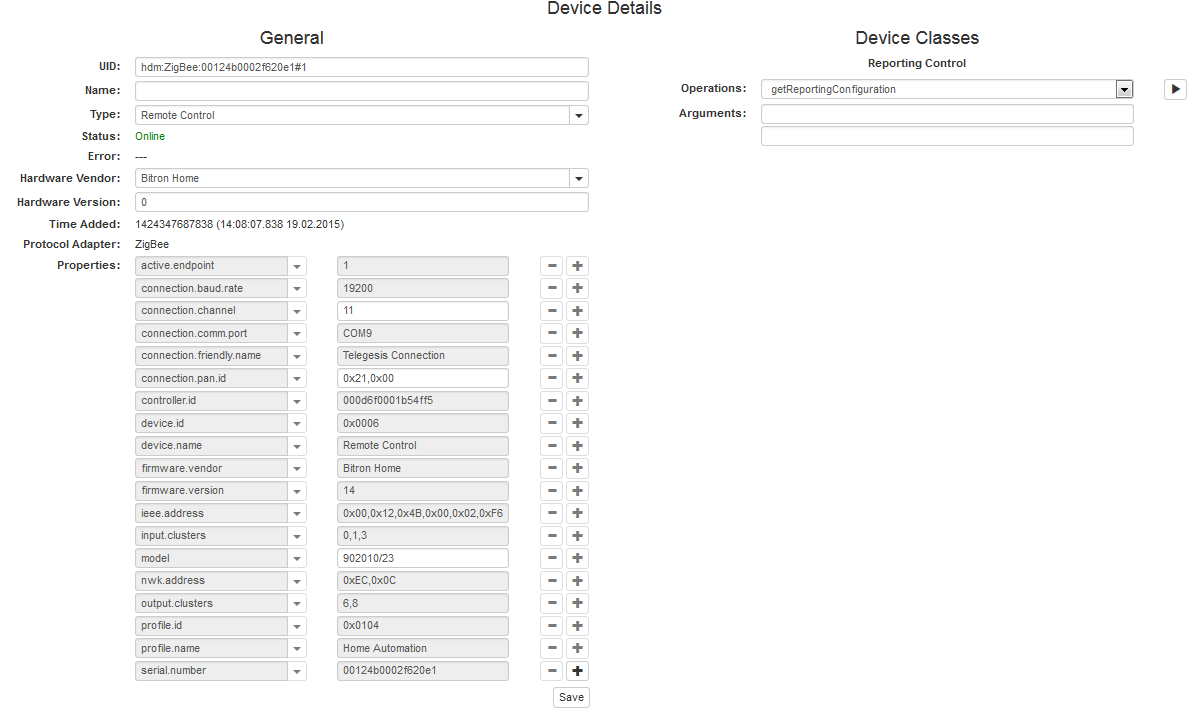
Bellow there is an XML example to import the following Key Configuration Templates XML in ConfigTree so that we configure the buttons:
<config name="ZigBeeKeyConfigurationTemplates">
<config name="RemoteControlGroupV3">
<config name="RemoteControlTemplateV4">
<config name="Filter">
<property key="device.id" value="0x0006" type="string" />
<property key="profile.id" value="0x0104" type="string" />
<property key="input.clusters" value="[0, 1, 3]" type="string" />
<property key="output.clusters" value="[6, 8]" type="string" />
<property key="active.endpoint" value="1" type="string" />
</config>
<config name="Configuration1">
<property key="identifier" value="On" type="string" />
<property key="clusterIdentifier" value="6" type="int" />
<property key="commandIdentifiersFilter" value="[1]" type="string" />
</config>
<config name="Configuration2">
<property key="identifier" value="Off" type="string" />
<property key="clusterIdentifier" value="6" type="int" />
<property key="commandIdentifiersFilter" value="[0]" type="string" />
</config>
<config name="Configuration3">
<property key="identifier" value="Level Down with On/Off" type="string" />
<property key="clusterIdentifier" value="8" type="int" />
<property key="commandIdentifiersFilter" value="[[6,[1, 10, 65535]]]" type="string" />
</config>
<config name="Configuration11">
<property key="identifier" value="Level Up with On/Off" type="string" />
<property key="clusterIdentifier" value="8" type="int" />
<property key="commandIdentifiersFilter" value="[[6,[0, 10, 65535]]]" type="string" />
</config>
</config>
</config>
</config>
The template's filter will match the protocol properties of device with UID hdm:ZigBee:00124b0001cdae8c#1 Applying the configuration to that device will create the following home device hierarchy:
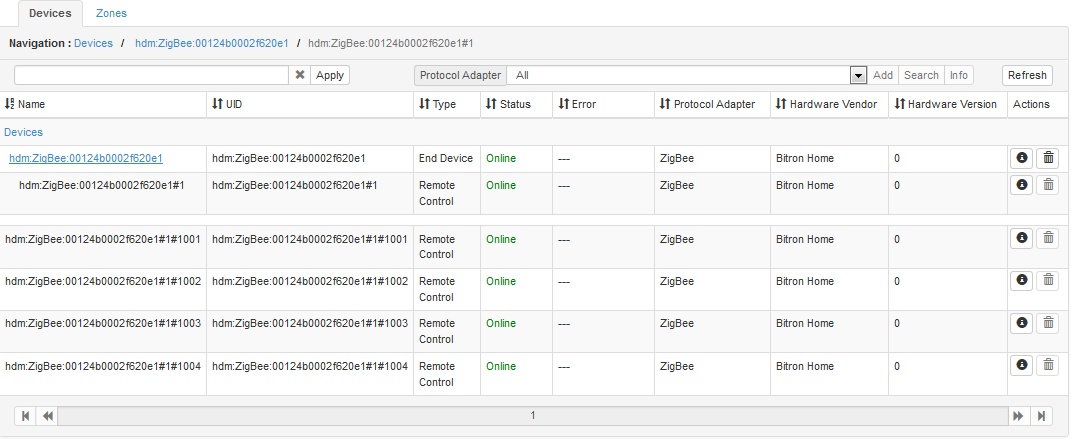
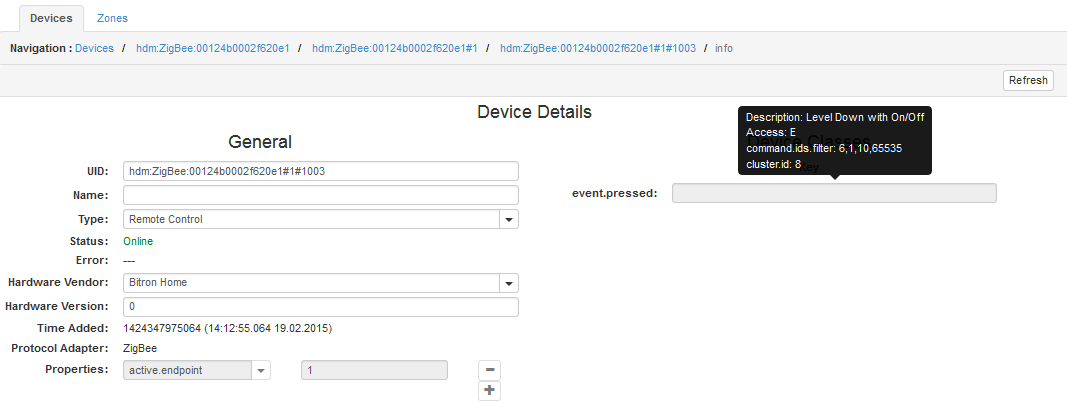
For each key configuration a child home device is created with Key device class object. Metadata for event.pressed device class property matches the information from the configuration :