


|
|
|
|
|
Prerequisites
Operating System Level Drivers
All supported Zigbee USB coordinators connect to the Gateway via a simulated serial port. To recognize a coordinator the operating system needs a special OS-level driver to be installed. For information about this driver contact to the vendor of the coordinator you are using.
 If You Are Using Windows
If you are using the Telegesis coordinator, install the ETRX2USB driver.
If you are using any of the other coordinators, install the USB FTDI Driver.
 If You Are Using Linux
For most Lniux based operating systems the required driver is included in the Kernel and you do not need to install it.
Installation
Automated Installation
The Zigbee Module provides Kit Manager installation scripts located in the bin/pscripts folder. To install the Zigbee Module using one of its scripts execute the console command
kitman.install "<script name>"
where <script name> is the name of the script to be installed. For example:
To Install the Zigbee module only with its core functionality type the following command in the console:
kitman.install "ZigBee Core"
To install the Zigbee module's core functionalities with added support for Device Access module through the DA API, type the following command in the console:
kitman.install "ZigBee DA Support"
To install the Zigbee module's core functionalities with added support for Device Access module through the HDM API, type the following command in the console:
kitman.install "ZigBee DA HDM Support"
To install the Zigbee module device configurations type the following command in the console:
kitman.install "ZigBee Device Configurations"
To install the Zigbee bundles without Device Access or HDM support type the following command in the console:
kitman.install "ZigBee <coordinator_brand> Driver"
To install the Zigbee bundles with added Device Access support type the following command in the console:
kitman.install "ZigBee <coordinator_brand> with DA Support"
To install the Zigbee bundles with added HDM support type the following command in the console:
kitman.install "ZigBee <coordinator_brand> with DA HDM Support"
The Zigbee module includes a Simulator component, which can simulate a fully functional Zigbee network for testing purposes.
kitman.install "ZigBee Simulator Core"
kitman.install "ZigBee <coordinator_brand> with Simulator"
The Simulator component is not supported for the Freescale coordinator!
<coordinator_brand> can be one of the following: Freescale ; Telegesis ; TI ; Ember
Manual Installation
You can install only the needed bundles from the module taking into account their dependencies both from this module and from other modules as well. All the bundles for this module can be found in the /runtime/osgi/bundles directory.
To install and start the Zigbee module only with its core functionalities do the following steps:
kitman.i "Comm (gnu.io) Bundle"
kitman.i "ConfigTree"
fw.i -s -f -l com.prosyst.mbs.osgi.log.eventadmin.jar
fw.i -f -l com.prosyst.mbs.zigbee.driver.api.jar
fw.i -s -f -l com.prosyst.mbs.zigbee.driver.ll.profile.handler.jar
fw.i -f -l com.prosyst.mbs.zigbee.zcl.metadata.general.jar
fw.i -f -l com.prosyst.mbs.zigbee.zcl.metadata.lighting.jar
fw.i -f -l com.prosyst.mbs.zigbee.zcl.metadata.hvac.jar
fw.i -f -l com.prosyst.mbs.zigbee.zcl.metadata.closures.jar
fw.i -f -l com.prosyst.mbs.zigbee.zcl.metadata.measurement.jar
fw.i -f -l com.prosyst.mbs.zigbee.zcl.metadata.security.jar
fw.i -f -l com.prosyst.mbs.zigbee.zcl.metadata.ha.jar
fw.i -f -l com.prosyst.mbs.zigbee.zcl.metadata.se.jar
fw.i -f -l com.prosyst.mbs.zigbee.zcl.metadata.ll.jar
fw.i -s -f -l com.prosyst.mbs.zigbee.zcl.metadata.service.jar
fw.i -s -f -l com.prosyst.mbs.zigbee.zcl.app.controller.jar
fw.i -s -f -l com.prosyst.mbs.zigbee.driver.commands.jar
To install and start the Zigbee module with added support for Device Access do the following steps:
kitman.i "Device Access"
kitman.i "ZigBee Core"
fw.i -f -l com.prosyst.mbs.zigbee.da.items.api.jar
fw.i -f -l com.prosyst.mbs.zigbee.da.hdm.api.jar
fw.i -s -f com.prosyst.mbs.zigbee.da.items.provider.jar
fw.i -f com.prosyst.mbs.zigbee.da.hdm.adapter.jar
config.update zigbee.hdm.adapter.pid {defaultDeviceClassProvidersList=[com.prosyst.mbs.zigbee.da.items.provider]}
fw.start com.prosyst.mbs.zigbee.da.hdm.adapter.jar
To install and start the Zigbee module with added support for HDM do the following steps:
kitman.i "Device Access HDM"
kitman.i "ZigBee Core"
fw.i -f -l com.prosyst.mbs.zigbee.da.items.api.jar
fw.i -f -l com.prosyst.mbs.zigbee.da.hdm.api.jar
fw.i -s -f -l com.prosyst.mbs.zigbee.da.hdm.dco.provider.general.jar
fw.i -s -f -l com.prosyst.mbs.zigbee.da.hdm.dco.provider.ha.jar
fw.i -s -f -l com.prosyst.mbs.zigbee.da.hdm.dco.provider.se.jar
fw.i -s -f -l com.prosyst.mbs.zigbee.da.hdm.dco.provider.ll.jar
fw.i -s -f -l com.prosyst.mbs.zigbee.da.hdm.dco.provider.key.jar
fw.i -f -l com.prosyst.mbs.zigbee.da.hdm.adapter.jar
config.update zigbee.hdm.adapter.pid {defaultDeviceClassProvidersList=[com.prosyst.mbs.zigbee.da.hdm.dco.provider.general,com.prosyst.mbs.zigbee.da.hdm.dco.provider.ha,com.prosyst.mbs.zigbee.da.hdm.dco.provider.se,com.prosyst.mbs.zigbee.da.hdm.dco.provider.ll,com.prosyst.mbs.zigbee.da.hdm.dco.provider.key]}
fw.start com.prosyst.mbs.zigbee.da.hdm.adapter.jar
To install and start the Zigbee module device configurations do the following steps:
fw.i -s com.prosyst.mbs.zigbee.device.configurations.jar
To install and start the Zigbee module device configurations with DA HDM ConfigTree do the following steps:
kitman.i "Device Access HDM Config Tree"
fw.i -s com.prosyst.mbs.zigbee.device.configurations.jar
To install and start the Zigbee bundles without Device Access or HDM support do the following steps:
kitman.i "ZigBee Core"
fw.i -s -f -l <specific_coordinator_driver_bundle_jar>
For Ember use the com.prosyst.mbs.zigbee.driver.ember.jar file.
For Freescale use the com.prosyst.mbs.zigbee.driver.freescale.jar file.
For Telegesis use the com.prosyst.mbs.zigbee.driver.telegesis.jar file.
For TI use the com.prosyst.mbs.zigbee.driver.ti.jar file.
To install and start the Zigbee bundles with Device Access support do the following steps:
kitman.i "ZigBee DA Support"
fw.i -s -f -l <specific_coordinator_driver_bundle_jar>
For Ember use the com.prosyst.mbs.zigbee.driver.ember.jar file.
For Freescale use the com.prosyst.mbs.zigbee.driver.freescale.jar file.
For Telegesis use the com.prosyst.mbs.zigbee.driver.telegesis.jar file.
For TI use the com.prosyst.mbs.zigbee.driver.ti.jar file.
To install and start the Zigbee bundles with HDM support do the following steps:
kitman.i "ZigBee DA HDM Support"
fw.i -s -f -l <specific_coordinator_driver_bundle_jar>
For Ember use the com.prosyst.mbs.zigbee.driver.ember.jar file.
For Freescale use the com.prosyst.mbs.zigbee.driver.freescale.jar file.
For Telegesis use the com.prosyst.mbs.zigbee.driver.telegesis.jar file.
For TI use the com.prosyst.mbs.zigbee.driver.ti.jar file.
To install and start the Zigbee simulator only with its core functionalities do the following steps:
kitman.i "Peripheral"
kitman.i "Device Access"
kitman.i "ZigBee Core"
fw.i -f -l com.prosyst.mbs.zigbee.simulator.api.jar
fw.i -s -f -l com.prosyst.mbs.zigbee.simulator.core.jar
fw.i -s -f -l com.prosyst.mbs.zigbee.simulator.zcl.general.jar
fw.i -s -f -l com.prosyst.mbs.zigbee.simulator.zcl.ha.ja
fw.i -s -f -l com.prosyst.mbs.zigbee.simulator.zcl.hvac.jar
fw.i -s -f -l com.prosyst.mbs.zigbee.simulator.zcl.lighting.jar
fw.i -s -f -l com.prosyst.mbs.zigbee.simulator.commands.jar
fw.i -f -l com.prosyst.mbs.zigbee.da.items.api.jar
fw.i -f -l com.prosyst.mbs.zigbee.da.hdm.api.jar
fw.i -s -f com.prosyst.mbs.zigbee.da.items.provider.jar
fw.i -f com.prosyst.mbs.zigbee.da.hdm.adapter.jar
config.update zigbee.hdm.adapter.pid {defaultDeviceClassProvidersList=[com.prosyst.mbs.zigbee.da.items.provider]}
fw.start com.prosyst.mbs.zigbee.da.hdm.adapter.jar
To install and start the Zigbee simulator for one of the supported coordinators, do the following steps:
kitman.i "ZigBee Simulator Core"
fw.i -s -f -l com.prosyst.mbs.zigbee.driver.ember.jar
fw.i -s -f -l com.prosyst.mbs.zigbee.driver.telegesis.jar
fw.i -s -f -l com.prosyst.mbs.zigbee.driver.ti.jar
fw.i -s -f -l com.prosyst.mbs.zigbee.simulator.ember.jar
fw.i -s -f -l com.prosyst.mbs.zigbee.simulator.telegesis.jar
fw.i -s -f -l com.prosyst.mbs.zigbee.simulator.ti.jar
fw.i -f com.prosyst.mbs.zigbee.simulator.ember.sample.jar
fw.i -s -f -l com.prosyst.mbs.zigbee.simulator.sample.jar
fw.i -f com.prosyst.mbs.zigbee.simulator.telegesis.sample.jar
fw.i -s -f -l com.prosyst.mbs.zigbee.simulator.sample.jar
fw.i -f com.prosyst.mbs.zigbee.simulator.ti.sample.jar
fw.i -s -f -l com.prosyst.mbs.zigbee.simulator.sample.jar
zigbeepersim.add -c Ember
zigbeepersim.add -c Telegesis
zigbeepersim.add -c Cleode
Configuring the Device Driver for the Coordinator
All supported Zigbee USB coordinators connect to the Home Gateway via simulated serial ports. There are two ways to configure the Zigbee OSGi driver in order for it to establish a connection to a coordinator: automatically (with the Peripheral Module) or manually.
Automatically (with Peripheral Module support)
The Peripheral Module is a generic manager for peripheral devices that automatically detects devices connected via a simulated serial port. If you want to use the Peripheral module in your runtime, proceed in the following way:
Manually
You can configure the Zigbee OSGi driver manually by specifying the serial port to which the coordinator is connected.
If you are using Windows, enter the occupied serial Port according to the Device Manager. For example: COM8.
If you are using Linux, enter the full path to the file which represents the occupied serial Port. For example: /dev/ttyUSB0.
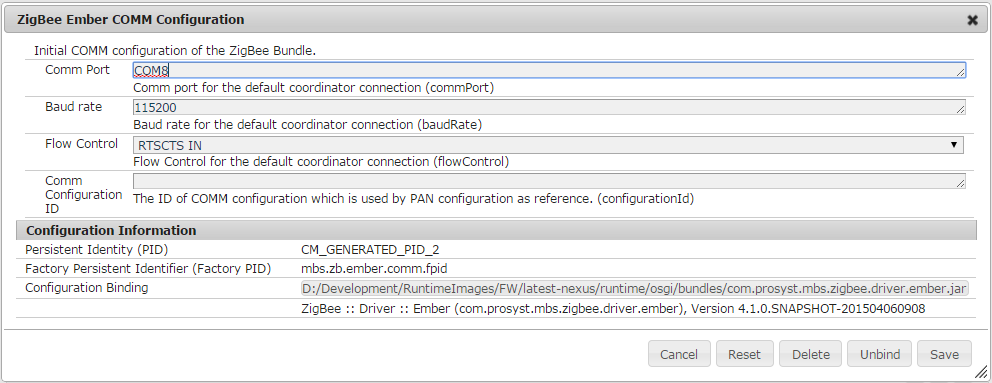
After configuring the properties for connection to the coordinator the driver establishes connection with it and a Coordinator Connection OSGi service becomes available.
Once the connection with the coordinator breaks (e.g. if it is removed and then plugged in again) the Zigbee module will not try to establish a connection again, unless the responsible driver bundle is restarted or its configuration is changed again.
System Properties
The Zigbee module uses the following system properties which define how the module operates.
Property |
Type |
Default Value |
Description |
|---|---|---|---|
zigbee.events.handlerPriority |
String |
1 |
Sets the priority for event handlers that are registered by the Zigbee OSGi driver and the HDM adapter. |
mbs.zigbee.driver.storage |
String |
- |
Specifies the path to the directory where the device database is kept into. As result, the custom database will be saved in the private area of the DB Bundle. |
For information on how to set them, refer to Changing Settings.
Configuration Properties
Configurations for Driver Bundles
The Zigbee Driver Bundles register Managed Service Factories with pids mbs.zb.<driver_name>.comm.fpid and mbs.zb.<driver_name>.pan.fpid. The respective configuration names are "ZigBee <coordinator_brand> Configuration". Configuration instances available for a specific factory configuration contain settings for connecting to a specific coordinator. For information on how to manage configurations, refer to Changing Settings.
Telegesis Driver Configuration
Name |
PID/FPID |
Property |
Type |
Default Value |
Description |
|---|---|---|---|---|---|
Comm Port |
mbs.zb.telegesis.comm.fpid |
commPort |
string |
- |
Specifies the COMM port to which the USB coordinator stick or board is attached. |
Baud Rate |
mbs.zb.telegesis.comm.fpid |
baudRate |
integer |
19200 |
Specifies the baud rate for data exchange. |
Comm Configuration ID |
mbs.zb.telegesis.comm.fpid |
configurationId |
string |
- |
The ID of COMM configuration which is used by PAN configuration as reference. (configurationId) |
Comm Configuration Reference |
mbs.zb.telegesis.pan.fpid |
configurationRef |
string |
- |
Reference to COMM configuration. |
Channel Mask |
mbs.zb.telegesis.pan.fpid |
channelMask |
integer |
25369 |
Channel Mask indicating which are the preferred channels for establishing the PAN. A 16bit int, where bit0=channel 0x0B, bit1=channel 0x0C, ..., bit15=channel 0x1A. Equal to Telegesis S00 register. The default value is the mask for the HA Profile preferred channels. |
Link key |
mbs.zb.telegesis.pan.fpid |
linkKey |
string |
5A6967426565416C6C69616E63653039 |
Key used for encryption and decryption (Zigbee trust center link key) (128 bit little endian hex is expected). |
Node Left |
mbs.zb.telegesis.pan.fpid |
nodeLeft |
boolean |
- |
Allows/Forbids automatic devices removal on NODELEFT prompt. |
Unsecured Rejoin |
mbs.zb.telegesis.pan.fpid |
unsecuredRejoin |
boolean |
false |
Allows/Forbids devices to be rejoined in an unsecured way. |
TC Forbid Join |
mbs.zb.telegesis.pan.fpid |
tcForbidJoin |
boolean |
true |
If the coordinator is not in pairing mode, when set to true this property forbids new devices to join the existing Zigbee network. Even if a router device allows joining, the coordinator's trust center will not deliver the network key to the device. Joining is only allowed when the coordinator is in pairing mode. To use a less restrictive security level, set TC Forbid Join to false. |
Default response timeout |
mbs.zb.telegesis.pan.fpid |
defaultRspTimeout |
long |
10000 |
Default timeout for TransmitService.sendRequestBlocking in milliseconds. |
Friendly Name |
mbs.zb.telegesis.pan.fpid |
friendlyName |
string |
Telegesis Connection |
Contains the friendly name to differentiate connections to multiple coordinators. |
Node Discovery Type |
mbs.zb.telegesis.pan.fpid |
deviceDiscoveryType |
string |
lqi |
Determines which ZDP command will be used in the node discovery algorithm. Possible values are "ieee" for using extended IEEE address requests and "lqi" for using the devices neighbor tables. |
Discovery Timeout |
mbs.zb.telegesis.pan.fpid |
discoveryTimeout |
integer |
4000 |
Determines the timeout in milliseconds that may be used in the device discovery procedures, i.e. time given to the Zigbee stick to initialize its LQI table after plugging it in. |
Use Confirmations |
mbs.zb.telegesis.pan.fpid |
useConfirmations |
boolean |
false |
Specifies if ACK/NACK prompts will be handled as confirmation messages. |
Telegesis Product ID |
mbs.zb.telegesis.pan.fpid |
productId |
integer |
0 |
Product Identifier of Telegesis Stick. |
ZCL Default Source Endpoint |
mbs.zb.telegesis.pan.fpid |
zclDefaultSourceEndpoint |
integer |
1 |
Determines which is the ZCL Default Source Endpoint in case there is no matching endpoint on the coordinator for given profile. |
Network key |
mbs.zb.telegesis.pan.fpid |
networkKey |
string |
- |
Network key used for network encryption and decryption. If set to "0" or null the coordinator selects a random network encryption key (recommended).(128 bit little endian hex is expected). |
Device Initialization Retries |
mbs.zb.telegesis.pan.fpid |
deviceInitializationRetries |
integer |
3 |
Determines the number of retries upon unsuccessful read of Zigbee devices protocol information. |
Device Announce Refresh Mask |
mbs.zb.telegesis.pan.fpid |
deviceAnnounceRefreshMask |
integer |
0 |
Determines which node and service discovery information should be read when a certain device is refreshed. The default "0" implies that the IEEE address, node descriptor, active endpoints and corresponding simple descriptors will be read. |
Device Initialization On Any Message |
mbs.zb.telegesis.pan.fpid |
deviceInitializationOnAnyMessage |
boolean |
false |
Determines whether or not service discovery should be performed on device announce command only or on any Zigbee message with unknown source. The default value " false" which implies that service discovery information will be read only on device announce command |
Device Initialization Mask |
mbs.zb.telegesis.pan.fpid |
deviceInitializationMask |
integer |
197 |
Determines which exactly node and service discovery information should be read when a certain device is initialized. The default initialization mask "197" implies that the IEEE address, node descriptor, active endpoints and corresponding simple descriptors will be read |
Device Failure Retries |
mbs.zb.telegesis.pan.fpid |
deviceFailureRetries |
integer |
3 |
Determines the number of initialization attempts that will be made on discovered devices which IEEE address is not read. If the number of retries are exhausted for a given discovered device and its IEEE address is still not read then it will be considered not part of the Zigbee PAN and removed. |
Device Failure Timeout |
mbs.zb.telegesis.pan.fpid |
deviceFailureTimeout |
long |
120000 |
Determines timeout in milliseconds between initialization attempts that will be made on discovered devices which IEEE address is not read. |
Destroy connection on error |
mbs.zb.telegesis.pan.fpid |
destroyConnectionOnError |
boolean |
true |
Key for the destroy connection on error property. This property determines whether the coordinator connection service will be closed and unregistered if an exception occurs related to read/write operations with the coordinator |
Input Clusters List for Endpoint3 |
mbs.zb.telegesis.pan.fpid |
inputClustersListEndpoint3 |
integer |
0, 3, 25 |
Input Clusters List for Endpoint3. Available only for DTAG firmware build 11 or higher! |
Output Clusters List for Endpoint3 |
mbs.zb.telegesis.pan.fpid |
outputClustersListEndpoint3 |
integer |
0, 3, 4, 5, 1280, 1026, 1029 |
Output Clusters List for Endpoint3. Available only for DTAG firmware build 11 or higher! |
Extended Application Profile Identifier |
mbs.zb.telegesis.pan.fpid |
extendedApplicationProfileId |
integer |
50462 |
Application profile identifier for endpoints 10 to 25. Available only for DTAG firmware build 11 or higher! |
Extended Application Device Identifier |
mbs.zb.telegesis.pan.fpid |
extendedApplicationDeviceId |
integer |
0 |
Application device identifier for endpoints 10 to 25. Available only for DTAG firmware build 11 or higher! |
Extended Application device Version |
mbs.zb.telegesis.pan.fpid |
extendedApplicationDeviceVersion |
integer |
0 |
Application device version for endpoints 10 to 25. Available only for DTAG firmware build 11 or higher! |
Extended Input Clusters List |
mbs.zb.telegesis.pan.fpid |
extendedInputClustersList |
integer |
0 |
Input clusters list for endpoints 10 to 25. Available only for DTAG firmware build 11 or higher! |
Extended Output Clusters List |
mbs.zb.telegesis.pan.fpid |
extendedOutputClustersList |
integer |
0 |
Output clusters list for endpoints 10 to 25. Available only for DTAG firmware build 11 or higher! |
LQI Scan Timeout |
mbs.zb.telegesis.pan.fpid |
lqiScanTimeout |
long |
180000 |
Determines the timeout in milliseconds which defines the validity of the last LQI scan performed by the NodeDiscoveryService. After the period expires if device LQI info is requested, a new scan of the network is done. The default timeout is 3 minutes. |
Device Announce Refresh Apply List |
mbs.zb.telegesis.pan.fpid |
deviceAnnounceRefreshApplyList |
integer |
4393 |
Defines the list of manufacturer codes of the devices which will be processed according to the Device Announce Refresh Mask property. The other devices will be treated as if there is no refresh mask. |
Radio Connection Timeout |
mbs.zb.telegesis.pan.fpid |
radioConnectionTimeout |
long |
5000 |
Sets the period in milliseconds in which the device is considered to have a radio connection (after last communication time). |
Controller Cooldown |
mbs.zb.telegesis.pan.fpid |
controllerCooldown |
long |
200 |
Determines the time in milliseconds needed by controller to overcome an excessive write session. The default timeout is 200 miliseconds. |
Set Telgesis registers |
mbs.zb.telegesis.pan.fpid |
setRegisters |
string |
- |
Configures Telegesis stick by setting register to specified values.
|
LQI time restriction. |
mbs.zb.telegesis.pan.fpid |
lqiTimeRestriction |
integer |
15 |
Determines the time restriction between two LQI requests (CoordinatorInterface#getLQI(byte[])) to a single device in minutes. |
Attach Source IEEE Address |
mbs.zb.telegesis.pan.fpid |
attachEUI64 |
boolean |
false |
Attach Source IEEE Address (EUI64) to NWK frame when sending a message. |
Filter by IEEE address |
mbs.zb.telegesis.invalid.sequence.number.devices |
ieeeAddressFilter |
string |
- |
An array with IEEE addresses to be filtered. Adding an IEEE address of already paired device is undefined! Expect 64-bit hex string for every IEEE address entry. Example: 1122334455667788 |
Filter by IEEE and Network address |
mbs.zb.telegesis.invalid.sequence.number.devices |
ieeeAndNetworkAddressFilter |
string |
- |
An array with IEEE and Network addresses to be filtered. The array will be automatically populated based on "Filter by IEEE address" array and received messages. Expect 64-bit (IEEE address) and 16-bit (Network address) hex strings separated by slash (/) for every entry. Example: 1122334455667788/1234 |
Freescale Driver Configuration
Name |
PID/FPID |
Property |
Type |
Default Value |
Description |
|---|---|---|---|---|---|
Comm Port |
mbs.zb.freescale.comm.fpid |
commPort |
string |
- |
Specifies the COMM port to which the USB coordinator stick or board is attached. |
Baud Rate |
mbs.zb.freescale.comm.fpid |
baudRate |
integer |
38400 |
Specifies the baud rate for data exchange. |
Comm Configuration ID |
mbs.zb.freescale.comm.fpid |
configurationId |
string |
- |
The ID of COMM configuration which is used by PAN configuration as reference. |
Comm Configuration Reference |
mbs.zb.freescale.pan.fpid |
configurationRef |
string |
- |
Reference to COMM configuration. |
Channel Mask |
mbs.zb.freescale.pan.fpid |
channelMask |
integer |
25369 |
Channel Mask indicating which are the preferred channels for establishing the PAN. A 16bit int, where bit0=channel 0x0B, bit1=channel 0x0C, ..., bit15=channel 0x1A. Equal to Telegesis S00 register. The default value is the mask for the HA Profile preferred channels. |
Link key |
mbs.zb.freescale.pan.fpid |
linkKey |
string |
5A6967426565416C6C69616E63653039 |
Key used for encryption and decryption (Zigbee trust center link key) (128 bit little endian hex is expected). |
Default response timeout |
mbs.zb.freescale.pan.fpid |
defaultRspTimeout |
long |
10000 |
Default timeout for TransmitService.sendRequestBlocking in milliseconds. |
Friendly Name |
mbs.zb.freescale.pan.fpid |
friendlyName |
string |
Freescale Connection |
Contains the friendly name to differentiate connections to multiple coordinators. |
Node Discovery Type |
mbs.zb.freescale.pan.fpid |
deviceDiscoveryType |
string |
ieee |
Determines which ZDP command will be used in the node discovery algorithm. Possible values are "ieee" for using extended IEEE address requests and "lqi" for using the devices neighbor tables. |
ZCL Default Source Endpoint |
mbs.zb.freescale.pan.fpid |
zclDefaultSourceEndpoint |
integer |
10 |
Determines which is the ZCL Default Source Endpoint in case there is no matching endpoint on the coordinator for given profile. |
Device Initialization Retries |
mbs.zb.freescale.pan.fpid |
deviceInitializationRetries |
integer |
3 |
Determines the number of retries upon unsuccessful read of Zigbee devices protocol information. |
Device Announce Refresh Mask |
mbs.zb.freescale.pan.fpid |
deviceAnnounceRefreshMask |
integer |
0 |
Determines which node and service discovery information should be read when a certain device is refreshed. The default "0" implies that the IEEE address, node descriptor, active endpoints and corresponding simple descriptors will be read. |
Device Initialization Mask |
mbs.zb.freescale.pan.fpid |
deviceInitializationMask |
integer |
197 |
Determines which exactly node and service discovery information should be read when a certain device is initialized. The default initialization mask "197" implies that the IEEE address, node descriptor, active endpoints and corresponding simple descriptors will be read |
Device Initialization On Any Message |
mbs.zb.freescale.pan.fpid |
deviceInitializationOnAnyMessage |
boolean |
false |
Determines whether or not service discovery should be performed on device announce command only or on any Zigbee message with unknown source. The default value " false" which implies that service discovery information will be read only on device announce command |
Device Failure Retries |
mbs.zb.freescale.pan.fpid |
deviceFailureRetries |
integer |
3 |
Determines the number of initialization attempts that will be made on discovered devices which IEEE address is not read. If the number of retries are exhausted for a given discovered device and its IEEE address is still not read then it will be considered not part of the Zigbee PAN and removed. |
Device Failure Timeout |
mbs.zb.freescale.pan.fpid |
deviceFailureTimeout |
long |
120000 |
Determines timeout in milliseconds between initialization attempts that will be made on discovered devices which IEEE address is not read. |
Destroy connection on error |
mbs.zb.freescale.pan.fpid |
destroyConnectionOnError |
boolean |
true |
Key for the destroy connection on error property. This property determines whether the coordinator connection service will be closed and unregistered if an exception occurs related to read/write operations with the coordinator |
Send ZDP-StartNwkEx.Request |
mbs.zb.freescale.pan.fpid |
sendZDPStartNwkEx |
boolean |
true |
Determines whether ZDP-StartNwkEx.Request command from BeeStack™ BlackBox Zigbee™ Test Client (ZTC) reference manual should be sent on network initialization. |
LQI Scan Timeout |
mbs.zb.freescale.pan.fpid |
lqiScanTimeout |
long |
180000 |
Determines the timeout in milliseconds which defines the validity of the last LQI scan performed by the NodeDiscoveryService. After the period expires if device LQI info is requested, a new scan of the network is done. The default timeout is 3 minutes. |
Device Announce Refresh Apply List |
mbs.zb.freescale.pan.fpid |
deviceAnnounceRefreshApplyList |
integer |
4393 |
Defines the list of manufacturer codes of the devices which will be processed according to the Device Announce Refresh Mask property. The other devices will be treated as if there is no refresh mask. |
Ember Driver Configuration
Name |
PID/FPID |
Property |
Type |
Default Value |
Description |
|---|---|---|---|---|---|
Comm Port |
mbs.zb.ember.comm.fpid |
commPort |
string |
- |
Specifies the COMM port to which the USB coordinator stick or board is attached. |
Baud Rate |
mbs.zb.ember.comm.fpid |
baudRate |
integer |
115200 |
Specifies the baud rate for data exchange. |
Flow Control |
mbs.zb.ember.comm.fpid |
flowControl |
integer |
1 |
Flow Control for the default coordinator connection. |
Use SPI protocol |
mbs.zb.ember.comm.fpid |
useSPI |
string |
- |
Determines which protocol to use in serial communication. The options are UART or SPI. |
Comm Configuration ID |
mbs.zb.ember.comm.fpid |
configurationId |
string |
- |
The ID of COMM configuration which is used by PAN configuration as reference. |
Comm Configuration Reference |
mbs.zb.ember.pan.fpid |
configurationRef |
string |
- |
Reference to COMM configuration. |
Default response timeout |
mbs.zb.ember.pan.fpid |
defaultRspTimeout |
long |
10000 |
Default timeout for TransmitService.sendRequestBlocking in milliseconds. |
Radio connection timeout |
mbs.zb.ember.pan.fpid |
radioConnectionTimeout |
integer |
5000 |
Sets the period in milliseconds in which the device is considered to have a radio connection (after last communication time). |
Friendly Name |
mbs.zb.ember.pan.fpid |
friendlyName |
string |
Ember Connection |
Contains the friendly name to differentiate connections to multiple coordinators. |
Node Discovery Type |
mbs.zb.ember.pan.fpid |
deviceDiscoveryType |
string |
lqi |
Determines which ZDP command will be used in the node discovery algorithm. Possible values are "ieee" for using extended IEEE address requests and "lqi" for using the devices neighbor tables. |
Discovery Timeout |
mbs.zb.ember.pan.fpid |
discoveryTimeout |
integer |
4000 |
Determines the timeout in milliseconds that may be used in the device discovery procedures, i.e. time given to the Zigbee stick to initialize its LQI table after plugging it in. |
LQI Scan Timeout |
mbs.zb.ember.pan.fpid |
lqiScanTimeout |
long |
180000 |
Determines the timeout in milliseconds which defines the validity of the last LQI scan performed by the NodeDiscoveryService. After the period expires if device LQI info is requested, a new scan of the network is done. The default timeout is 3 minutes. |
Communicator Write Timeout |
mbs.zb.ember.pan.fpid |
communicatorWriteTimeout |
long |
100 |
Key for the write timeout property that determines the timeout in milliseconds between consequent writes in the coordinator connection. |
Device Initialization Retries |
mbs.zb.ember.pan.fpid |
deviceInitializationRetries |
integer |
3 |
Determines the number of retries upon unsuccessful read of Zigbee devices protocol information. |
Device Initialization Mask |
mbs.zb.ember.pan.fpid |
deviceInitializationMask |
integer |
197 |
Determines which exactly node and service discovery information should be read when a certain device is initialized. The default initialization mask "197" implies that the IEEE address, node descriptor, active endpoints and corresponding simple descriptors will be read |
Device Initialization On Any Message |
mbs.zb.ember.pan.fpid |
deviceInitializationOnAnyMessage |
boolean |
false |
Determines whether or not service discovery should be performed on device announce command only or on any Zigbee message with unknown source. The default value " false" which implies that service discovery information will be read only on device announce command. |
Device Announce Refresh Mask |
mbs.zb.ember.pan.fpid |
deviceAnnounceRefreshMask |
Integer |
0 |
Determines which exactly node and service discovery information should be refreshed when a certain device has announced itself after the device initialization has finished. |
Device Announce Refresh Apply List |
mbs.zb.ember.pan.fpid |
deviceAnnounceRefreshApplyList |
integer |
4393 |
Defines the list of manufacturer codes of the devices which will be processed according to the Device Announce Refresh Mask property. The other devices will be treated as if there is no refresh mask. |
Device Failure Retries |
mbs.zb.ember.pan.fpid |
deviceFailureRetries |
integer |
3 |
Determines the number of initialization attempts that will be made on discovered devices which IEEE address is not read. If the number of retries are exhausted for a given discovered device and its IEEE address is still not read then it will be considered not part of the Zigbee PAN and removed. |
Device Failure Timeout |
mbs.zb.ember.pan.fpid |
deviceFailureTimeout |
long |
120000 |
Determines timeout in milliseconds between initialization attempts that will be made on discovered devices which IEEE address is not read. |
Channel Mask |
mbs.zb.ember.pan.fpid |
channelMask |
integer |
25369 |
Channel Mask indicating which are the preferred channels for establishing the PAN. A 16bit int, where bit0=channel 0x0B, bit1=channel 0x0C, ..., bit15=channel 0x1A. Equal to Telegesis S00 register. The default value is the mask for the HA Profile preferred channels. |
ZigBee Stack Profile |
mbs.zb.ember.pan.fpid |
stackProftcForbidJoinile |
integer |
2 |
Zigbee stack profile setting. "0" for Network Specific "1" for Zigbee-2006 "2" for Zigbee-PRO |
Link key |
mbs.zb.ember.pan.fpid |
linkKey |
string |
5A6967426565416C6C69616E63653039 |
Key used for encryption and decryption (Zigbee trust center link key) (128 bit little endian hex is expected). |
Network key |
mbs.zb.ember.pan.fpid |
networkKey |
|
|
Network key used for network encryption and decryption. If no key is set or key is zeros (default), the coordinator selects a random network encryption key (recommended). If new network key is set then hard reset will perform! (128 bit little endian hex is expected). |
Destroy connection on error |
mbs.zb.ember.pan.fpid |
destroyConnectionOnError |
boolean |
true |
Key for the destroy connection on error property. This property determines whether the coordinator connection service will be closed and unregistered if an exception occurs related to read/write operations with the coordinator. |
Unsecured Rejoin |
mbs.zb.ember.pan.fpid |
unsecuredRejoin |
boolean |
false |
Allows/Forbids devices to be rejoined in an unsecured way. |
TC Forbid Join |
mbs.zb.ember.pan.fpid |
tcForbidJoin |
boolean |
true |
Trust Center forbids joining for all routers in PAN. |
Ember Product ID |
mbs.zb.ember.pan.fpid |
productId |
integer |
0 |
Product Identifier of Ember chip. |
ZCL Default Source Endpoint |
mbs.zb.ember.pan.fpid |
zclDefaultSourceEndpoint |
integer |
1 |
Determines which is the ZCL Default Source Endpoint in case there is no matching endpoint on the coordinator for given profile. |
1st Endpoint Identifier |
mbs.zb.ember.pan.fpid |
ep1_index |
integer |
1 |
The index of the first endpoint. Must be between 1 and 240. |
1st Application Profile Identifier |
mbs.zb.ember.pan.fpid |
ep1_applicationProfileId |
integer |
260 |
1st Application Profile Identifier. |
1st Application Device Identifier |
mbs.zb.ember.pan.fpid |
ep1_applicationDeviceId |
integer |
5 |
1st Application device Identifier. |
1st Application Device Version |
mbs.zb.ember.pan.fpid |
ep1_applicationDeviceVersion |
integer |
0 |
1st Application device version. |
1st Input Clusters List |
mbs.zb.ember.pan.fpid |
ep1_inputClustersList |
integer |
[0, 3, 10, 25] |
1st Input Clusters List. |
1st Output Clusters List |
mbs.zb.ember.pan.fpid |
ep1_outputClustersList |
integer |
[0, 3, 4, 5, 1280, 1026, 1029] |
1st Output Clusters List. |
2nd Endpoint Identifier |
mbs.zb.ember.pan.fpid |
ep2_index |
integer |
2 |
The index of the second endpoint. Must be between 1 and 240. |
2nd Application Profile Identifier |
mbs.zb.ember.pan.fpid |
ep2_applicationProfileId |
integer |
50462 |
2nd Application Profile Identifier. |
2nd Application Device Identifier |
mbs.zb.ember.pan.fpid |
ep2_applicationDeviceId |
integer |
5 |
2nd Application device Identifier. |
2nd Application Device Version |
mbs.zb.ember.pan.fpid |
ep2_applicationDeviceVersion |
integer |
0 |
2nd Application device version. |
2nd Input Clusters List |
mbs.zb.ember.pan.fpid |
ep2_inputClustersList |
integer |
[0, 3, 25] |
Input Clusters List of the second endpoint. |
2nd Output Clusters List |
mbs.zb.ember.pan.fpid |
ep2_outputClustersList |
integer |
[0, 3, 4, 5, 1280, 1026, 1029] |
Output Clusters List of the second endpoint. |
Extended Application Profile Identifier |
mbs.zb.ember.pan.fpid |
extendedApplicationProfileId |
integer |
50462 |
Application profile identifier for endpoints 10 to 25. |
Extended Application Device Identifier |
mbs.zb.ember.pan.fpid |
extendedApplicationDeviceId |
integer |
0 |
Application device identifier for endpoints 10 to 25. |
Extended Application device Version |
mbs.zb.ember.pan.fpid |
extendedApplicationDeviceVersion |
integer |
0 |
Application device version for endpoints 10 to 25. |
Extended Input Clusters List |
mbs.zb.ember.pan.fpid |
extendedInputClustersList |
integer |
0 |
Input clusters list for endpoints 10 to 25. |
Extended Output Clusters List |
mbs.zb.ember.pan.fpid |
extendedOutputClustersList |
integer |
0 |
Output clusters list for endpoints 10 to 25. |
Configure EZSP policies |
mbs.zb.ember.pan.fpid |
ezspPolicies |
string |
[01/11, 05/52, 06/60] |
Configure EZSP policies decision. These policies will be send via setPolicy(EZSP_FRAME_ID_SET_POLICY) command. |
Configure EZSP properties |
mbs.zb.ember.pan.fpid |
ezspConfigurations |
string |
[03/0014, 04/000A, 05/000E, 11/0010, 12/1F40, 13/000A, 17/0001, 19/000E, 1A/0018, 1E/0005, 1C/0001, 2A/0001, 2D/0001, 01/00FF] |
EZSP properties to be used when configure NCP, after reset. This properties will not be updated immediately. They will be set after reseting the Ember chip. These configuration will be send via setConfigurationValue(EZSP_FRAME_ID_SET_CONFIGURATION_VALUE) command. |
EZSP configurations |
mbs.zb.ember.pan.fpid |
ezspConfigOthers |
string |
- |
Configure EZSP using different frame ids. Value should be formated as setByte/frameId/payload: setByte should be 00(SET_CONFIG_AFTER_RESET) these config will be set after reset or 01(SET_CONFIG_ALWAYS); frameId should be 0xAB(setValue), 0xAC(setGpioCurrentConfiguration), 0xAD(setGpioPowerUpDownConfiguration) or 0xAE(setGpioRadioPowerMask); payload should be hex string with even number length, if not even the last hex digit will be ignored. |
The radio power setting. |
mbs.zb.ember.pan.fpid |
radioTxPower |
byte |
0 |
A power setting, in dBm. |
Enable PAN backup and restore. |
mbs.zb.ember.pan.fpid |
enableBackupRestore |
boolean |
false |
Determines whether a PAN configurations should be backuped and restored. |
LQI time restriction. |
mbs.zb.ember.pan.fpid |
lqiTimeRestriction |
integer |
15 |
Determines the time restriction between two LQI requests(CoordinatorInterface#getLQI(byte[])) to a single device in minutes. |
The maximum EZSP version. |
mbs.zb.ember.pan.fpid |
ezspMaxVersion |
integer |
8 |
Determines the maximum EZSP version that could be send to the NCP. The version should not be less than 4. If the specified version is less than 4, the version 8 will be used. |
Trust Center allow only Install Code join. |
mbs.zb.ember.pan.fpid |
tcOnlyInstallCodeJoin |
boolean |
false |
Trust Center enforces all devices to join with an Install Code derived link key. This is supported for EZSP 6.3 and above. |
Texas Instruments Driver Configuration
Name |
PID/FPID |
Property |
Type |
Default Value |
Description |
|---|---|---|---|---|---|
Comm Port |
mbs.zb.ti.comm.fpid |
commPort |
string |
- |
Specifies the COMM port to which the USB coordinator stick or board is attached. |
Baud Rate |
mbs.zb.ti.comm.fpid |
baudRate |
integer |
- |
Specifies the baud rate for data exchange. |
Flow control |
mbs.zb.ti.comm.fpid |
flowControl |
int |
- |
Flow control for the default coordinator connection. |
Comm Configuration ID |
mbs.zb.ti.comm.fpid |
configurationId |
string |
- |
The ID of COMM configuration which is used by PAN configuration as reference. |
Comm Configuration Reference |
mbs.zb.ti.pan.fpid |
configurationRef |
string |
- |
Reference to COMM configuration. |
Channel Mask |
mbs.zb.ti.pan.fpid |
channelMask |
integer |
25369 |
Channel Mask indicating which are the preferred channels for establishing the PAN. A 16bit int, where bit0=channel 0x0B, bit1=channel 0x0C, ..., bit15=channel 0x1A. The default value is the mask for the HA Profile preferred channels. |
Link key |
mbs.zb.ti.pan.fpid |
linkKey |
string |
5A6967426565416C6C69616E63653039 |
Key used for encryption and decryption (Zigbee trust center link key) (128 bit little endian hex is expected). |
Default response timeout |
mbs.zb.ti.pan.fpid |
defaultRspTimeout |
long |
10000 |
Default timeout for TransmitService.sendRequestBlocking in milliseconds. |
Friendly Name |
mbs.zb.ti.pan.fpid |
friendlyName |
string |
TI Connection |
Contains the friendly name to differentiate connections to multiple coordinators. |
Node Discovery Type |
mbs.zb.ti.pan.fpid |
deviceDiscoveryType |
string |
lqi |
Determines which ZDP command will be used in the node discovery algorithm. Possible values are "ieee" for using extended IEEE address requests and "lqi" for using the devices neighbor tables. |
Discovery Timeout |
mbs.zb.ti.pan.fpid |
discoveryTimeout |
integer |
4000 |
Determines the timeout in milliseconds that may be used in the device discovery procedures (i.e. time given to the Zigbee stick to initialize its LQI table after plugging it in). |
Application Endpoint |
mbs.zb.ti.pan.fpid |
applicationEndpoint |
integer |
11 |
Application Endpoint. |
ZCL Default Source Endpoint |
mbs.zb.ti.pan.fpid |
zclDefaultSourceEndpoint |
integer |
11 |
Determines which is the ZCL Default Source Endpoint in case there is no matching endpoint on the coordinator for given profile. |
Network key |
mbs.zb.ti.pan.fpid |
networkKey |
string |
- |
Network key used for network encryption and decryption. If set to 0 (default), the coordinator selects a random network encryption key (recommended).(128 bit little endian hex is expected). |
Device Initialization Retries |
mbs.zb.ti.pan.fpid |
deviceInitializationRetries |
integer |
3 |
Determines the number of retries upon unsuccessful read of Zigbee devices protocol information. |
Device Announce Refresh Mask |
mbs.zb.ti.pan.fpid |
deviceAnnounceRefreshMask |
integer |
0 |
Determines which node and service discovery information should be read when a certain device is refreshed. The default "0" implies that the IEEE address, node descriptor, active endpoints and corresponding simple descriptors will be read. |
Device Initialization Mask |
mbs.zb.ti.pan.fpid |
deviceInitializationMask |
integer |
197 |
Determines which exactly node and service discovery information should be read when a certain device is initialized. The default initialization mask "197" implies that the IEEE address, node descriptor, active endpoints and corresponding simple descriptors will be read. |
Device Initialization On Any Message |
mbs.zb.ti.pan.fpid |
deviceInitializationOnAnyMessage |
boolean |
false |
Determines whether or not service discovery should be performed on device announce command only or on any Zigbee message with unknown source. The default value " false" which implies that service discovery information will be read only on device announce command. |
Device Failure Retries |
mbs.zb.ti.pan.fpid |
deviceFailureRetries |
integer |
3 |
Determines the number of initialization attempts that will be made on discovered devices which IEEE address is not read. If the number of retries are exhausted for a given discovered device and its IEEE address is still not read then it will be considered not part of the Zigbee PAN and removed. |
Device Failure Timeout |
mbs.zb.ti.pan.fpid |
deviceFailureTimeout |
long |
120000 |
Determines timeout in milliseconds between initialization attempts that will be made on discovered devices which IEEE address is not read. |
Destroy connection on error |
mbs.zb.ti.pan.fpid |
destroyConnectionOnError |
boolean |
true |
Key for the destroy connection on error property. This property determines whether the coordinator connection service will be closed and unregistered if an exception occurs related to read/write operations with the coordinator. |
LQI Scan Timeout |
mbs.zb.ti.pan.fpid |
lqiScanTimeout |
long |
180000 |
Determines the timeout in milliseconds which defines the validity of the last LQI scan performed by the NodeDiscoveryService. After the period expires if device LQI info is requested, a new scan of the network is done. The default timeout is 3 minutes. |
Device Announce Refresh Apply List |
mbs.zb.ti.pan.fpid |
deviceAnnounceRefreshApplyList |
integer |
4393 |
Defines the list of manufacturer codes of the devices which will be processed according to the Device Announce Refresh Mask property. The other devices will be treated as if there is no refresh mask. |
Configurations for Other Bundles
Name |
PID/FPID |
Property |
Type |
Default Value |
Description |
|---|---|---|---|---|---|
INITIALIZING During Device Search |
zigbee.hdm.adapter.pid |
allInitializingDuringDeviceSearch |
boolean |
false |
Indicates whether all Zigbee devices or only the coordinator ones will go into INITIALIZING state during the process of device search. By default, only coordinator devices will go into INITIALIZING state. |
Use Home Device Properties Polling |
zigbee.hdm.adapter.pid |
useHomeDevicePropertiesPolling |
boolean |
true |
Indicates if polling will be performed over Zigbee devices. When true, devices will be polled at an interval of 5 minutes. |
Default Home Device Properties Polling Interval |
zigbee.hdm.adapter.pid |
defaultPollingInterval |
long |
1860000 |
Indicates the polling interval of Zigbee devices in milliseconds. Changing this value will not affect already created Zigbee devices. |
ONLINE with error failure counter |
zigbee.hdm.adapter.pid |
onlineWithErrorFailureCounter |
integer |
5 |
Indicates the number of failed transmissions which will cause the target device to go online with COMMUNICATION_ERROR if exceeded. |
OFFLINE failure counter |
zigbee.hdm.adapter.pid |
offlineFailureCounter |
integer |
10 |
Indicates the number of failed transmissions which will cause the target device to go offline with COMMUNICATION_ERROR if exceeded. |
Default List of Zigbee Device Class Providers |
zigbee.hdm.adapter.pid |
defaultDeviceClassProvidersList |
string |
com.prosyst.mbs.zigbee.da.items.provider |
Holds the default list of Zigbee Device Class Providers. |
Extension List of ZigBee Device Class Providers |
zigbee.hdm.adapter.pid |
extensionDeviceClassProvidersList |
string |
- |
Holds the extension list of Zigbee Device Class Providers. |
List of disabled ZigBee Clusters |
zigbee.hdm.adapter.pid |
disabledClustersList |
integer |
- |
Holds a list of disabled Zigbee Clusters. |
Identify on commisioning |
zigbee.hdm.adapter.pid |
identifyOnCommisioning |
boolean |
false |
Specifies whether identify command should be send during device commissioning. |
Initialization slots |
zigbee.hdm.adapter.pid |
initializationSlots |
integer |
-0 |
Indicates the maximum number of devices that could be simultaneously initializing at a time. Zero and negative property values would be treated as no slot limitation. The property is not taken in account for devices that use strict poll control. |
Cluster cache size |
zigbee.metadata.service.pid |
zigbee.metadata.clusters.cache.size |
integer |
15 |
Cluster cache size. |
Device cache size |
zigbee.metadata.service.pid |
zigbee.metadata.device.cache.size |
integer |
5 |
Device cache size. |
Profile cache size |
zigbee.metadata.service.pid |
zigbee.metadata.profile.cache.size |
integer |
5 |
Profile cache size. |
Default ZigBee Metadata Providers |
zigbee.metadata.providers.pid |
zigbee.metadata.providers |
string |
com.prosyst.mbs.zigbee.zcl.metadata.general, com.prosyst.mbs.zigbee.zcl.metadata.lighting, com.prosyst.mbs.zigbee.zcl.metadata.hvac, com.prosyst.mbs.zigbee.zcl.metadata.closures, com.prosyst.mbs.zigbee.zcl.metadata.measurement, com.prosyst.mbs.zigbee.zcl.metadata.security, com.prosyst.mbs.zigbee.zcl.metadata.ha, com.prosyst.mbs.zigbee.zcl.metadata.se, com.prosyst.mbs.zigbee.zcl.metadata.ll |
The list of default Zigbee metadata providers. |
Extended ZigBee Metadata Providers |
zigbee.metadata.providers.pid |
zigbee.metadata.providers.ext |
string |
- |
The list of extended Zigbee metadata providers |
Profile Specific Cluster List |
zigbee.metadata.providers.pid |
zigbee.metadata.profile.clusters |
integer |
- |
The list of profile-specific clusters. The array is of even length and contains profile-cluster id pairs. |
Basic Cluster Filter |
zigbee.zcl.app.controller.pid |
basic.cluster.filter |
string |
[(&(profile.id=260)(cluster.id=0))] |
Zigbee message event LDAP fiter for Basic server cluster support. The cluster can be disabled with an empty filter. |
Basic Cluster Attributes |
zigbee.zcl.app.controller.pid |
basic.cluster.attributes |
string |
[0=2, 4=Bosch.IO, 5=Bosch ZigBee Stack, 7=1] |
AttributesSpecify supported basic attributes and their initial values (AttributeId=InitialValue). |
Identify Cluster Filter |
zigbee.zcl.app.controller.pid |
identify.cluster.filter |
string |
(&(profile.id=260)(cluster.id=3)) |
Zigbee message event LDAP fiter for Identify server cluster support. The cluster can be disabled with an empty filter. |
IAS Zone Enroll Cluster Filter |
zigbee.zcl.app.controller.pid |
ias.zone.enroll.filter |
string |
(&(profile.id=260)(cluster.id=1280)) |
Zigbee message event LDAP fiter for IAS Zone Enroll command support. The cluster can be disabled with an empty filter. |
Time Cluster Filter |
zigbee.zcl.app.controller.pid |
time.cluster.filter |
string |
(&(profile.id=260)(cluster.id=10)) |
Zigbee message event LDAP fiter for Time server cluster support. The cluster can be disabled with an empty filter. |
OTA Upgrade Cluster Filter |
zigbee.zcl.app.controller.pid |
ota.upgrade.cluster.filter |
string |
(&(profile.id=260)(cluster.id=25)) |
Zigbee message event LDAP fiter for OTA Upgrade server cluster support. The cluster can be disabled with an empty filter. |
OTA Upgrade Cluster Maximum Retries |
zigbee.zcl.app.controller.pid |
ota.upgrade.cluster.max.retries |
integer |
0 |
Specifies the maximum number of retries for OTA Upgrade. |
Global Cluster Attributes |
zigbee.zcl.app.controller.pid |
global.cluster.attributes |
string |
[0-true/65533, 3-true/65533, 10-true/65533, 25-true/65533, 0-false/65533, 3-false/65533, 4-false/65533, 5-false/65533, 1026-false/65533, 1029-false/65533, 1280-false/65533] |
Holds global attribute entries. Format: profileId(O)-clusterId-isServer/attributeId=value(O);... Profile id and value are optional, if missing the Home Automation id and the default attribute value are used. E.g: "0-true/65533;65534=1" means that it is Home Automation Basic server cluster. Default value should be used for CLusterRevision; AttributeReportingStatus is 1. |
Configurations for Network Simulator Bundles
Name |
PID/FPID |
Property |
Type |
Default Value |
Description |
|---|---|---|---|---|---|
Network name |
mbs.zb.sim.ti.fpid |
networkName |
string |
ti |
Network name for the default coordinator connection |
Comm Port |
mbs.zb.sim.ti.fpid |
commPort |
string |
- |
Comm port for the default network simulation |
Baud rate |
mbs.zb.sim.ti.fpid |
baudRate |
integer |
57600 |
Baud rate for the default network simulation |
Network name |
mbs.zb.sim.telegesis.fpid |
networkName |
string |
telegesis |
Network name for the default coordinator connection |
Comm Port |
mbs.zb.sim.telegesis.fpid |
commPort |
string |
- |
Comm port for the default network simulation |
Baud rate |
mbs.zb.sim.telegesis.fpid |
baudRate |
integer |
57600 |
Baud rate for the default network simulation |
Network name |
mbs.zb.sim.ember.fpid |
networkName |
string |
ember |
Network name for the default coordinator connection |
Comm Port |
mbs.zb.sim.ember.fpid |
commPort |
string |
- |
Comm port for the default network simulation |
Baud rate |
mbs.zb.sim.ember.fpid |
baudRate |
integer |
115200 |
Baud rate for the default network simulation |
Log Configurations
Each functional Zigbee bundle defines an OSGi configuration which enables to dynamically control the log level and log print level of all Zigbee Modules.
Bundle Name |
Configuration PID |
|---|---|
com.prosyst.mbs.zigbee.driver.ember |
zigbee.log.driver.ember.pid |
com.prosyst.mbs.zigbee.driver.freescale |
zigbee.log.driver.freescale.pid |
com.prosyst.mbs.zigbee.driver.telegesis |
zigbee.log.driver.telegesis.pid |
com.prosyst.mbs.zigbee.driver.ti |
zigbee.log.driver.ti.pid |
com.prosyst.mbs.zigbee.da.hdm.adapter |
zigbee.log.hdm.adapter.pid |
com.prosyst.mbs.zigbee.da.hdm.dco.provider.general |
zigbee.log.hdm.dco.general.pid |
com.prosyst.mbs.zigbee.da.hdm.dco.provider.ha |
zigbee.log.hdm.dco.ha.pid |
com.prosyst.mbs.zigbee.da.hdm.dco.provider.ll |
zigbee.log.hdm.dco.ll.pid |
com.prosyst.mbs.zigbee.da.hdm.dco.provider.se |
zigbee.log.hdm.dco.se.pid |
com.prosyst.mbs.zigbee.simulator.core |
zigbee.log.simulator.core.pid |
com.prosyst.mbs.zigbee.simulator.ember |
zigbee.log.simulator.ember.pid |
com.prosyst.mbs.zigbee.simulator.sample |
zigbee.log.simulator.sample.pid |
com.prosyst.mbs.zigbee.simulator.telegesis |
zigbee.log.simulator.telegesis.pid |
com.prosyst.mbs.zigbee.simulator.ti |
zigbee.log.simulator.ti.pid |
com.prosyst.mbs.zigbee.simulator.zcl.general |
zigbee.log.simulator.zcl.general.pid |
com.prosyst.mbs.zigbee.simulator.zcl.ha |
zigbee.log.simulator.zcl.ha.pid |
com.prosyst.mbs.zigbee.simulator.zcl.hvac |
zigbee.log.simulator.zcl.hvac.pid |
com.prosyst.mbs.zigbee.simulator.zcl.lighting |
zigbee.log.simulator.zcl.lighting.pid |
com.prosyst.mbs.zigbee.zcl.app.controller |
zigbee.log.zcl.app.controller.pid |
com.prosyst.mbs.zigbee.zcl.metadata.service |
zigbee.log.zcl.metadata.service.pid |
com.prosyst.mbs.zigbee.da.items.provider |
zigbee.log.da.items.provider.pid |
com.prosyst.mbs.zigbee.da.items.provider.centralite |
zigbee.log.da.items.provider.centralite.pid |
com.prosyst.mbs.zigbee.da.hdm.dco.provider.key |
zigbee.log.hdm.dco.key.pid |
com.prosyst.mbs.zigbee.da.hdm.dco.provider.centralite |
zigbee.log.hdm.dco.centralite.pid |
com.prosyst.mbs.zigbee.da.hdm.dco.provider.bosch |
zigbee.log.hdm.dco.bosch.pid |
Troubleshooting
The following troubleshooting guide covers issues that may occur while establishing connection to your coordinator or adding devices to your Zigbee network.
Solution:
If the device is included in the zigbee.ls list but does not appear in FIM switch on debugging of the ZigBee DA HDM Adapter and the ZigBee DA Items Provider bundles. Inspect the logs for errors.
For debugging purposes you can use the following console commands:
Solution:
This issue occurs when using a Telegesis Zigbee coordinator on a hardware with a Linux based operating system. It is caused by the modem-manager process, part of the Network Manager which is responsible for detecting 3G modem hotplug and configuring the networking through such a 3G modem. There is a period (not exactly determined) after hotplugging a modem device (e.g. Zigbee Telegesis stick) when the modem-manager opens the port and sets different baudrate (we opened it with 19800bps, but after some time it was 57600, which did not cause errors from serial writes, but serial reads also do not work on the wrong baudrate). Suggested solution is to uninstall the modem-manager using the Linux package manager.
sudo apt-get purge modemmanager*
Solution:
/dev/ttyACMAAA ports are not always-present by default on Linux. In order to make them available (just like ttyUSB0..3) edit your .prs file and set the following property:
mbs.comm.devices=/dev/ttyUSB0,/dev/ttyUSB1,/dev/ttyUSB2,/dev/ttyUSB3,/dev/ttyUSB3,/dev/ttyACM0,/dev/ttyACM1,/dev/ttyACM2,/dev/ttyACM3
Solution:
The ZigBee DA HDM Adapter manages the state of the connected devices by monitoring the received device messages. When the device do not send any message for certain period of time a poll message will be send (Active Endpoints Request is used). The default timeout for sleepy and non-sleepy devices is 31 minutes. Failed poll message will change the device status to Offline. If a message is received from a device which is Offline or if the poll succeed, the error counter is reset and the status is set to Online. This mechanism could lead to sleepy devices occasionally going Offline especially if the polling period of their parent is greater than 6 seconds, since the MAC layer of the parent is obliged to only keep a message for ~7.5 seconds. To avoid this dropping Offline, the sleepy devices should be configured to report to the coordinator at a period less than the polling period, in our case 31 minutes. Device configurations should be used to configure reporting configurations.