


|
|
|
|
|
The PlatformState service provides a set of predefined states, which can further be extended by custom ones, if needed.
More information about the API is available at: Platform State Utility JSON-RPC API
The PlatformState Service provides the following features:
The Platform State service should be used only by bundles that are part of the core functionality of the platform – as the state of these bundles defines the state of the platform. Bundles that are part of a user application should only use the services that their functionality depends on.
Registering bundle
This service is registered by System bundle.
Platform states
During the lifecycle of an OSGi framework the installed components (bundles or applications) go through different states. The OSGi specification defines several standard states and the framework implements several other called "user states".
Each state has an associated integer value, in the range of 0 to Integer.MAX_VALUE. These values are used to both identify the state, and to define the priorities of the state and consequently defining the order of state transitions.
There are two types of states:
Figure 1. Framework lifecycle platform states:
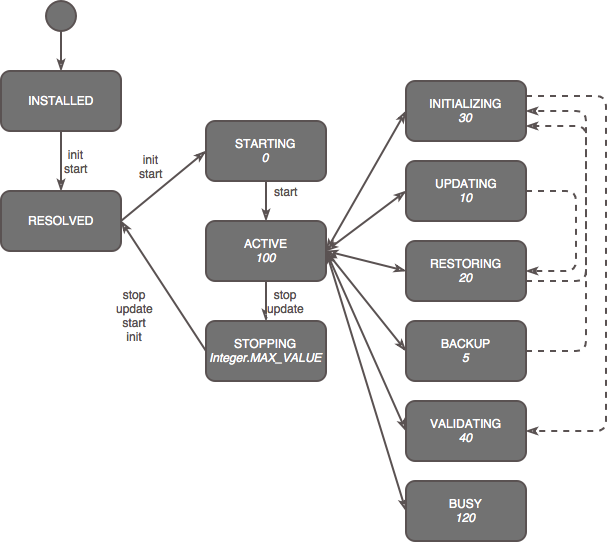
OSGi default platform states
These are the OSGi defined states: starting, stopping, active. These states can not be requested by bundles.
The platform starts in starting state. The state ends when all bundles are started.
Refer to the "Framework startup" section in the Starting the framework for details on the process.
The platform goes into this state when the starting state has ended, and no other states are requested. The state ends when a bundle requests a state change, or when the framework starts to shut down.
The stopping state starts when the framework receives a shutdown request and the current state is active. If the current state is not active, the shutdown will wait for the state to change to active.
The values for the states are:
User platform states
In order for the platform to enter one of these states, the state must be explicitly requested by a bundle.
The following user states are available:
Some bundles need additional initialization. It may take more time than a standard bundle start-up should take, and/or depend on other services being present. So the bundle performs it asynchronously, after the FW STARTED event has been sent.
The bundle is being updated by a management agent.
The BackupAdmin service is performing a restore operation (that involves this bundle). The bundle’s functionality must be shut down, and then reinitialized.
Refer to the Auto Restore section in the BackupAdmin service document for details on auto restore process.
The BackupAdmin service is performing a backup operation that involves this bundle. The bundle’s functionality might be shut down, and then reinitialized.
After starting all bundles, the framework might want to run a validation procedure – checking if all required bundles are started, all required services are registered, etc. This is usually performed after an OSGi image or firmware update, but could also be triggered manually.
Some bundles are performing operations that might affect the performance of the other bundles – operations that, for example, are consuming too much CPU time.
If multiple states are requested concurrently, the framework makes sure that the state sequence is always in the correct order, for example: updating > restoring > initializing > validating. The order is defined by the int value of the state.
For user states with values < active (100), states with lower values have bigger priority; and so the platform state will change from starting (0) up to active (100).
For user states with values > active (100), states with higher values have higher priority; and so the platform state will change from the highest requested user state, down to active.
A user state begins when it was requested by a bundle and:
A user state ends when:
When a user state ends, the platform chooses the next state, based on the following rules:
The values for the user states are:
Security
If security is switched on the framework the PlatformState service will be protected with the standard OSGi ServicePermission. The security policy must be configured in such a way that only the core bundles can access it. There are no further fine grained access definitions.
Implementation
The PlatformState service is registered by the system bundle.
It provides the following methods:
/** Return the current platform state */
public int getPlatformState()
/** Called by a component to request a state change */
public void requestState(int state)
To receive platform state changes, a bundle can implement and register the PlatformStateListener. The interface defines the methods:
/** Notification for a state change */public void stateChanged(int state)
/** Returns the max time that the component needs to work in this state */
public long getTimeout(int state)
Additionally, service events can be used to receive platform state changes: The platform state service is registered with the mbs.platform.state=<current_state> registration property. Platform state changes can be tracked by listening for service events (modified) for this service.
When a platform state changes the following operations are performed: