


|
|
|
|
|
The Transaction Manager service allows applications to execute operations in transactions. A transaction is a sequence of operations executed over a system to change its state in a certain way. However, it is important to guarantee the system's integrity and stability while performing transactions over it. Therefore, transactional systems should implement a special collection of features called ACID. In brief, they are:
The Transaction Manager is available as a service under the com.prosyst.mbs.services.transaction.TransactionManager interface in case the mbs.tm.class system property is set to a Transaction Manager implementation class name. The default implementation of the Transaction Manager is com.prosyst.mbs.impl.framework.module.transaction.TransactionManagerImpl.
You can implement your own Transaction Manager (com.prosyst.mbs.services.transaction.TransactionManager) and specify its class name under the mbs.tm.class property prior to starting the framework.
Registering bundle
This service package is exported by the System bundle.
Two-phase commit mechanism
Two-phase commit is the most effective and wide-spread mechanism to providing ACID in transactional systems. It consists of:
Transaction resources available in the framework
Transaction Resources are applications or services in the framework, which implement transactional behavior and can participate in transactions. For details on the functions Transaction Resources perform, refer to the "Transaction Manager" document.
Currently, the Transaction Resources available in the framework are com.prosyst.mbs.services.db.DB instances obtainable from the DB Manager service. You can create custom Transaction Resources by implementing the com.prosyst.mbs.services.transaction.TransactionResource interface. Instructions and recommendations on implementing a Transaction Resource are available in the "Recommendations on implementing a transaction resource" section below.
Creating a transactional application
To create a transactional application, you have to call some functionality provided by a Transaction Resource into a transaction. To manage the transaction's life cycle, you need a com.prosyst.mbs.services.transaction.Transaction instance obtainable through the Transaction Manager.
The source example listed from below is a transactional application, which uses the DB Service to create a phonebook database and populates it with entries. The operations performed using the DB Manager service are included into a transaction.
Creating a transactional application is shown in the following example:
package transactional.app.example;
import java.io.File;
import java.io.IOException;
import com.prosyst.mbs.services.transaction.Transaction;
import com.prosyst.mbs.services.transaction.TransactionException;
import com.prosyst.mbs.services.transaction.TransactionManager;
import org.osgi.framework.BundleActivator;
import org.osgi.framework.BundleContext;
import org.osgi.framework.ServiceReference;
import com.prosyst.mbs.services.db.DB;
import com.prosyst.mbs.services.db.DBManager;
public class DBTransactionExample implements BundleActivator {
TransactionManager transMngr;
Transaction dbTransaction;
ServiceReference transMngrRef, dbMngrRef;
DBManager dbMngr;
static String DB_ALIAS = null;
static String DB_ROOT = null;
private DB aliasRootBD;
private static final String PHONEBOOK_KEY = "Phonebook";
private static final String LETTER_A = "A";
private static final String LETTER_B = "B";
private static final String LETTER_C = "C";
public void start(BundleContext bc) throws Exception {
//Get the Transaction Manager
transMngrRef = bc.getServiceReference(TransactionManager.class.getName());
transMngr = (TransactionManager) bc.getService(transMngrRef);
//Initiate a transaction
dbTransaction = transMngr.begin();
//Get the newly created transaction's PID and print it in the system output
long pid = dbTransaction.getPid();
System.out.println("[DBTransactionExample] The transaction PID is:" + pid);
//Print the transaction's current state
printTransactionState(dbTransaction);
try{
//Call methods on the Transaction Resource in use - the DB service currently.
DB_ALIAS = System.getProperty("my.db.alias", "mydb");
DB_ROOT = System.getProperty("my.db.root", "mydb_root");
System.out.println("[DBTransactionExample] Creating a custom DB...");
System.out.println("[DBTransactionExample] alias = " + DB_ALIAS + ";\troot = " + DB_ROOT);
dbMngrRef = bc.getServiceReference(DBManager.class.getName());
dbMngr = (DBManager) bc.getService(dbMngrRef);
aliasRootBD = dbMngr.getCustomDB(DB_ALIAS, new File(DB_ROOT));
dbTransaction.commit();
printTransactionState(dbTransaction);
} catch (TransactionException e){
e.printStackTrace();
//Roll back the transaction in case problems occur
dbTransaction.rollback();
printTransactionState(dbTransaction);
}
}
//A method which prints a transaction's current state in the system output
public void printTransactionState (Transaction t){
int transactionState = t.getStatus();
switch(transactionState){
case Transaction.STATUS_ACTIVE:
System.out.println("[DBTransactionExample] The transaction is in STATUS_ACTIVE"); break;
case Transaction.STATUS_COMMITTED:
System.out.println("[DBTransactionExample] The transaction is in STATUS_COMMITTED");break;
case Transaction.STATUS_ROLLEDBACK:
System.out.println("[DBTransactionExample] The transaction is in STATUS_ROLLEDBACK");break;
}
}
public void stop(BundleContext bc) throws Exception {
}
private void fillDb(DB db) throws IOException {
// Writing a main node for phone numbers
db.setValue(new String[] { PHONEBOOK_KEY },
null,
DB.NODE);
// Creating a node for a latter
db.setValue(new String[] { PHONEBOOK_KEY, LETTER_A },
null,
DB.NODE);
// Writing an entry for a person's phone number
db.setValue(new String[] { PHONEBOOK_KEY, LETTER_A, "Mr. R. Armstrong" },
"2121 4343",
DB.STRING);
db.setValue(new String[] { PHONEBOOK_KEY, LETTER_B },
null,
DB.NODE);
db.setValue(new String[] { PHONEBOOK_KEY, LETTER_B, "Mr. A. Been" },
"9988 9988",
DB.STRING);
db.setValue(new String[] { PHONEBOOK_KEY, LETTER_C },
null,
DB.NODE);
db.setValue(new String[] { PHONEBOOK_KEY, LETTER_C, "Mr. P. Cage" },
"1234 1234",
DB.STRING);
}
}
Recommendations on implementing a transaction resource
To create a TransactionResource service, you have to implement the com.prosyst.mbs.services.transaction.TransactionResource interface. It provides three methods - prepare, commit and rollback. The implementation of these methods is tightly connected to the functionality of the Transaction Resource and the design of the transactional system it will be part of. Therefore, there are no strict rules on implementing a Transaction Resource. However, the following recommendations can be outlined:
Enabling the transaction support
To turn on the transaction support in the framework, set the mbs.tm.type system property to default.
Retrieving transaction manager
The Transaction Manager is available as a service under the com.prosyst.mbs.services.transaction.TransactionManager interface, as described at the beginning of the document.
Implement transaction manager
You can provide your own implementation of the Transaction Manager and set its implementation class to the mbs.tm.type system property. Make sure that the implementation class is present in the classpath of the framework.
Transactions in the framework
The OSGi framework provides support for creation and management of applications that implement transactional behavior. This support is provided by the Transaction Manager module.
Scope
Transactions in the framework have the following scope:
Only one transaction is supported per thread. An error will be thrown if you try to run more than one transaction at the same thread.
Nested transactions are not supported. You are not allowed to run a transaction within another one.
Transaction resources
Transaction Resources are valid applications that implement transactional behavior and can participate in transactions. A Transaction Resource can be the Configuration Admin service, for example.
Transaction Resources perform the following functions:
Transaction manager functions
The Transaction Manager performs the following functions:
Preventing overlap
To prevent from overlapping of the components participating in its different layers, the Transaction Manager imposes certain restrictions on the applications wanting to implement transactional behavior. These restrictions are provided on two levels:
System recovery support
Transaction Manager provides recovery support of the system after major crashes resulted in unusual circumstances like power failure, as an instance. For this purpose, Transaction Manager keeps a record of all currently active transactions that includes their PIDs, state and resources it uses. When the Transaction Manager is started, it checks if there are any interrupted transactions and waits for the Transaction Resources to rejoin them. Then it decides whether to commit or roll back the interrupted transactions depending on their life cycle states.
Deadlock recovery mechanism
To prevent the occurrence of deadlocks in the system, transactional applications can specify a time-out after which the Transaction Manager will terminate the transactions associated with them. Applications may reset this time-out after each transaction since different transactions may take different time to fulfil.
For details on the Transaction and TransactionContext objects, refer to the Transaction Manager API.
Data model
The diagram below shows the sequence of executing management actions over a transaction during its life cycle:
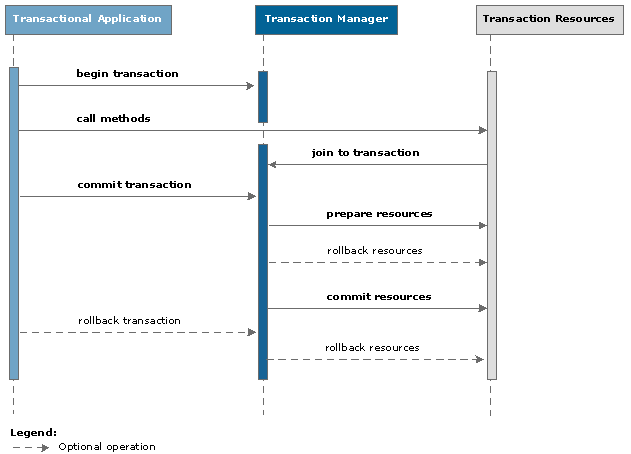
The depicted management operations are executed in the following order in time:
Transaction lifecycle
The diagram below depicts the life cycle of a transaction in the framework:
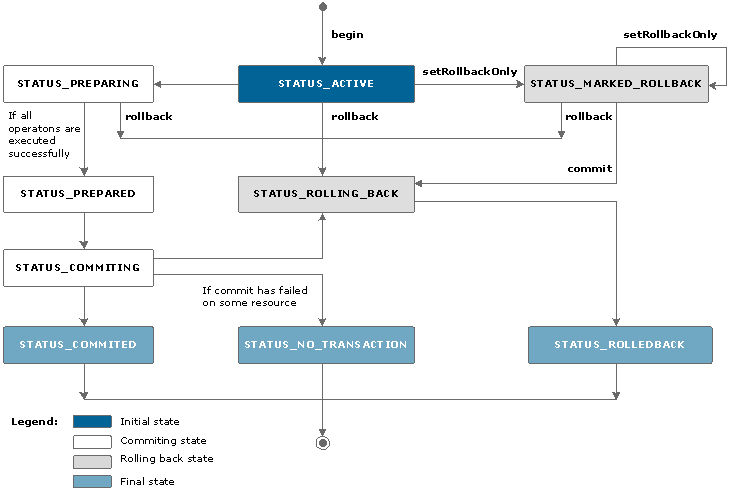
STATUS_ACTIVE
A transaction's initial state. It indicates the transaction has joined the current thread of its creator application and has received all needed resources.
STATUS_PREPARING
A transaction passes into this state when the execution of its composite operations begins. None of the participating modules is aware of the actions the system performs while the transaction is into this state. Other currently active transactions are not informed as well. If a problem is raised, all operations made so far will be rolled back and the transaction will go into STATUS_ROLLING_BACK.
STATUS_PREPARED
This state is associated with a transaction when all of its operations are executed successfully.
STATUS_COMMITING
This state indicates that all changes made by a transaction are going to be committed.
STATUS_COMMITED
A transaction's final state where the changes it has made to the system are declared publicly and will remain persistent. Disposing the transaction follows in order to free the corresponding thread for new transactions.
STATUS_NO_TRANSACTION
A transaction can pass into this state if some of the changes it has made fail to commit properly because of some reason. It indicates the transaction was made persistent and public but not all the changes it has made were committed correctly. This state is also final for the transaction and its disposal will follow.
STATUS_MARKED_ROLLBACK
A transaction can pass into this state if some of the modules taking part in its execution or management detects a circumstance that threatens the system's stability and integrity. It indicates that the transaction can only be rolled back from this point on. Even if some transactional application tries to commit the transaction, it will result into rolling it back.
STATUS_ROLLING_BACK
If an error occurs on some stage of a transaction's execution, the operation that has caused it will be rolled back and the transaction will pass into STATUS_ROLLING_BACK. The transaction will remain into this state until all of the operations it has performed so far will be rolled back.
STATUS_ROLLEDBACK
This state indicates that all operations performed by a transaction were rolled back. It is a final state for the transaction and it will be destroyed to free the corresponding thread for new transactions.