


|
|
|
|
|
With the Update Manager Service you can update:
Registering bundle
This service is registered by the System bundle.
Update Manager properties
Details on the Update Manager system properties are provided in the Setup guide.
Preliminaries
Before Updating your Framework take into account:
The Update Manager Service is activated if the system property mbs.updatemanager is set to true and the OSGi runtime is started from the mBSA. The service is registered under the com.prosyst.mbs.framework.updatemanager.UpdateManager interface and can be configured through the mbs.um.storage and mbs.um.osUpdate system properties.
For more information on mBSA Watchdog configuration go to "Watchdog Config" section of the mBSA setup guide.
Initiating an image update
Update images are taken from a specific directory. After you prepare the image, place it in the specified location on the same level as the "jvm", "mbsa" and "osgi" folders - e.g. [osgi_update_location] in the base directory ([install path]) as shown in the following Figure.
Figure 1. Tree for the mBSA-framework with separated mbsa/osgi directories. 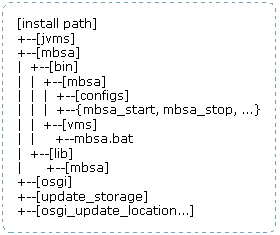
In order to start an update, call the updateImage method of the Update Manager service. The method requires two arguments:
The call of the updateImage method results only in framework restart.
The following basic steps are performed for a successful OSGI image update:
If an error occurs – the original image is kept.
If an error occurs from the new image – the original one is restored.
The update of the JVM image is basically performed in the same manner as the OSGi image update. Updating the JVM of a target device does not mean automatically update of the OSGi. You can either update the OSGi or the JVM images, but not both at the same time.