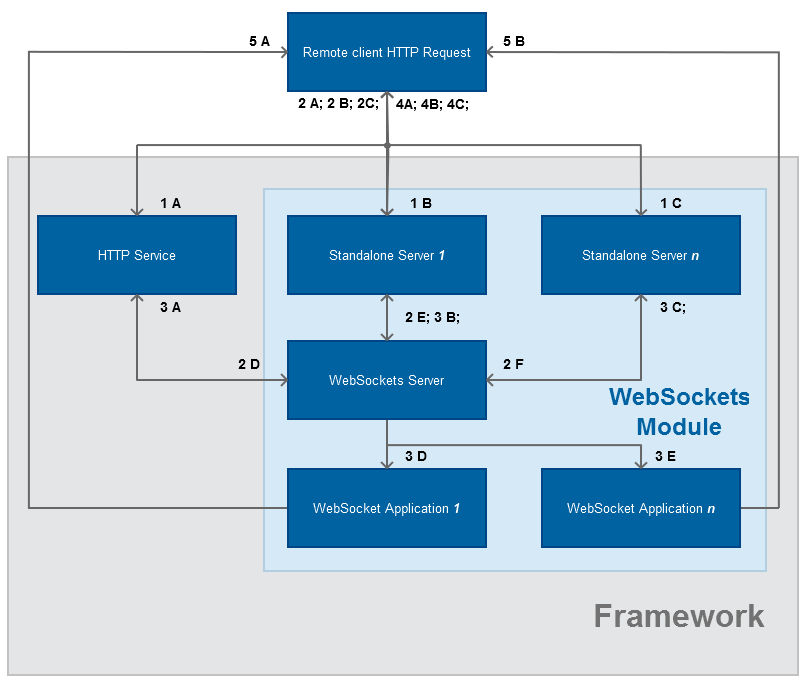
Provides information about the WebSockets system architecture.
Module Design
HTTP Request is initiated by the HTTP client (Web browser or standalone application)
request is sent to the Bosch IoT Gateway Software HTTP Service (standard port 80 or 443)
request is sent to a Standalone Server 1 (Simulated HTTP server only for WebSocket connections)
request is sent to a Standalone Server n (Simulated HTTP server only for WebSocket connections)
The request is checked for the required headers (UPGRADE: websocket, CONNECTION: upgrade)
if the required headers are missing or there is no registered WebSockets ProtocolHandler service available return normal HTTP response by the Bosch IoT Gateway Software HTTP Service
if the Standalone Server 1 does not find the (UPGRADE: websocket, CONNECTION: upgrade) it returns HTTP 404 Websockets upgrade failed
if the Standalone Server n does not find the (UPGRADE: websocket, CONNECTION: upgrade) it returns HTTP 404 Websockets upgrade failed
if the request contains the necessary headers it is transferred to the to the Bosch IoT Gateway Software WebSocket Server by the Bosch IoT Gateway Software HTTP Service
if the request contains the necessary headers it is transferred to the to the Bosch IoT Gateway Software WebSocket Server by Standalone Server 1
if the request contains the necessary headers it is transferred to the to the Bosch IoT Gateway Software WebSocket Server by Standalone Server n
The WebSockets Server checks for suitable WebSocket Application, scope of the server and WebSocket Application match, etc.
if the checks fail the control is returned to the Bosch IoT Gateway Software HTTP Service
if the checks fail the control is returned to the Standalone Server 1
if the checks fail the control is returned to the Standalone Server n
if the checks pass, the control is transferred to WebSockets Application 1
if the checks pass, the control is transferred to WebSockets Application n
The HTTP non-successful response is returned
the Bosch IoT Gateway Software HTTP server returns either 404 or 200 if the resource is found
Standalone Server 1 returns 404
Standalone Server n returns 404
The HTTP client request for WebSockets protocol upgrade is successful and 101 HTTP code is returned to the HTTP client (switching protocols)
WebSocket is created by WebSocket Application 1
WebSocket is created by WebSocket Application n
HTTP Error Codes
The Bosch IoT Gateway Software WebSocket Server supports the following error codes:
HTTP/1.1 400 Incorrect request, The Upgrade Protocol has failed
HTTP/1.1 404 Not Found, if the Upgrade process fails the request is handed as normal HTTP
HTTP/1.1 503 Websocket Server have reached the maximum allowed connections number and the Upgrade Protocol failed
HTTP/1.1 500 General error code if the Websocket Server cannot create a WebSocket