Previous Topic

Next Topic

Book Contents

Book Index

Authorization flow

This page describes the authorization flow.

In order to work an application must be registered in the developer portal with:

More information on the Authorization Flow can be found here.

Steps to authorize an application
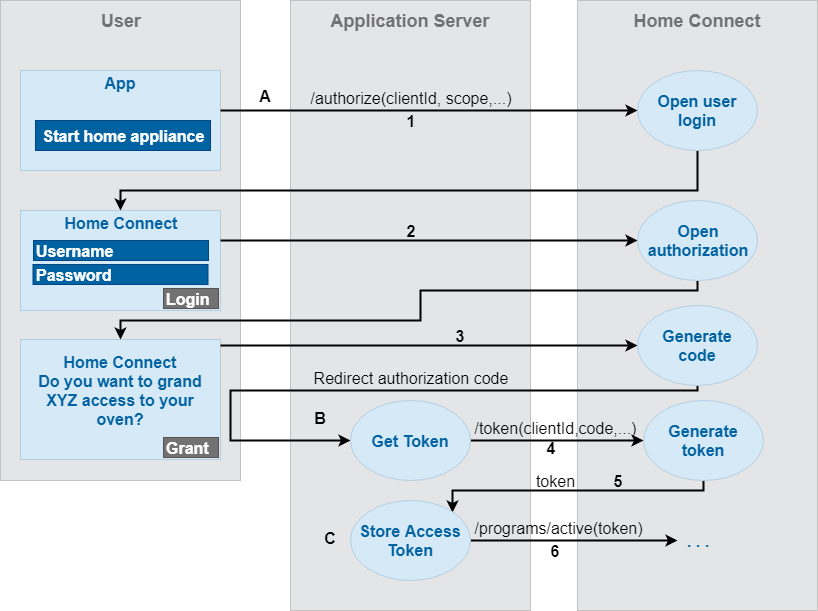
mbs_homeconnect_authorization_v90

For more information - refer to the official Home Connect Authorization Flow Description.

How to authorize Home Connect driver to backend servers

There are three ways of authorizing the module with the backend servers are supported which depend on the passed parameters:

  1. Passing 'username' AND 'password'  - covering all steps from the Authorization flow described above.
  2. Passing 'code' - End user app interacts with the user for their credentials (doing steps 1) 2) 3) from Authorization flow described above) and than passing 'code'. In this case the authorization continues from step 4) This requires additional paramters clientId, scope, redirect_url - if not passed the default configuration is used.
  3. Passing 'refresh_code' - The end user app interacts with the user for their credentials (doing steps 1) 2) 3) 4) and than passing 'refresh_token'. In this case our authorization continues from step 5)

Regardless of the chosen way for authentication, username and refresh_token is persisted.

On system restart/expire of access_token renew token with persisted refresh_token is done(having already valid refresh_token)