


|
|
|
|
|
Since mBProfiler supports profiling several local or remote applications from the same Eclipse frontend, it also provides a convenient way to switch between the processes, monitor and control the execution of the corresponding launch configurations, from a central view – Profile. Once a profiling process is started or connected by mBProfiler via the relevant launch configuration, you can control the profiling execution, that is, relaunch, suspend, etc.
Each launch is represented as a root node with a node representing the JVM connection properties and, for local profiling targets, another node for the JVM executable. Imported profiling targets are represented as <imported - file_location>.
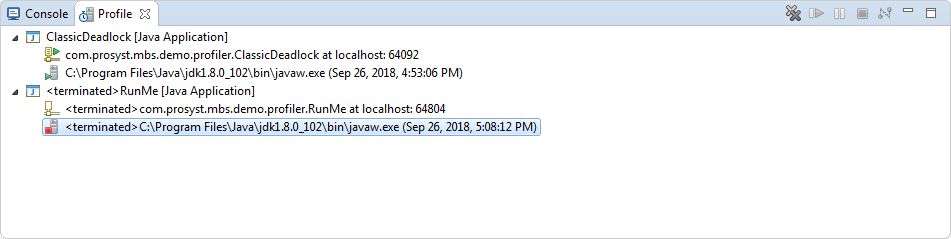
You can control if the terminated profiling launches should be auto-cleared (default) or should remain visible in the Profile view. Select Window > Preferences ( for OS X use Eclipse > Preferences) and go to the Run/Debug > Launching preferences page. There, select/deselect the Remove terminated launches when a new launch is created option according to your needs.
Disconnecting from a Remote Profiling Target
To disconnect mBProfiler from a remotely profiled application, right-click the launch configuration and use the Disconnect option from pop-up menu, or click the  button on the view toolbar. Next, you can relaunch profiling to proceed with performance analysis.
Relaunching Profiling
To relaunch profiling in the Profile view right-click on the application process and use the Relaunch option from the pop-up menu.
For remote applications, you cannot relaunch a profiling process which is already running, that is, the agent and the frontend have already been engaged in communication. Another case is that if the application is stopped, you have to start it manually.
Terminating a Process
To terminate a profiling application in the Profile view, right-click the configuration and select the Terminate option from the pop-up menu, or click the  button on the view toolbar.
By using the other terminate options of the pop-up menu you can also combine ending the launch with a subsequent relaunch or with clearing the configuration from the profiling process list.
For remotely profiled application termination is possible only if the Allow termination of remote VM option from Connect tab of the launch configuration has been selected prior to the launch.
Suspending/Resuming a Profiled Application
To suspend an application profiled with mBProfiler in the Profile view, e.g. to better explore collected profiling details, right-click on it and use the Suspend option from the pop-up menu, or click the  button on the view toolbar.
Then, to resume the execution again and continue profiling, use similarly the Resume option or the  button.
Modifying a Profile configuration
To quickly open and edit a profile launch configuration used to start profiling an application, right-click on its root node or on some of its sub-nodes and use Edit <configuration_name> option from the pop-up menu.