The Web Console is a developer tool and must not be used in production.
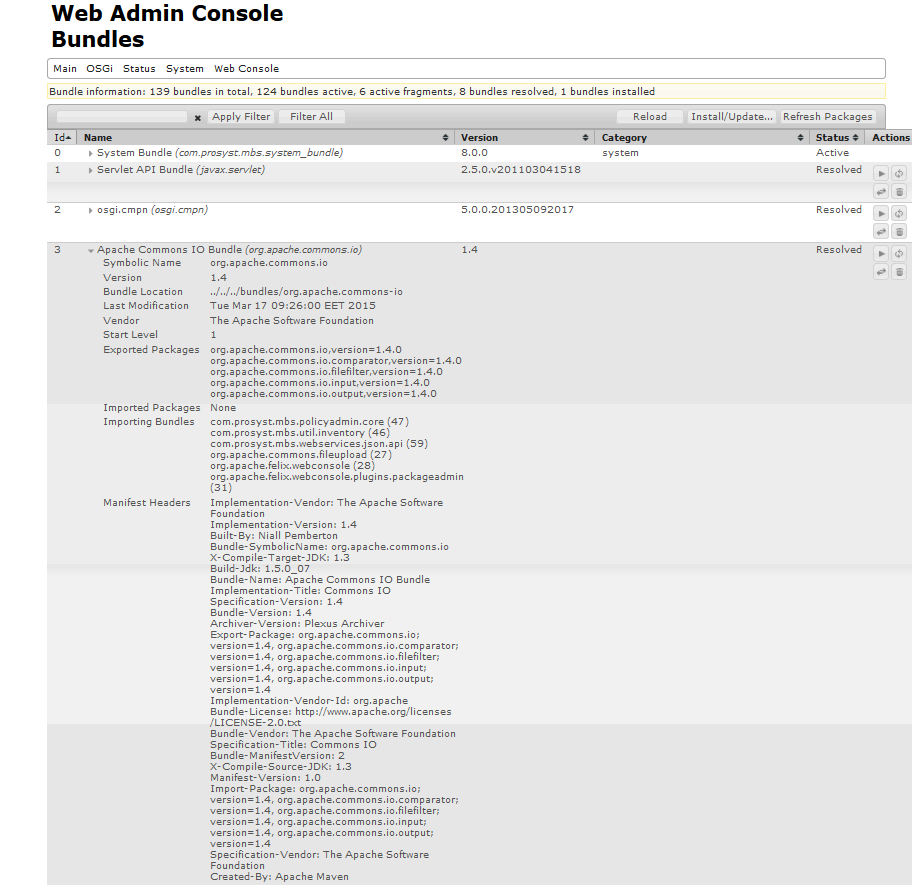
To view the general information about a bundle, click the button in front of the bundle name. The bundle's row expands.
The information displayed after expanding the bundle's row is non-editable and depends on the manifest headers provided by the bundle. The following properties are provided for all bundles:
Symbolic Name - Indicates the bundle symbolic name
Version - Holds the bundle version
Bundle Location - Indicates the URL of the bundle JAR file
Last Modification - Indicates the time the bundle was last modified
Vendor - Contains the value of the Bundle-Vendor manifest header
Description - Holds the free-hand description of the bundle
Start Level - Indicates the current start level of the bundle
Exported Package - Holds a list of all packages exported by the bundle
Imported Packages - Contains a list of all packages imported by the bundle and the symbolic name of the bundle that exports the specific package. Click on the symbolic name of the exporting bundle and its general information will be displayed.
Manifest Headers - Shows information extracted by the bundle's manifest file.
Bundles can provide some additional properties like:
Service ID <number> - Indicates the service(s) registered by the bundle in the service registry. Click on the service ID number to see more information about the registered service shown in the Services page.
Importing Bundles - Shows a list of all bundles currently using the specific bundle.
Host Bundles - Indicates that the bundle is a fragment bundle and its value is the bundle host.


 button in front of the bundle name. The bundle's row expands.