


|
|
|
|
|
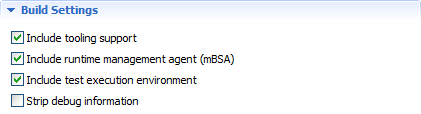
The Build Settings section of an Image Description editor contain options for adding capabilities for testing and image management on a native level, as well as for some code clean-up.
 .
.
Enable Tooling Support through our Tooling Client (iAgent)
Including into the image the agent (called iAgent) which communicates with the Eclipse plug-ins of the SDK is convenient if you plan to further develop the features on the target device platform. You will be able to install applications straight from Eclipse as well as re-launch the platform in debug or profile mode remotely or as an emulation.
To add the components that build up the tooling communication, select the Include tooling support option from Build Settings of the Image Description.
Enable Native Image Management
You can add the special management agent in the SDK, called mBSA, to the image. This agent is able to control the native process of the image including fault recovery, communication on OS level, restart in debug or profile mode, etc. It is needed if you will re-launch the platform in debug or profile mode remotely or as an emulation.
To add the runtime agent to the image, select the Include runtime management agent (mBSA).
Include the Test Execution Environment
You can add the Test Execution Environment (TEE) for running test cases, which can be either a part of the SDK Runtime Validator or third-party ones compliant with the test environment.
To add the components of the Test Execution Environment, select Include text execution environment.
Reduce Image Size by Stripping Debugging Code
In certain production scenarios, it is not expected to debug the image anymore and you can remove the related code from the framework and bundles. In such a case, use the Strip debug information option.