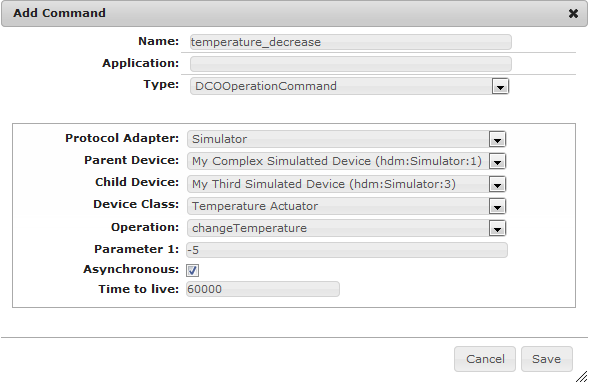
You can create a command that will execute an operation on a specific Device Class Object:
Select the Device
Protocol Adapter - Select the protocol adapter that is used by the home device. For Example: ZigBee, Z-Wave etc. All devices available for this protocol adapter are listed in the Parent Device drop-down menu.
Parent Device - Select the device that will be used to execute the command on. If the device you selected has child devices you will see them in the Child Device drop-down menu.
Child Device - Optional. To create the command for a child devices, select it from the drop-down menu. If you want to manage the root device leave this field empty.
Device Class - Select the device class that will be the subject of the command. All available operations will be listed in the Operation drop-down menu.
Specify the Operation
Operation - Select the operation that you want to execute. If the operation requires input parameters, you will be provided with the respective number of fields to specify them.
Parameter<number> - Specify the required operation parameter. It will automatically be converted to the appropriate data type.
Place the cursor over the parameter's text field and a tool tip will appear providing information about the expected parameter.
Asynchronous - Mark this checkbox if you want the operation to be executed asynchronously.
Time to live - Specify the time (in milliseconds) that this operation should remain active if the command requires an asynchronous execution of the device operation. In case the specified time elapses and the device operation is not performed, the request will be canceled automatically.
Filter Device Class Object Operation Command
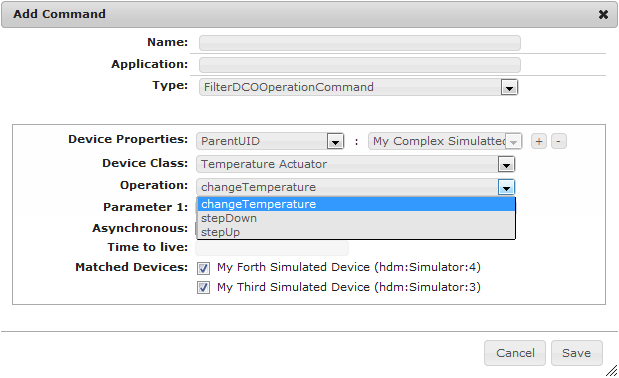
You can create a command that will trigger an operation on several Device Class Objects that share common properties.
Select the Devices
Device Properties - Select the devices that you want to use for the command by creating a filter in the following way:
Click on the first drop-down menu to select the property key.
Select the property's value from the second drop-down menu. The property will be added to the filter.
Press + and repeat the procedure to add another property to the filter, if needed.
Matched Devices - Select which devices you will include in the condition from the list of the devices matching the filter. You can exclude a device from the list, without changing the filter by unchecking its checkbox.
Device Class - Select a Device Class Object from the ones listed in the drop-down menu depending on the devices you selected from the Matched Devices section.
The devices are filtered when the condition is created. If a new device that matches the criteria is added later to the system, it will not be included until the condition is refreshed.
Specify the Operation
Operation - Select the operation that you want to execute. If the operation requires input parameters, there will be displayed the respective number of fields to specify them.
Parameter<number> - Specify the required operation parameter. It will automatically be converted to the appropriate data type.
Place the cursor over the parameter's text field and a tool tip will appear providing information about the expected parameter.
Asynchronous - Mark this checkbox if you want the operation to be executed asynchronously.
Time to live - Specify the time (in milliseconds) that this operation should remain active if the command requires an asynchronous execution of the device operation. In case the specified time elapses and the device operation is not performed, the request will be canceled automatically.
Zone Device Class Object Operation Command
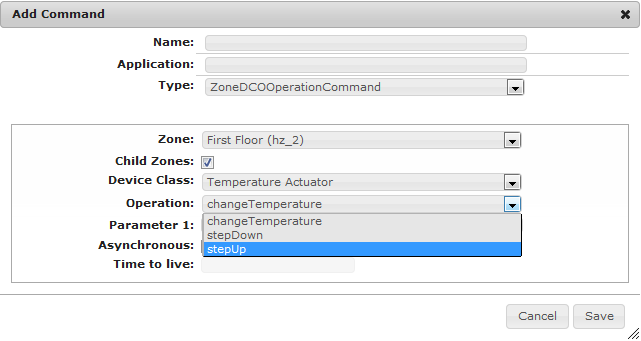
You can create a command that will execute an operation on several Device Class Objects part of the same zone.
Select the Devices
Zone - Select the zone that will be used to execute the operation on.
Child Zones - Mark this checkbox if the zone you selected has child zones and you want them also to be affected by the command.
Device Class - Select the device class whose operation you want to execute through the command. You will see all its operations in the Operation drop-down menu.
Specify the Operation
Operation - Select the operation that you want to execute. If the operation requires input parameters, there will be displayed the respective number of fields to specify them.
Parameter<number> - Specify the required operation parameter. It will automatically be converted to the appropriate data type.
Place the cursor over the parameter's text field and a tool tip will appear providing information about the expected parameter.
Asynchronous - Mark this checkbox if you want the operation to be executed asynchronously.
Time to live - Specify the time (in milliseconds) that this operation should remain active if the command requires an asynchronous execution of the device operation. In case the specified time elapses and the device operation is not performed, the request will be canceled automatically.
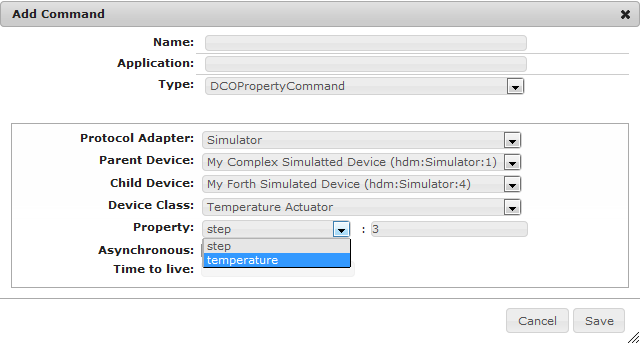
Using automation commands, you can change a property of a specific Device Class Object.
Select the Device
Protocol Adapter - Select the protocol adapter that is used by the home device. For Example: ZigBee, Z-Wave etc. All devices available for this protocol adapter are listed in the Parent Device drop-down menu.
Parent Device - Select the device whose property you want to change via the command. If the device you selected has child devices they will be listed in the Child Device drop-down menu.
Child Device - Optional. Select one of the child devices from this drop-down menu, if you want the command to be executed only on it. If you want to select the root device leave this field empty.
Device Class - Select the device class whose property you want to change. You will see all its properties in the Property drop-down menu.
Specify the Property
Property - Select the property you want to change from the drop-down menu and type the desired value in the text field next to it.
Asynchronous - Mark this checkbox if you want the property to be changed asynchronously.
Time to live - Specify the time (in milliseconds) that this command should remain active if it requires an asynchronous device property change. In case the specified time elapses and there is no change in the property, the request will be canceled automatically.
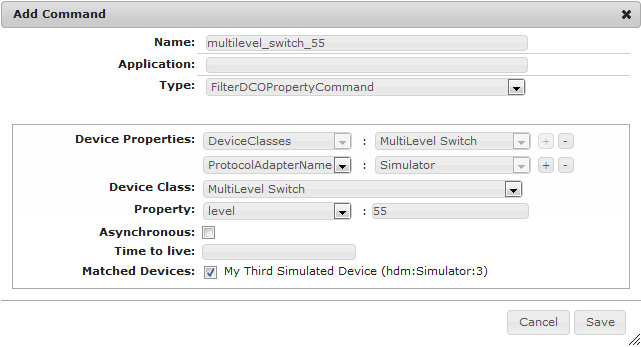
Filter Device Class Object Property Command
You can create a command to change a property of several Device Class Objects that share common properties.
Select the Devices
Device Properties - Select the devices that you want to use for the command by creating a filter in the following way:
Click on the first drop-down menu to select the key of a property.
Select the property's target value from the second drop-down menu. The property will be added to the filter.
Press + and repeat the procedure to add another property to the filter, if needed.
Device Class - Select a Device Class Object from the ones listed in the drop-down menu depending on the devices you selected from the Matched Devices section.
Matched devices - Select which devices you will include in the command from the list of the devices matching the filter. You can exclude a device from the list, without changing the filter by unchecking its checkbox.
The devices are selected when the command is created. If a new device that matches the criteria is added later to the system, it will not be included until the command is refreshed.
Specify the Property
Property - Select the property you want to change from the drop-down menu and specify its desired value in the text field next to it.
Asynchronous - Mark this checkbox if you want the property to be changed asynchronously.
Time to live - Specify the time (in milliseconds) that this command should remain active if the property requires an asynchronous change. In case the specified time elapses and there is no change in the property, the request will be canceled automatically.
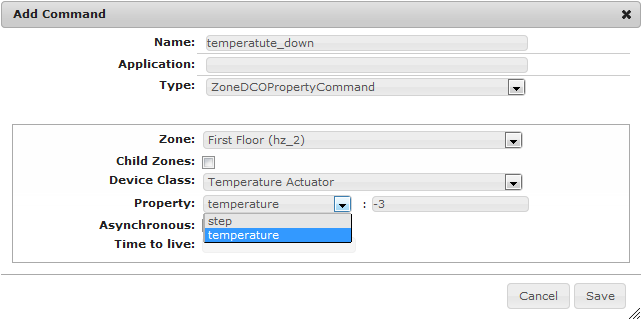
Zone Device Class Object Property Command
You can create a command to change a property of several Device Class Objects that belong to the same zone.
Select the Devices
Zone - Select the zone.
Child Zones - Mark this checkbox if the zone you selected has child zones and you want them also to be affected by the command.
Device Class - Select the device class whose property you want to change through the command. You will see all its properties in the Property drop-down menu.
Specify the Property
Property - Select the property you want to change from the drop-down menu and enter the desired value in the text field next to it.
Asynchronous - Mark this checkbox if you want the property to be changed asynchronously.
Time to live - Specify the time (in milliseconds) that this command should remain active if the property requires an asynchronous change. In case the specified time elapses and there is no change in the property, the request will be canceled automatically.
For more information about these commands and instructions on how to create them programmatically, see the Developer Guide.


 icon in the top right corner.