Follow the general steps for discovering and connecting BLE devices.
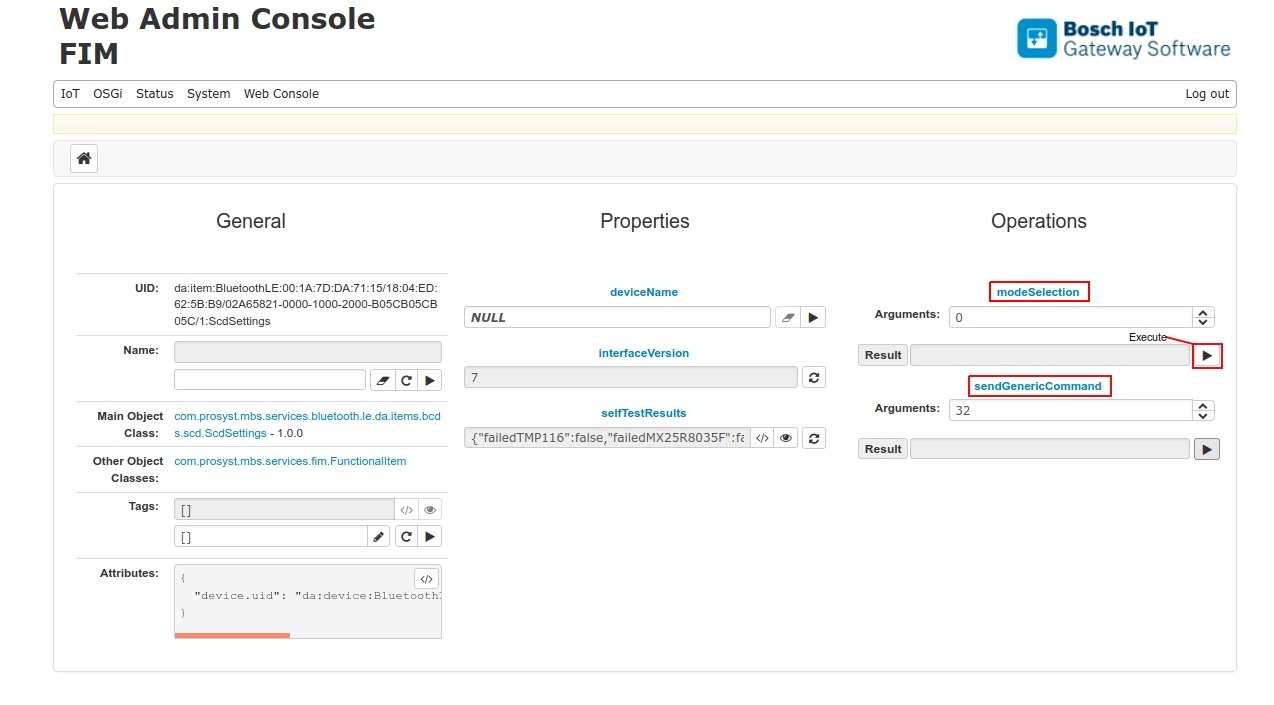
After successfully connecting a BCDS SCD device, a new device item ScdSettings will be registered.
The SCDSettings functional item is the entry point, where to start working with the device: to set the working mode, start the ShortTermExperiment execution or execute another basic command.
Properties
deviceName property can be modified to contain a custom human readable device name.
interfaceVersion property contains the version of the BLE SCD Interface specification.
selfTestResults property can be used to estimate the failure state of the device - if it is operational or an error has occurred with some of its components.
To set the working mode of SCD Device, execute modeSelection operation. Currently it supports argument value 0 = STE mode.
Operations
Operation sendGenericCommand allows the execution of basic commands. Supported commands are:
0x20 - start/stop ShortTermExperiment . ShortTermExperiment is running when the ShortTermExperiment results property rollingCounter is changing.
0x21 - cmdResetThresholdFlag s- reset the threshold violation flags.
0x30 - cmdEraseSensorData - erases raw sensor data. This results in: disconnect, erase data, start advertising.