The Sense Connect Detect (SCD) enables companies to get started easily with industry 4.0. As a cost-effective, reliable (IP67) and easy-to-install solution, the sensor device attaches to almost any machine and component. The data acquisition process can start right away and reports wirelessly via Bluetooth LE.
To connect the SCD device, follow the general steps for discovering and connecting BLE devices.
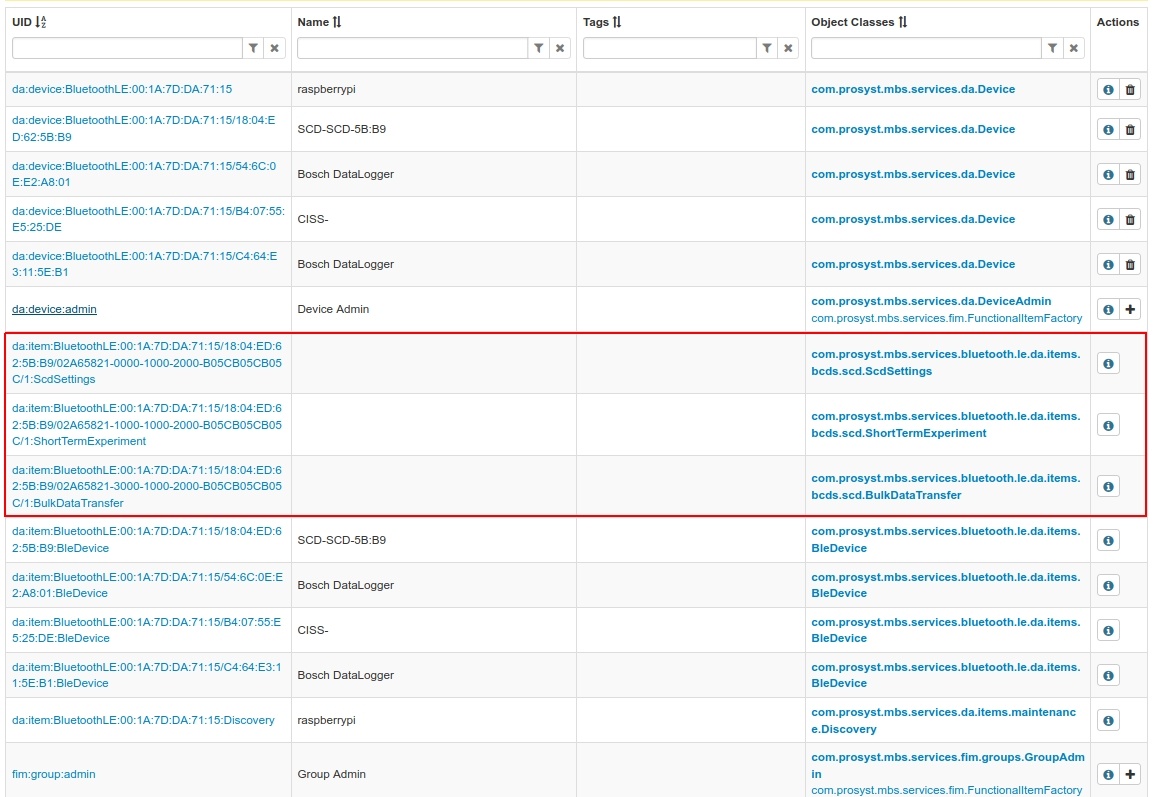
After connecting the SCD device three functional items will be registered: ScdSettings, ShortTermExperiment and BulkDataTransfer. See screenshot below.
The SCDSettings functional item is the entry point, where to start working with the device: to set the working mode, start the STE execution or execute another basic command.
The ShortTermExperiment functional item contains reference to the control and monitoring of the sensors.
The BulkDataTransferfunctional item allows download of data logged during ShortTermExperiment operation.
Note that if there is no activity between the central and peripheral device for 2 minutes the device will disconnect.
The general use cases for managing SCD devices are as follows:
execute ScdSettingsmodeSelection (0)
go to the ShortTermExperiment configuration, enable the desired sensors, set the thresholds
execute the ScdSettings functional item sendGenericCommand(0x20)to stat ShortTermExperiment execution
listen to the ShortTermExperiment results property and check if rollingCounter is changing - it is an indication that ShortTermExperiment has actually started
listen to the ShortTermExperiment results property for sensor updated
To download logged data:
execute ScdSettings sendGenericCommand(0x20) to stop ShortTermExperiment execution
execute the BulkDataTransfer download, watch for changes of state: IDLE, ONGOING, FINISHED, ERROR
check the HistoryAdmin service for the downloaded data