


|
|
|
|
|
It's not always possible to run the Profiler Frontend on the same host as the program to be profiled. The frontend consumes additional system resources besides the application it profiles, so this could make the profiling impossible on devices with thin resources. For that reason, mBProfiler enables profiling not only of locally running applications but also of remote ones.
Remote Java Application Launch Configuration
You can profile applications residing on a remote JVM using a Remote Java Application launch configuration. You have to supply connection properties in the Connect tab, as well as configure if needed the properties into the mBProfiler and Triggers tabs. The rest of the launch properties are the same as in the other launch configurations.
To create a Remote Java Application profile configuration:
 button pull-down menu and select the Profile Configurations item.
In the Connection Type field allows to choose how you will connect to the remote JVM.
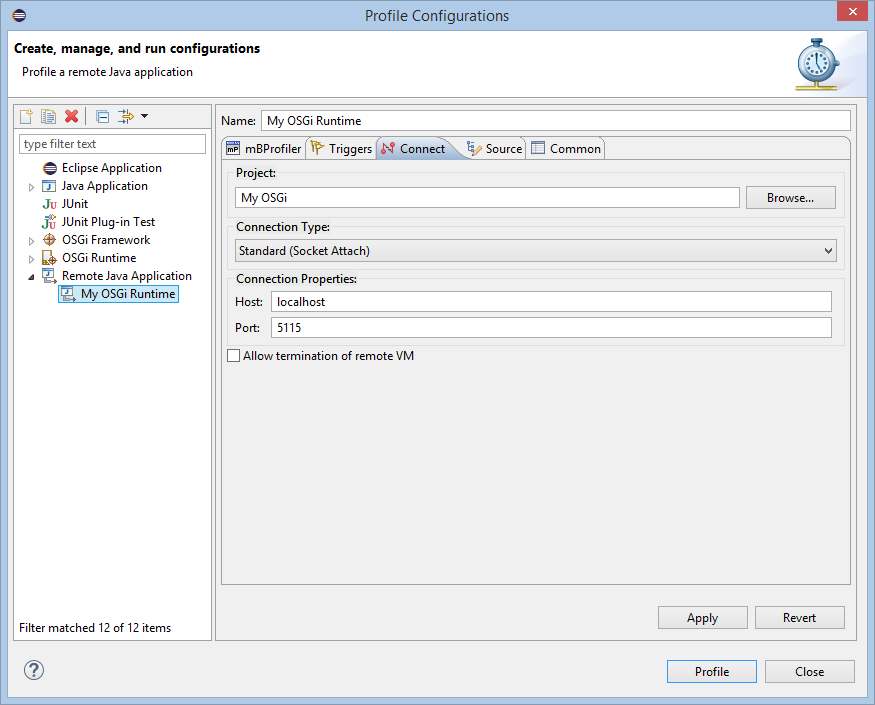
Providing a Profiler Agent onto the Remote System
This feature is supported only when mBProfiler is started as a standalone application.
To be able to perform remote profiling, first you need to equip the remote application's host with a Profiler Agent. To do that, copy the Profiler Agent intended for the corresponding OS on the target host. Then add the location of the agent's directory to the PATH environment variable for Windows OS, to the LD_LIBRARY_PATH one for Linux and Solaris, or to its analogue in the OS in use. Modifications of the agent adapted to different OSes are available in the plugins/com.prosyst.mbs.mbprofiler_x_x_x/native installation directory.
Enabling Byte Code Modification for JVMTI
This feature is supported only when mBProfiler is started as a standalone application.
In certain cases, using mBProfiler on top of JVMTI requires additional byte code modification on the target host. To enable the JVM load the modification mechanism, compliant with mBProfiler, execute one of the following tasks:
Attaching to a Remote VM
To attach mBProfiler to a remote JVM:
Prerequisite: On the profiled host make sure that the JVM is supported by mBProfiler as well as that the profiler agent is suitable for the underlying platform, such as OS, JVMTI profiling interface, etc.
On JDK, for instance, use the command line loading the following agent library on Windows:
java -Djava.compiler=NONE -agentlib:proft=server=y,suspend=y,address=<port>[,<other_options>]
<java_class_name>
java -Djava.compiler=NONE -agentlib:proft=server=y,suspend=n,address=<port>[,<other_options>]
<java_class_name>
Using older options:
java -Djava.compiler=NONE -agentlib:proft=attach=<port>[,<other_options>]
<java_class_name>
java -Djava.compiler=NONE -agentlib:proft=listen=<port>[,<other_options>]
<java_class_name>
For example:
java -Djava.compiler=NONE -agentlib:proft=server=y,suspend=y,address=5116
<java_class_name>
java -Djava.compiler=NONE -agentlib:proft=server=y,suspend=n,address=5116
<java_class_name>
Using older options:
java -Djava.compiler=NONE -agentlib:proft=attach=5116
application.MyApplication
java -Djava.compiler=NONE -agentlib:proft=listen=5116
application.MyApplication
Once profiling is launched, you can control its execution from the Profile view.
Listening to a Remote VM
When listening to a remote JVM, mBProfiler actually waits for the remote JVM to connect to it and then starts displaying the profiling information. To listen to a remote VM:
Prerequisite: On the profiled host make sure that the JVM is supported by mBProfiler as well as that the profiler agent is suitable for the underlying platform.
On JDK, for instance, use the command line loading the following agent library on Windows:
java -Djava.compiler=NONE -agentlib:proft=server=n,address=
<mbprofiler_host>:<port><java_class_name>
Using older options:
java -Djava.compiler=NONE -agentlib:proft=net=<mbprofiler_host>:<port>
[,<other_options>]<java_class_name>
For example:
java -Djava.compiler=NONE
-agentlib:proft=server=n,address=192.168.55.17:5117
application.MyApplication
Using older options:
java -Djava.compiler=NONE -agentlib:proft=net=192.168.55.17:5117
application.MyApplication
Once profiling is launched, you can control its execution from the Profile view.
Adding the Profiler API to the Java Process
mBProfiler provides a special API, which can be used to launch certain profiling actions such as memory or CPU profiling during the execution of a method. This API is used by the profiler agent itself as well. Hence, to have the complete set of mBProfiler features active, make sure that the Java boot classpath contains a path to com.prosyst.mbs.mbprofiler.api.jar, initially available in the Eclipse subfolder plugins/com.prosyst.mbs.mbprofiler_x.x.x. For example, on JDK use the -Xbootclasspath/a: or -Xbootclasspath/p: option.
The following warning will be displayed in case the com.prosyst.mbs.mbprofiler.api.jar archive is missing from the Java classpath of the profiled application:
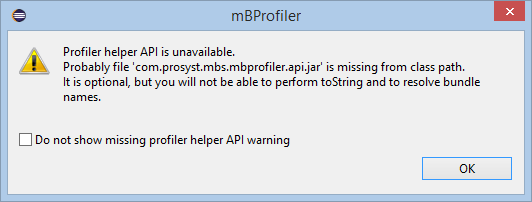
The absence of the com.prosyst.mbs.mbprofiler.api.jar in the profiled application's class path will lead to the following consequences:
Profiling Agent Arguments
You can pass the following arguments, separated with commas, to the profiler agent by using the relevant JVM-specific profiling startup options:
Option Name and Value |
Default Value |
Description |
|---|---|---|
transport=socket|ipc |
socket |
The transport type in use. |
server=y|n |
n |
Whether the profiler agent is the server or not. |
suspend=y|n |
y |
Whether to block for incoming connections or not. Valid only if server=y. |
address=[<host>:]<port>[:n] |
5115 |
The host and the port of the profiled application. If mBProfiler is the server, both host and port must be provided. When mBProfiler is a client, only port is required. The "n" argument indicates the number of connection retries that the Profiler Agent will make. |
jni=<boolean> |
true |
Defines if the Java interpreter supports JNI. The default value is "true" (has support). In particular, this argument actually defines if automatic JVM recognition, based on JNI, will be enabled. With JVMs that do not support JNI, this option should be switched off. Not available if running the mBProfiler version for JVMTI. |
jphelper=<boolean> |
true |
Enables using an internal Java helper profiler class, which is used to perform the toString object command from the visual interface and to control the profiling procedure by means of commands to the agent from within the profiled application itself – see Profiler API. To have this option working you must also have the com.prosyst.mbs.mbprofiler.api.jar file included in the boot classpath (see "Adding the Profiler API to the Java Process" section above). |
tostring |
true |
Activates the support of the toString object command, issued from the visual interface. |
loader=<boolean> |
true |
Enables displaying class loader information. Not available if running the mBProfiler version for JVMTI. |
buff_size=<bytes> |
8192 |
Sets the size in bytes of the socket buffer. |
cputime_buff=<bytes> |
4096 |
Sets the size in bytes of the local buffer of each thread for CPU time events. |
net=<host>:<port>[:n] |
- |
Deprecated. Use the server and address arguments instead, that is, server=n and address=<host>:<port>[:n]. Connects to a Profiler Frontend running on the specified remote host and port. The "n" argument specifies the number of connection retries that the Profiler Agent will make. |
ipc=<port> |
- |
Deprecated. Use the transport and address arguments instead, that is, transport=ipc and address=<port>. Connects to the specified named port using Windows IPC. |
attach=<port> |
- |
Deprecated. Use the server, suspend and address arguments instead, that is, server=y, suspend=y and address=<port>[:n]. Blocks the JVM execution waiting for connections on the specified port, that is, until mBProfiler attaches to the process. This is useful if you want to capture all profiling info from the very beginning. |
listen=<port> |
- |
Deprecated. Use the server, suspend and address arguments instead, that is, server=y, suspend=n and address=<port>[:n]. Starts listening for connections on the specified port. The JVM execution is not blocked no matter if mBProfiler is running or not. You can connect and disconnect to the executed application process at any moment. |
To get help about the agent's argument, use the help option of the agent. For example:
java -agentlib:proft=help
siege -Xrunprof:help
pvm_g -profiler prof -profiler-options help