Populate the properties of the condition. The properties depend on the condition's type. Instructions on how to define them for the available custom condition's types are available further in this document.
Save the condition.
To edit a condition, click the button next to it.
To trigger a condition, click the button dedicated to the condition.
Managing Custom Conditions
Event Condition
The Event Condition is a condition that is triggered by OSGi events with a specified topic and a specified set of properties. It can be triggered by third party applications.
Topic - The topic of the event that triggers the condition.
Filter - An LDAP String filter that specifies event properties for the event that triggers the condition. If you leave this field empty the condition will be triggered by all events with the specified topic.
Absolute Timer Condition
The Absolute Timer Condition is triggered only once and is scheduled for a specific time.
Start Time - The exact time when the condition should be triggered.
Start Date - The date when it should be triggered.
Daily Timer
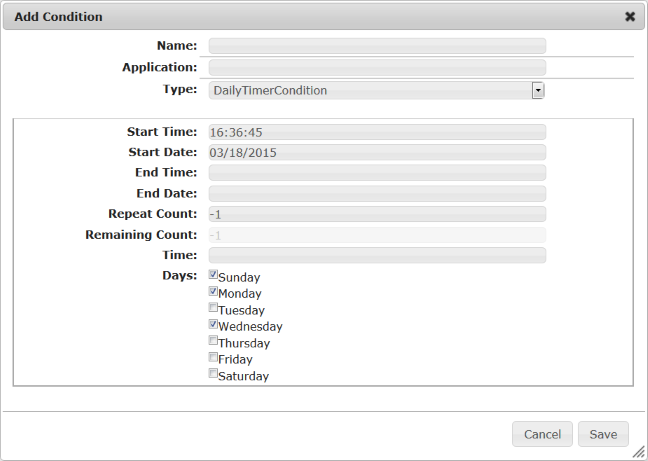
The Daily Timer Condition is triggered every day at a specified time. You have to define the days of the week at which the condition is active. It can be active either every day, or only at certain days of the week (for example, only on work days - from Monday to Friday).
Start Time and Start Date - The condition is activated after that time and date.
End Time and End Date - The condition stops being active after that time and date.
Repeat Count - The number of times the condition should be triggered. You can enter "-1" as a value to indicate that the condition should be executed endlessly.
Remaining Count - The remaining number of times the condition should be triggered.
Time - The exact time when the condition should be triggered.
Days -The days of the week at which the condition should be active.
Daily Period Timer Condition
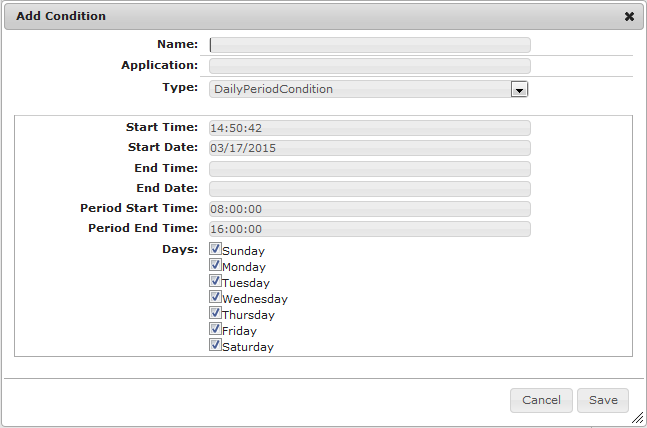
The Daily Period Timer Condition is an extension to the Daily Timer Condition that is triggered every day at a specified time and stays active for a specific time interval.
Start Time and Start Date - The condition is activated after that time and date.
End Time and End Date - The condition is inactivated after that time and date.
Period Start Time and Period End Time - The time interval for which the condition should be active. Specify the exact time when the condition should be activated in the Period Start Time field. For example, the interval can be set from "08:00:00" to "16:00:00" o'clock.
Days - The days of the week at which the condition should be active.
Astro Timer
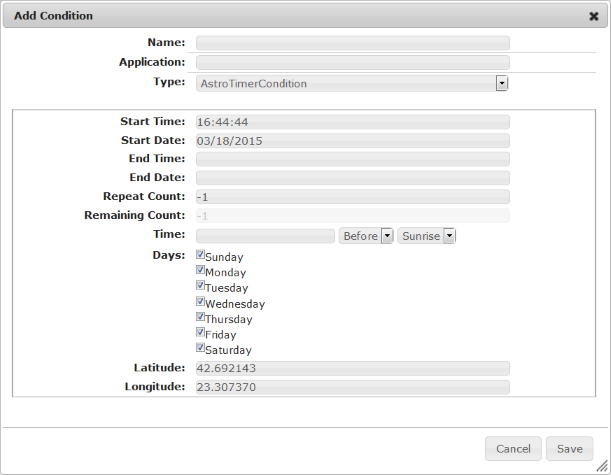
The Astro Timer Condition is an extension to the Daily Timer Condition and is triggered relative to the sunrise or sunset.
Start Time and Start Date - The condition is activated after that time and date.
End Time and End Date - The condition is inactive after that time and date.
Repeat Count - The number of times the condition should be triggered. You can enter "-1" as a value to indicate that the condition should be triggered endlessly.
Remaining Count - The remaining number of times the condition should be triggered.
Time - The exact time when the condition should be triggered. You can specify whether it should be triggered before or after the sunrise or sunset by using the drop-down menus after the Time field.
Days - The days of the week at which the condition should be active.
Latitude and Longitude - The exact location that will be used to calculate the specified times for triggering the condition.
Interval Timer
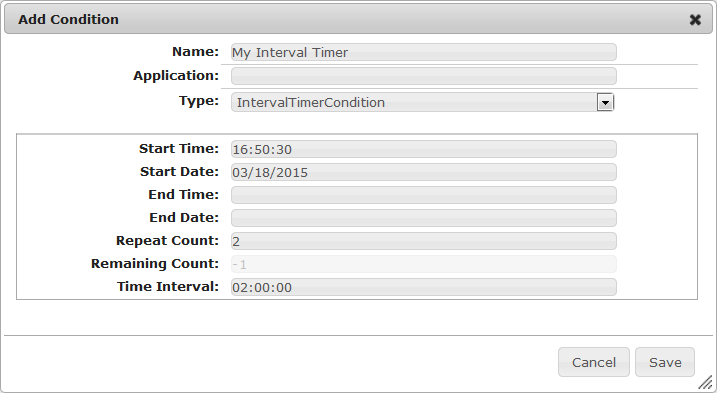
The Interval Timer Condition is triggered at a specific time interval.
Start Time and Start Date - The condition is activated after that time and date.
End Time and End Date - The condition is inactivated after that time and date.
Repeat Count - The number of times that the condition should be executed. You can enter "-1" as a value to indicate that the condition should be triggered endlessly.
Remaining Count - The remaining number of times the condition should be triggered.
Time Interval - The interval between two triggers of the condition. For example, if you specify "01:00:00" in this field, there will be one hour interval between two triggers of the condition. Set "00:01:00:" to indicate one minute interval between the condition activations, etc.
Nth Day Timer Condition
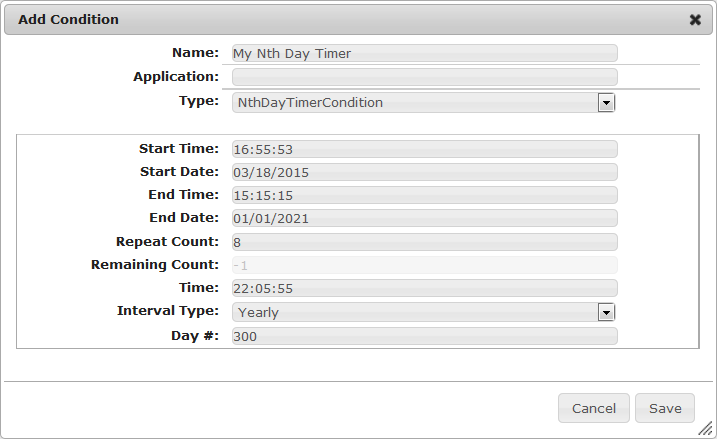
The Nth Day Timer Condition is triggered on a specified day every year, every month or every week.
Start Time and Start Date - The condition is activated after that time and date.
End Time and End Date - The condition is inactivated after that time and date.
Repeat Count - The number of times the condition should be triggered. You can enter "-1" as a value to indicate that the condition should be triggered endlessly.
Remaining Count - The remaining number of times the condition should be triggered.
Time - The exact time at which the condition should be triggered.
Interval Type - The type of time interval that will be applied for triggering the condition - yearly, monthly or weekly.
Day # - The number of days after the start date of the condition that it has to wait before it is triggered.
Status Condition
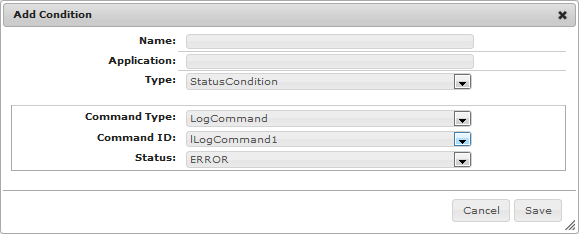
Status Conditions are triggered when the status of an associated command becomes equal to a predefined value.
Command Type - The command type that will trigger the condition. You will see all available commands of the selected type in the Command ID drop-down menu.
Command ID - The unique ID of the command that will trigger the condition.
Status - The specific status of the command that will trigger the condition.
Postpone Condition
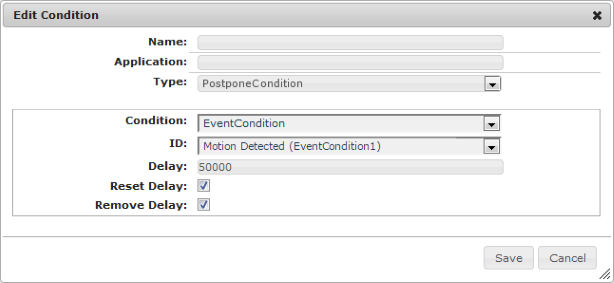
A postpone condition is triggered following a specified delay time after another condition (called source condition) is triggered.
Condition - The type of the source condition.
ID - The ID of the source condition.
Delay - The time delay in milliseconds after triggering the source condition when the postpone condition is triggered.
Reset Delay - An option to reset the delay time for the postpone condition if the source condition is triggered again before the delay time has elapsed. If checked the delay time is reset.
Remove Delay - An option to remove the delay period for the postpone condition if the source condition is triggered within an already started delay period. If checked the delay time is removed.
Delay Condition
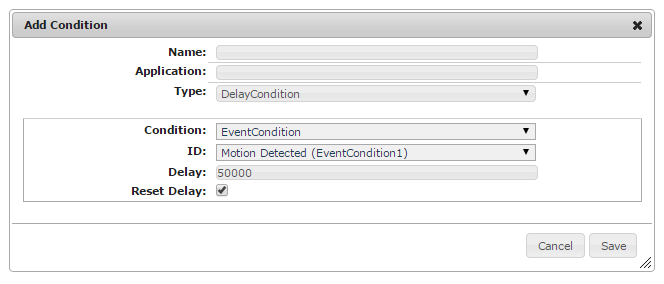
A delay condition remains satisfied a specified delay time after another condition (called source condition) is triggered.
Condition - The type of the source condition.
ID - The ID of the source condition.
Delay - The time delay in milliseconds after triggering the source condition during which the delay condition remains satisfied.
Reset Delay - An option to reset the delay time for the delay condition if the source condition is triggered again before the delay time has elapsed. If checked the delay time is reset.
Logic Condition
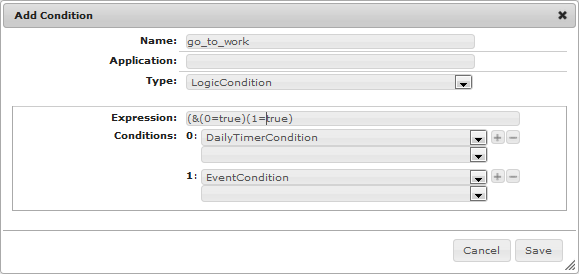
The Logic Condition is logical combination of other conditions.
Expression - An LDAP filter that represents the logic expression for triggering the condition.
Conditions - The conditions that are involved in the logical combination of this condition. Each triggering condition is assigned an ID starting from "0". To add a condition to the Logic Condition:
Select the condition type from the first drop-down menu. After you have selected the desired condition type, all available conditions will be available in the second drop-down menu.
Select the unique ID of the condition from the second drop-down menu.
Click the button and repeat steps 1 and 2 to add a new condition to the Logic Condition. Repeat this operation until you enter all conditions that you want to be part of the Logic Condition.
More information about the currently available predefined conditions you can find here and if you want to create your own condition type refer to this guide.


 icon in the top right corner.
 button next to it.
 button dedicated to the condition.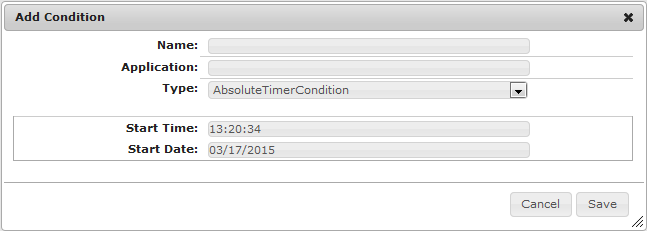
 button and repeat steps 1 and 2 to add a new condition to the Logic Condition. Repeat this operation until you enter all conditions that you want to be part of the Logic Condition.