


|
|
|
|
|
This document describes the basic building elements of the OSGi Runtime framework.
The framework implementation of the OSGi Runtime is composed of modules each providing separate functionality:
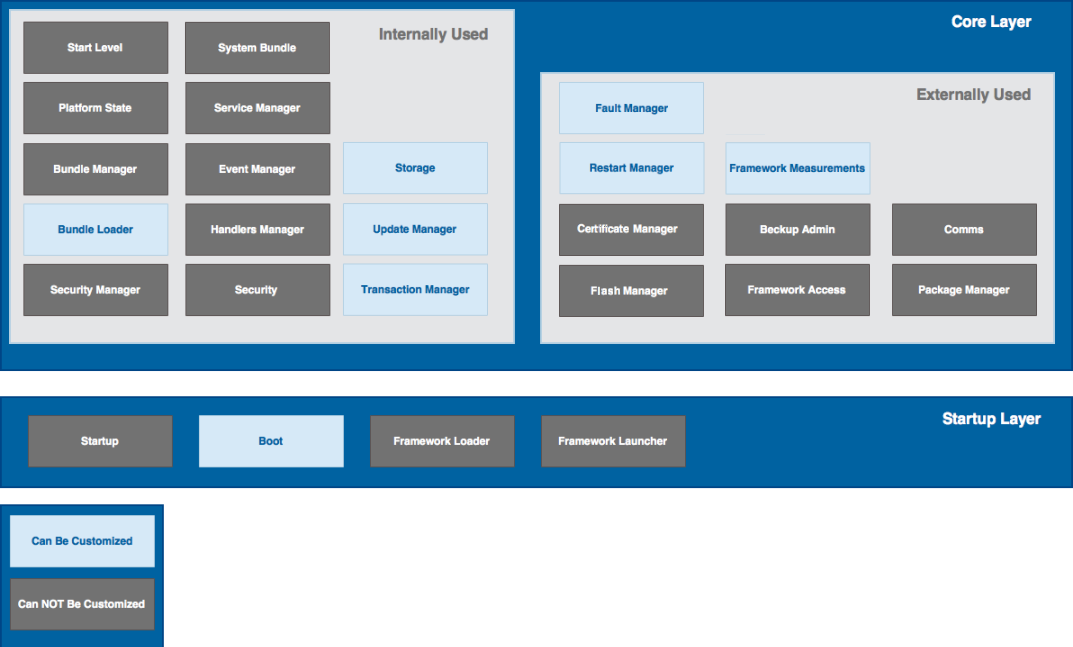
Startup
The Startup module is responsible for:
Boot
The Boot module is responsible for installing a predefined set of bundles at framework startup without ready bundle storage (i.e. at clean launch).
By default, the Boot module takes the initial bundle set from one or more Startup bundles list files, which contain bundle installation instructions (like install, start, stop) in XML format. A Startup bundles list file may also contain the initial start level and required permissions of startup bundles.
The logic of the boot process can be customized by defining a boot extension – such an extension can perform its own installation process instead of the default one. A boot extension can also be used to preserve the default boot logic implying the use of a boot.ini to load the boot.ini from a remote URL, since the framework initially locates the boot.ini as a resource in the local file system.
Refer to the Customizable boot module to get more information on the Startup bundles list file features and format.
Framework loader
The framework contains own class loader, called the Framework loader, which should be used when working with framework extension bundles. It is not needed to restart the framework when installing framework extension bundles – the classes from the extension are internally added to classpath of the framework thanks to the Framework loader.
The scripts in OSGi Runtime distribution activate the Framework loader by default. To disable the Framework loader, use the nofwloader option of the server script.
Framework launcher
To start the Framework programatically, use the Framework factory specified in the OSGi Framework launcher API (org.osgi.framework.launch). Launchers can launch the framework from the JVM-specific lib/framework/serverXxx.jar files and retrieve the Framework factory implementation from the META-INF/services/org.osgi.framework.launch.FrameworkFactory text file inside the JAR file. As input argument to the newFramework method of the Framework Factory pass needed system properties as specified in the OSGi Service Platform Core Specification and in System properties section in the Setup guide document.
Start level
The OSGi Runtime framework supports bundle start levels, as defined in the OSGi Start Level Specification. Briefly, the framework starts those bundles which have a start level less than or equal to the framework active level. Similarly, it stops installed bundles in a level descending order.
The framework active start level is determined through the mbs.startlevel system property at startup. Runtime framework and bundle start levels can be changed with the startlevel text command or from the System Information tab of the Web Admin Console.
Bundle start levels at framework startup are specified in a Customizable boot module, which sets 5 as initial bundle start level. The framework considers the bundles from the boot.ini as system bundles, and all bundles installed after installing those boot bundles - as application bundles. Such application bundles are associated with a special, more restrictive, start level, which is determined as the value of the mbs.applicationBundleStartLevel system property (default is (<highest_level_from_boot_ini>+1)).
Management bundles can use the OSGi Start Level service of the System bundle to dynamically change the framework active level and the start levels of bundles.
Platform state
The functionality of the Platform state module is represented by Platform state service. It is designed to provide the notion of the overall system state. The OSGi specification defines several standard states (starting, active, stopping) and the Framework module implements several other states called "user platform states".
Bundle manager
The Bundle Manager manages the installation and the life cycle of bundles. It loads bundles from the ready storage if available or installs the bundles defined in the boot.ini file. Next, loaded bundles are activated according to their start level (refer to the Start Level section above).
Bundle loader
The Bundle loader module implements the com.prosyst.mbs.framework.classloader.ClassProvider interface and the framework uses it for loading the classes of bundles.
There are modifications of the bundle loader for security mode of the framework.
You can define a custom bundle loader by providing a class that implements the com.prosyst.mbs.framework.classloader.ClassProvider interface and extends the java.lang.ClassLoader class. The loader class must have a constructor with a single argument com.prosyst.mbs.impl.framework.BundleLoader. Your bundle loader implementation can call the generic BundleLoader to retrieve useful bundle management utilities.
Finally, to make the framework use your loader, set the mbs.loader.type system property to custom and use the mbs.loader.class one to specify the name of the class implementing ClassProvider.
As the BundleLoader class interface is considered as internal and is not included in the API documentation, contact the support team for more information on their structure and usage.
Package manager
The Package Manager module manages package dependencies between the bundles in the framework.
Service manager
The Service Manager handles service-related operations in the framework, such as service registration and retrieval.
Event manager
The Event Manager manages the listener registration and cares to send events synchronously or asynchronously (in a separate event delivering thread).
Handlers manager
The Handlers Manager module implements the OSGi URL Handlers Service Specification. It is responsible for extending the Java runtime with new URL schemes and content-types, provided, respectively, by URL Stream Handler and Content Handler services in the framework.
Security manager
The module provides implementation of Java SecurityManager which is needed when the OSGi framework is working with security enabled. This manager is also needed by the Security module, described below.
The Security Manager also has an additional function not related directly to the Java security model – it provides the Privileged thread manager service in the System sundle for marking threads as privileged. The Privileged Thread Manager service is registered only if the framework is started with security.
The features of the Security Manager are available if the mbs.sm system property is set true.
Security
The Security module is responsible for security-related operations. It works with the security models of Java 2 and CDC Foundation 1.1.
The Security module is activated if the Security Manager is on when (if server is started with security option, or if the mbs.sm system property has value true). The system property mbs.security specifies which Security implementation to be used. More details on this can be found at the Security properties section in the Setup guide.
In addition, this module implements the following services of the System bundle:
Certificate manager
The Certificate Manager module provides means for checking the trust of certificates against a certificate storage. The Certificate Manager is available only if the mbs.certificates system property is true.
For more information about the functionality that the Certificate Manager offers, refer to the Certificate Manager service document.
System bundle
The System bundle registers as services modules that are part of the framework and can be used by management bundles for execution of administration operations. The bundleID of the System Bundle is always 0. Its lifecycle cannot be managed as conventional bundles, because its state is tightly bound to the state of the framework. For example, to stop the System bundle means to shut down the framework and to update it - to restart the framework (possible through the mBSA).
It is possible via system properties to add to the System bundle export-packages, activators and configurations, placed in the framework JAR or added to the classpath. This saves great part of the resources, consumed for activation of bundles, as no bundle objects and class loaders are created.
For more details about the features of the System Bundle, refer to the System bundle document.
Storage
The Storage module is responsible for the framework and bundle operations with files - ZIPs, JARs, native libraries and data files.
Storage on top of java.io
Operates on the standard I/O library from the java.io package. This storage works with ZIP files through the java.util.zip API.
This type of storage is activated through the mbs.storage.impl system property with value com.prosyst.mbs.impl.framework.module.storage.file.StorageImpl.
With this type of storage you can benefit from the following features:
Custom storage
You can provide a custom storage by implementing the com.prosyst.mbs.framework.storage.Storage interface and declaring it with the mbs.storage.impl system property. Developers may contact the support team at support@bosch.io in order to receive more details about storage implementation.
Flash manager
The framework offers a flash manager, which can be used for transferring bundle data files from a flash file system, which is persistent but with slow write access, to a temporary storage on a RAM file system, which is not persistent but is with much faster access. After the operations with files on the RAM are done, they can be flushed from the RAM to the flash storage overwriting the original files. In this way the benefits of both flash and RAM storage can be used.
The flash manager is available as a System bundle service. It can be configured with the mbs.storage.ramroot, mbs.storage.flashmgr.replace, mbs.storage.flashmgr.flatram and mbs.storage.norename system properties. Note that the flash manager service is registered only if the mbs.storage.ramroot property is set.
Fault manager
The Fault Manager module can be used to signal fault situations which depending on the Fault Manager implementation may be resolved through device reset, restart of the framework process, etc., so as to avoid further damage.
The Fault Manager is a customizable module – different implementations can exist, each reflecting a specific fault solution method.
By default, there is no active Fault Manager implementation in the framework. Such can be specified with the mbs.fm.class system property.
The default Fault Manager implementation that the framework contains is com.prosyst.mbs.impl.framework.module.fm.FaultManagerImpl. It records fault messages in a file. There is another Fault Manager relying on mBSA for the execution of fault corrective actions.
The active Fault Manager implementation can be accessed as a System Bundle service. To reduce development efforts, bundles can conveniently use the log reference utility com.prosyst.util.ref.Log of the Core API Bundle to indicate fault situations.
Backup Admin
The framework provides means for bundles to backup and import their data on demand. Refer to the BackupAdmin Service documentation for more details.
Framework Asccess
The Framework Access module provides access to some of the framework's powerful features, such as:
This module is available as a service of the System Bundle and is intended mainly for internal use. For details, refer to the FrameworkAccess service document.
Framework measurement
The Framework Measurement module is capable of measuring consumption of specific memory type on Java level. For details, refer to the Framework measurement document.
Transaction manager
The Transaction manager module provides transactional behavior to applications. It allows applications to manage transactions (begin, commit, roll-back, etc.) as well as to add transactional logic to existing transactions. For details, refer to the TransactionManager service document.
Restart manager
Restart Manager is a framework module that provides functionality to performing and managing framework and OS restarts in a unified way.
For details, refer to the RestartManager service document.
Update manager
Update Manager cooperates with the mBSA application to support updates of the images of the OSGi runtime image, JVM image or operating system.
For details, refer to the UpdateManager service document.
Comms module
The Comms Module is responsible for the communication between the OSGi environment and the mBSA as well as for sending OSGi framework starting, restart and stop events.
The Comms Module is active only if the framework is started through mBSA.
The communication is based on two files – an input and an output file. The input file is used for receiving messages that monitor or control the life-cycle of the framework instance (e.g. On FW_EXIT message received when the framework is stopped). The output file is used for sending framework life-cycle messages (e.g. messages if a fault has occurred or heartbeat messages).
To enable using the Communications File module implementation on the framework instance, the module must be configured before framework startup in one of the configuration .prs files (default.prs, common.prs). Use the provided system properties (refer to the System Properties section in the Setup guide).
The functionality of the Comms module is represented by the com.prosyst.mbs.framework.comms CommsModule service in the OSGi framework. The module also registers the com.prosyst.mbsa.core.Core service, which provides Java API for calling specific mBSA plug-ins.
The module supports all the framework life-cycle functionalities of a standard communications module implementation:
Support messages (refer to the Support messages section in the Setup guide) defined in the: